Loading
Form preview
  • US Legal Forms
  • Form Library
  • More Forms
  • More Multi-State Forms
  • Gsa Sf 1200 1982

Get Gsa Sf 1200 1982-2026

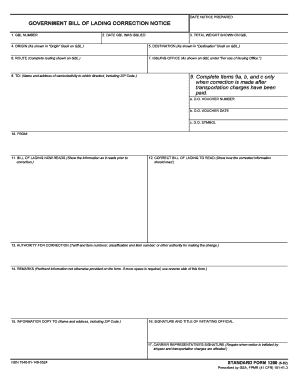
(As shown in "Destination" block on GBL.) 6. ROUTE (Complete routing shown on GBL.) 7. ISSUING OFFICE (As shown on GBL under "For use of Issuing Office.") 8. TO: (Name and address of carrier/activity to which directed, including ZIP Code.) 9. Complete Items 9a, b, and c only when correction is made after transportation charges have been paid. a. D.O. VOUCHER NUMBER b. D.O. VOUCHER DATE c. D.O. SYMBOL 10. FROM: 11. BILL OF LADING NOW READS (Show the information as it reads prior to correcti.

How it works

  1. Open form

    Open form follow the instructions

  2. Easily sign form

    Easily sign the form with your finger

  3. Share form

    Send filled & signed form or save

How to fill out the GSA SF 1200 online

The GSA SF 1200, also known as the Government Bill of Lading Correction Notice, is essential for correcting any errors on a previously issued bill of lading. This guide provides you with a clear and supportive approach to filling out the form online, ensuring accurate information is submitted.

Follow the steps to complete the GSA SF 1200 effectively.

  1. Click ‘Get Form’ button to obtain the form and open it in the editor.
  2. In section 1, enter the GBL number as indicated on the original document. This number serves as the unique identifier for the bill of lading.
  3. For section 2, input the date the GBL was issued. Ensure that this corresponds with the original documentation.
  4. In section 3, provide the total weight shown on the GBL. This figure should match what was recorded at the time of the original shipment.
  5. Section 4 requires you to detail the origin of the shipment as shown in the 'Origin' block of the GBL.
  6. In section 5, fill in the destination as specified in the 'Destination' block on the original GBL.
  7. For section 6, present the complete routing information as it appears on the GBL.
  8. In section 7, outline the issuing office's details, as indicated on the GBL under 'For use of Issuing Office.'
  9. In section 8, fill out the name and address of the carrier or activity to which the correction is directed, including ZIP Code.
  10. Complete sections 9a, 9b, and 9c only when the correction is made after transportation charges have been paid. Here, enter the D.O. voucher number, voucher date, and D.O. symbol if applicable.
  11. Section 10 requires you to fill in your information for 'FROM:'
  12. In section 11, display the information as it currently reads prior to the correction.
  13. For section 12, show how the corrected information should read after the corrections have been made.
  14. In section 13, indicate the authority for the correction, including relevant tariff and item numbers.
  15. Provide any pertinent information not otherwise included in section 14 under 'REMARKS.' If additional space is required, you may use the reverse side of the form.
  16. In section 15, fill in the name and address of the individual receiving an information copy, including ZIP Code.
  17. Section 16 requires the signature and title of the initiating official. Ensure this is completed accurately.
  18. Lastly, if the notice was initiated by the shipper and affects transportation charges, have the carrier representative sign in section 17.
  19. Once you have filled out all necessary fields, review your information for accuracy. You can then save your changes, download, print, or share the form as needed.

Start filling out your documents online today for accurate and efficient processing.

Get form

Experience a faster way to fill out and sign forms on the web. Access the most extensive library of templates available.
Get form

Related content

Government Bill of Lading Correction Notice | GSA
Form: SF1200. Government Bill of Lading Correction Notice. Current Revision Date: 08/1982...
Learn more
GOVERNMENT BILL OF LADING CORRECTION ... - GSA
shipper and transportation charges are affected.) NSN 7540-01-140-5524. STANDARD FORM 1200...
Learn more
Locations | UL
Global Services Agreement (GSA) · GSA Service Terms · Service Terms for UL Services...
Learn more

Related links form

MN DoR CRP 2015 MN DoR CRP 2014 MN DoR CRP 2013 MN DoR CRP 2012

Questions & Answers

Get answers to your most pressing questions about US Legal Forms API.

Contact support

Gay–straight alliance - Wikipedia.

The financial statements and financial data presented in this report have been prepared from the U.S. General Services Administration (GSA) accounting records in conformity with generally accepted accounting principles (GAAP) as prescribed by the Federal Accounting Standards Advisory Board (FASAB).

GSA U.S. General Services Administration.

(a) GSA Form 300 , Order for Supplies and Services, is a multipurpose form that may be used for purchases of supplies or services, orders under existing contracts or agreements, and orders from required sources of supplies and services.

GSA is an acronym that stands for the General Services Administration, which is an independent agency within the executive branch of the United States federal government.

The GSA Schedule, also known as Federal Supply Schedule, and Multiple Award Schedule (MAS), is a long-term governmentwide contract with commercial companies that provide access to millions of commercial products and services at fair and reasonable prices to the government.

Get This Form Now!

Use professional pre-built templates to fill in and sign documents online faster. Get access to thousands of forms.
Get form
If you believe that this page should be taken down, please follow our DMCA take down processhere.
Get GSA SF 1200
Get form
  • Adoption
  • Bankruptcy
  • Contractors
  • Divorce
  • Home Sales
  • Employment
  • Identity Theft
  • Incorporation
  • Landlord Tenant
  • Living Trust
  • Name Change
  • Personal Planning
  • Small Business
  • Wills & Estates
  • Packages A-Z
  • Affidavits
  • Bankruptcy
  • Bill of Sale
  • Corporate - LLC
  • Divorce
  • Employment
  • Identity Theft
  • Internet Technology
  • Landlord Tenant
  • Living Wills
  • Name Change
  • Power of Attorney
  • Real Estate
  • Small Estates
  • Wills
  • All Forms
  • Forms A-Z
  • Form Library
  • Legal Hub
  • About Us
  • Help Portal
  • Legal Resources
  • Blog
  • Affiliates
  • Contact Us
  • Delete My Account
  • Site Map
  • Industries
  • Forms in Spanish
  • Localized Forms
  • State-specific Forms
  • Forms Kit
  • Real Estate Handbook
  • All Guides
  • Notarize
  • Incorporation services
  • For Consumers
  • For Small Business
  • For Attorneys
  • USLegal
  • FormsPass
  • pdfFiller
  • signNow
  • altaFlow
  • DocHub
  • Instapage
Form Packages
  • Adoption
  • Bankruptcy
  • Contractors
  • Divorce
  • Home Sales
  • Employment
  • Identity Theft
  • Incorporation
  • Landlord Tenant
  • Living Trust
  • Name Change
  • Personal Planning
  • Small Business
  • Wills & Estates
  • Packages A-Z
Form Categories
  • Affidavits
  • Bankruptcy
  • Bill of Sale
  • Corporate - LLC
  • Divorce
  • Employment
  • Identity Theft
  • Internet Technology
  • Landlord Tenant
  • Living Wills
  • Name Change
  • Power of Attorney
  • Real Estate
  • Small Estates
  • Wills
  • All Forms
  • Forms A-Z
  • Form Library
Customer Service
  • Legal Hub
  • About Us
  • Help Portal
  • Legal Resources
  • Blog
  • Affiliates
  • Contact Us
  • Delete My Account
  • Site Map
  • Industries
  • Forms in Spanish
  • Localized Forms
  • State-specific Forms
  • Forms Kit
Legal Guides
  • Real Estate Handbook
  • All Guides
Prepared for you
  • Notarize
  • Incorporation services
Our Customers
  • For Consumers
  • For Small Business
  • For Attorneys
Our Sites
  • USLegal
  • FormsPass
  • pdfFiller
  • signNow
  • altaFlow
  • DocHub
  • Instapage
Social Media
Call us now toll free:
+1 833 426 79 33
As seen in:
© Copyright 1999-2026 airSlate Legal Forms, Inc. 17 Station Street, Suite 303, Brookline, MA 02445
  • Your Privacy Choices
  • Terms of Service
  • Privacy Notice
  • Content Takedown Policy
  • Bug Bounty Program