Loading
Form preview
  • US Legal Forms
  • Form Library
  • Tax Forms
  • Michigan Tax Forms
  • Mi Dot 4917 2016

Get Mi Dot 4917 2016-2026

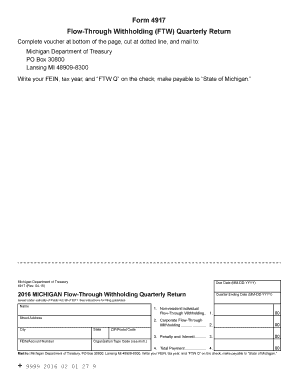
Non-resident Individual 2. Corporate Flow-Through Withholding. 2. 3. Penalty and Interest. 3. 4. Total Payment. 4. Mail to Michigan Department of Treasury PO Box 30800 Lansing MI 48909-8300. Write your FEIN tax year and FTW Q on the check make payable to State of Michigan. 9999 2016 02 01 27 9. Form 4917 Flow-Through Withholding FTW Quarterly Return Complete voucher at bottom of the page cut at dotted line and mail to Michigan Department of Treasury PO Box 30800 Lansing MI 48909-8300 Write your .

How it works

  1. Open form

    Open form follow the instructions

  2. Easily sign form

    Easily sign the form with your finger

  3. Share form

    Send filled & signed form or save

How to fill out the MI DoT 4917 online

Filling out the MI DoT 4917 form online is essential for reporting flow-through withholding tax obligations efficiently. This guide will provide you with step-by-step instructions to ensure you complete the form accurately.

Follow the steps to complete the MI DoT 4917 form online.

  1. Click the ‘Get Form’ button to access the MI DoT 4917 form and open it in your preferred editor.
  2. Enter the due date in the specified format (MM-DD-YYYY) at the top of the form.
  3. Fill in the quarter ending date (MM-DD-YYYY) that corresponds to the tax period you are reporting.
  4. Provide your full name, street address, city, state, and ZIP/postal code in the appropriate fields.
  5. Input your FEIN (Federal Employer Identification Number) or account number in the designated area.
  6. Select your organization type code by referring to the instructions provided for details.
  7. Complete the amounts for each category: non-resident individual flow-through withholding, corporate flow-through withholding, and any penalties and interest as applicable.
  8. Total your payments and enter the final amount in the 'Total Payment' field.
  9. After filling out all sections, review your entries for accuracy.
  10. Save your changes, and you have the option to download, print, or share the completed form as needed.

Complete your MI DoT 4917 form online today to meet your tax reporting requirements.

Get form

Experience a faster way to fill out and sign forms on the web. Access the most extensive library of templates available.
Get form

Related content

Company Snapshot UNITED XPRESS LLC
ACTIVE: The entity's US DOT number is active. INACTIVE: Inactive per 49 ... 4917 SCHAEFER...
Learn more
National Transportation Statistics
System Mileage Within the United States (Updated April 2016). 1-2. Number of Air Carriers...
Learn more
Engineering | UTokyo - iGEM 2024
We selected Three biomarkers for glaucoma. We investigated whether similar sequence of...
Learn more

Related links form

TX Affidavit of Inability to Pay Costs - Original Action TX Affidavit of Indigence TX Affidavit of Indigency 2014 TX Affidavit of Non-Prosecution - Brazos County

Questions & Answers

Get answers to your most pressing questions about US Legal Forms API.

Contact support

Filing a workers' comp claim can be beneficial if you experience work-related injuries or illnesses. It offers financial assistance for medical expenses and lost wages, which can significantly ease your burden. Assessing your situation under the standards of MI DoT 4917 will help you understand your rights. Consulting with professionals, including resources from US Legal Forms, can clarify whether filing is the right step for you.

Yes, you can apply for Workman's Comp online in most cases. This method is convenient and allows you to submit your information quickly without unnecessary delays. However, ensure you follow the specific guidelines set by MI DoT 4917 during your application. Platforms like US Legal Forms can guide you through the online application process effectively.

Filing Michigan Form 5081 involves completing the form with accurate information about your claim. After ensuring all details are correct, submit the form to the appropriate department as specified in the filing instructions. Familiarizing yourself with the guidelines of MI DoT 4917 is crucial for a successful submission. US Legal Forms can also assist in providing the correct format and help with any questions.

The CA1 form is primarily for traumatic injury claims, while the CA2 form addresses occupational disease claims. Understanding these distinctions is essential so that you file the correct form based on your situation. Each form has specific requirements outlined in the MI DoT 4917 guidelines. If you're unsure, US Legal Forms can offer clarity and help you choose the right path.

To file Form CA 1, start by gathering the required details about your employment and incident. You can download the form online or obtain a physical copy. After completing the form, follow the instructions to submit it through the designated channels. For detailed guidance, consider using resources related to MI DoT 4917.

Filing a CA1 typically takes a few minutes, especially if you prepare your documents in advance. Once you submit the form, the processing time may vary based on your local authority. For best results, ensure that you have all necessary information and understand the MI DoT 4917 guidelines. Using online platforms like US Legal Forms can simplify the filing process.

To get a MI DOT number, start by filling out the application through the Michigan Department of Transportation's website. You’ll have to provide your business details and vehicle information. After completing the application, submit it according to the instructions. USLegalForms offers templates and insights to make this process smooth for obtaining your MI DoT 4917.

Opening your own DOT number involves applying through the appropriate state office. You will need to submit a completed application along with business details and any required fees. Make sure you also comply with safety regulations and insurance requirements. With uslegalforms, you can effortlessly access the information and forms you need to get started with MI DoT 4917.

To get a DOT number, you'll need to provide certain information about your business and vehicles. This includes details like your business name, address, and the type of transport you plan to operate. You may also need to supply information about your fleet. Using uslegalforms can simplify this process by providing the right forms and guidance related to MI DoT 4917.

To obtain a Michigan DOT number, you need to complete an application with the Michigan Department of Transportation. First, gather your business information, which includes your legal business name and address. Then, submit the necessary forms online or by mail. It’s a straightforward process, and uslegalforms can guide you through each step, ensuring you meet all requirements for MI DoT 4917.

Get This Form Now!

Use professional pre-built templates to fill in and sign documents online faster. Get access to thousands of forms.
Get form
If you believe that this page should be taken down, please follow our DMCA take down processhere.

Industry-leading security and compliance

US Legal Forms protects your data by complying with industry-specific security standards.
  • In businnes since 1997
    25+ years providing professional legal documents.
  • Accredited business
    Guarantees that a business meets BBB accreditation standards in the US and Canada.
  • Secured by Braintree
    Validated Level 1 PCI DSS compliant payment gateway that accepts most major credit and debit card brands from across the globe.
Get MI DoT 4917
Get form
  • Adoption
  • Bankruptcy
  • Contractors
  • Divorce
  • Home Sales
  • Employment
  • Identity Theft
  • Incorporation
  • Landlord Tenant
  • Living Trust
  • Name Change
  • Personal Planning
  • Small Business
  • Wills & Estates
  • Packages A-Z
  • Affidavits
  • Bankruptcy
  • Bill of Sale
  • Corporate - LLC
  • Divorce
  • Employment
  • Identity Theft
  • Internet Technology
  • Landlord Tenant
  • Living Wills
  • Name Change
  • Power of Attorney
  • Real Estate
  • Small Estates
  • Wills
  • All Forms
  • Forms A-Z
  • Form Library
  • Legal Hub
  • About Us
  • Help Portal
  • Legal Resources
  • Blog
  • Affiliates
  • Contact Us
  • Delete My Account
  • Site Map
  • Industries
  • Forms in Spanish
  • Localized Forms
  • State-specific Forms
  • Forms Kit
  • Real Estate Handbook
  • All Guides
  • Notarize
  • Incorporation services
  • For Consumers
  • For Small Business
  • For Attorneys
  • USLegal
  • FormsPass
  • pdfFiller
  • signNow
  • altaFlow
  • DocHub
  • Instapage
Form Packages
  • Adoption
  • Bankruptcy
  • Contractors
  • Divorce
  • Home Sales
  • Employment
  • Identity Theft
  • Incorporation
  • Landlord Tenant
  • Living Trust
  • Name Change
  • Personal Planning
  • Small Business
  • Wills & Estates
  • Packages A-Z
Form Categories
  • Affidavits
  • Bankruptcy
  • Bill of Sale
  • Corporate - LLC
  • Divorce
  • Employment
  • Identity Theft
  • Internet Technology
  • Landlord Tenant
  • Living Wills
  • Name Change
  • Power of Attorney
  • Real Estate
  • Small Estates
  • Wills
  • All Forms
  • Forms A-Z
  • Form Library
Customer Service
  • Legal Hub
  • About Us
  • Help Portal
  • Legal Resources
  • Blog
  • Affiliates
  • Contact Us
  • Delete My Account
  • Site Map
  • Industries
  • Forms in Spanish
  • Localized Forms
  • State-specific Forms
  • Forms Kit
Legal Guides
  • Real Estate Handbook
  • All Guides
Prepared for you
  • Notarize
  • Incorporation services
Our Customers
  • For Consumers
  • For Small Business
  • For Attorneys
Our Sites
  • USLegal
  • FormsPass
  • pdfFiller
  • signNow
  • altaFlow
  • DocHub
  • Instapage
Social Media
Call us now toll free:
+1 833 426 79 33
As seen in:
© Copyright 1999-2026 airSlate Legal Forms, Inc. 3720 Flowood Dr, Flowood, Mississippi 39232
  • Your Privacy Choices
  • Terms of Service
  • Privacy Notice
  • Content Takedown Policy
  • Bug Bounty Program