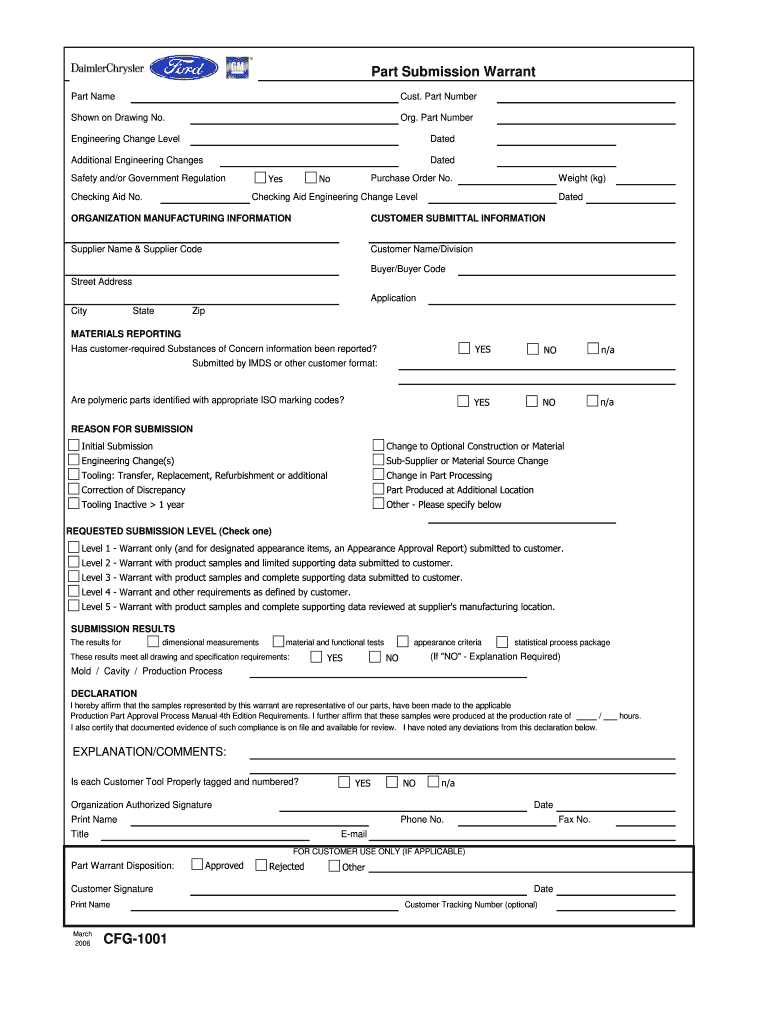
I have noted any deviations from this declaration below. EXPLANATION/COMMENTS Is each Customer Tool Properly tagged and numbered Organization Authorized Signature Phone No. Title Fax No. E-mail FOR CUSTOMER USE ONLY IF APPLICABLE Part Warrant Disposition Customer Signature March CFG-1001 Approved Rejected Other Customer Tracking Number optional hours. Part Submission Warrant Part Name Cust. Part Number Shown on Drawing No* Org* Part Number Engineering Change Level Dated Additional Engineering Changes Yes Safety and/or Government Regulation Checking Aid No* No Purchase Order No* Weight kg Checking Aid Engineering Change Level ORGANIZATION MANUFACTURING INFORMATION CUSTOMER SUBMITTAL INFORMATION Supplier Name Supplier Code Customer Name/Division Buyer/Buyer Code Street Address Application City State Zip MATERIALS REPORTING YES NO n/a Has customer-required Substances of Concern information been reported Submitted by IMDS or other customer format Are polymeric parts identified with appropr....

Open form follow the instructions

Easily sign the form with your finger

Send filled & signed form or save
How to fill out the CFG-1001 online
The CFG-1001 is a critical form used for part submissions within various manufacturing processes. This guide provides a clear and user-friendly approach to completing the CFG-1001 online, ensuring that you provide all necessary details accurately.
Follow the steps to successfully complete the CFG-1001 online.
- Press the ‘Get Form’ button to access the CFG-1001 and open it in the digital editor.
- Begin by filling out the part submission section. Enter the part name, customer part number, and original part number as shown on the drawing. Ensure that these details match any referenced documentation.
- For the engineering change level, indicate the appropriate level, followed by the date. Include any additional engineering changes and their respective dates if applicable.
- In the safety and/or government regulation section, check the relevant boxes regarding the checking aid number and purchase order number. Specify the weight of the part in kilograms.
- Provide detailed organization manufacturing information, including the supplier name and code, customer name or division, buyer information, and the complete street address, including city, state, and zip code.
- In the materials reporting section, indicate whether customer-required substances of concern have been reported. Answer 'yes', 'no', or 'n/a' as appropriate.
- Select the reason for submission by checking the box that applies, such as initial submission, changes to construction or material, or corrections of discrepancies.
- Choose the requested submission level by checking one of the options provided, ranging from level 1 to level 5.
- Review the submission results section for dimensional measurements and tests. Confirm if they meet all drawing requirements and provide explanations if necessary.
- Complete the declaration section by affirming that the samples are representative and meet applicable requirements. Ensure to provide your signature, printed name, phone number, title, fax number, and email.
- If applicable, complete the customer use section, noting any dispositions, customer signatures, and tracking numbers.
- Once all fields are complete, save your changes, download a copy, or print the form for your records. You can also share the form as needed.
Ensure your parts are submitted correctly by filling out the CFG-1001 online today.
Experience a faster way to fill out and sign forms on the web. Access the most extensive library of templates available.
Related content
Dec 31, 2019 — A Certificate to Foreign Government (CFG) is, for the export of medical...
Oct 24, 2003 — Class 25: Context Free Grammars. Reading: Section 3.1 of Theory of...
The prefix for SIP User ID, it can be numbers or strings, if you set Prefix to 100, and...
Get answers to your most pressing questions about US Legal Forms API.
How to fill out a withholding exemption form?
To fill out a withholding exemption form like the CFG-1001, start by gathering your personal and financial information. Provide your name, address, and Social Security number, and then follow the specific instructions for claiming exemptions based on your anticipated tax liability. If you encounter difficulties, platforms like USLegalForms can offer assistance and clarity in completing your form correctly.
How many exemptions should I withhold?
Determining the right number of exemptions to withhold on your CFG-1001 form depends on your tax situation. Consider factors such as your income level, dependents, and eligibility for credits. An accurate calculation can help prevent owing taxes or receiving a surprise balance at tax time.
How should I fill out my tax withholding form?
Filling out your CFG-1001 tax withholding form requires careful attention to detail. Start by providing your personal information accurately, then determine your filing status and exemptions. Seek to understand the instructions provided in the form, as they guide you on making the right choices based on your financial situation.
How to answer 'Are you exempt from withholding'?
When you answer the question about being exempt from withholding on the CFG-1001 form, consider your overall tax situation. If you had no tax liability last year and expect none this year, you can claim exemption. Make sure to review your financial circumstances carefully to ensure that you adhere to the guidelines set forth by the IRS.
Use professional pre-built templates to fill in and sign documents online faster. Get access to thousands of forms.
If you believe that this page should be taken down, please follow our DMCA take down process here.