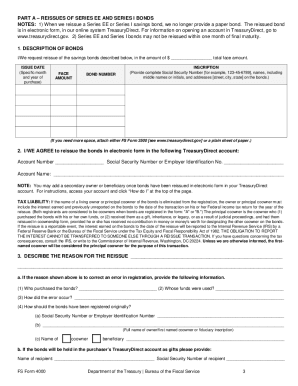
Ions in filling out this form. Making any false, fictitious, or fraudulent claim or statement to the United States is a crime and may be prosecuted. Print in ink or type all information. NOTE: When we reissue a Series EE or Series I savings bond, we no longer provide a paper bond. The reissued bond is in electronic form, in our online system TreasuryDirect. For information on TreasuryDirect, go to www.treasurydirect.gov. If you are the and are requesting reissue to Owner Change name.
Open form follow the instructions
Easily sign the form with your finger
Send filled & signed form or save
How to fill out the TreasuryDirect FS 4000 online
Filling out the TreasuryDirect FS 4000 form is an essential process for users wishing to reissue United States savings bonds. This guide provides clear, step-by-step instructions to assist you in successfully completing the form online.
Follow the steps to complete the TreasuryDirect FS 4000 form effectively.
- Click ‘Get Form’ button to obtain the form and open it in the digital editor.
- Begin filling out Part A by providing the description of the bonds you are requesting to reissue. Include the total face amount, issue date, bond number, and the complete inscription, which includes the Social Security Number and names of all owners.
- In the same section, agree to reissue the bonds in electronic form by entering your TreasuryDirect account number and account name, along with the required taxpayer identification number.
- State the reason for the reissue in the designated area. If correcting an error, provide detailed information regarding who purchased the bonds, whose funds were used, and how the error occurred.
- Navigate to Part B to describe any Series HH bonds if applicable. Fill in the same type of information as required in Part A, including bond details and registration information.
- Proceed to Part C, where all involved parties must certify the information provided. Each person named on the bonds must sign the form in ink and in the presence of a certifying officer.
- After completing all sections, ensure all required documentation is attached, if necessary, and review your information for accuracy before submitting.
- Finally, you can save changes, download, print, or share the completed form as needed.
Complete your TreasuryDirect FS 4000 form online today to ensure the smooth reissuance of your savings bonds.
Experience a faster way to fill out and sign forms on the web. Access the most extensive library of templates available.
Related content
You'll need to provide death certificate. 2) Request reissue by. FS Form 4000. A & C. See...
Oct 15, 2023 — This book is for people who need to practice finance - a group consisting...
Get answers to your most pressing questions about US Legal Forms API.
Where to put bonds on a tax return?
You should report savings bonds in the interest income section of your tax return, specifically on Line 2b of Form 1040. It's essential to include any interest reported on Form 1099-INT if applicable. The TreasuryDirect FS 4000 keeps your investments organized, making it easier to gather this information at tax time.
How to report savings bonds on tax return?
You report savings bonds on your tax return using Form 1040, where you list any interest earned. If you received a Form 1099-INT, use that amount for reporting. Utilizing the TreasuryDirect FS 4000 helps streamline this process by providing essential information about your bonds and interest.
How do I fund my TreasuryDirect account?
Funding your TreasuryDirect account is straightforward. You can transfer funds directly from your bank account using a one-time or recurring transfer option. This seamless process is a feature of the TreasuryDirect FS 4000, allowing easy access to start investing in savings bonds.
Do I have to report savings bonds on my taxes?
Yes, you need to report savings bond interest on your tax return. The interest accrued is considered taxable income, which is why keeping accurate records via the TreasuryDirect FS 4000 is crucial. If you used the bonds for education expenses, you might qualify for tax exclusions, so be sure to explore that option.
What is FS form 4000?
The FS form 4000, or TreasuryDirect FS 4000, is a vital form used to manage U.S. savings bonds online. This form facilitates online transactions and helps users maintain accurate records of their investments. Understanding its functionality can enhance your experience when using TreasuryDirect.
Do I qualify to exclude series EE or I bond interest?
You may qualify to exclude interest from series EE or I bonds if you use the proceeds for educational purposes and meet the income limits set by the IRS. To determine your eligibility, review the specific criteria outlined in IRS guidelines. This benefit can reduce your tax burden and enhance your investment experience with TreasuryDirect FS 4000.
How do I avoid taxes when cashing in savings bonds?
To potentially avoid taxes when cashing in savings bonds, consider using your bonds for qualified education expenses. You may be able to exclude interest from your taxable income if you meet specific income requirements. Keep records of your educational costs and consult a tax professional to understand your options fully. This strategy can enhance your experience with TreasuryDirect FS 4000.
How do I get my tax documents from TreasuryDirect?
To obtain your tax documents from TreasuryDirect, log into your account and navigate to the ‘Reports’ section. There, you will find your tax documents for the year, including the crucial Form 1099-INT for interest income. Ensure you have accurate details before downloading any forms, as these will be useful when preparing your taxes. Using TreasuryDirect FS 4000 can simplify this process.
Do I need to report I bonds on my tax return?
Yes, you typically need to report I bonds on your tax return in the year you redeem them unless you choose to defer the interest. The interest earned is subject to federal income tax, but it may be exempt from state tax. For detailed instructions and guidance, check the resources available through TreasuryDirect FS 4000.
What is the 45 day rule for TreasuryDirect?
The 45-day rule stipulates that any changes to a TreasuryDirect account must be submitted 45 days before any scheduled transaction. This allows sufficient time for processing and ensures secure management of your investments. Understanding this rule is essential for effective planning within the TreasuryDirect FS 4000 system.
Use professional pre-built templates to fill in and sign documents online faster. Get access to thousands of forms.
If you believe that this page should be taken down, please follow our DMCA take down process here.