Loading
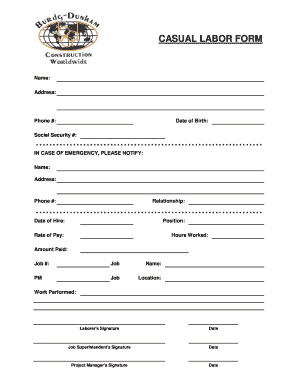
Get Online Casual Labor Name Form
How it works
-

Open form follow the instructions
-

Easily sign the form with your finger
-

Send filled & signed form or save
How to fill out the Online Casual Labor Name Form online
This comprehensive guide will assist you in accurately completing the Online Casual Labor Name Form. Follow the step-by-step instructions to ensure all necessary information is provided clearly and correctly.
Follow the steps to complete the Online Casual Labor Name Form with ease.
- Press the 'Get Form' button to access the form and open it in your preferred editor.
- Begin by entering your name in the designated field to accurately identify yourself.
- Provide your current address in the address section, ensuring it is complete and up to date for contact purposes.
- Input your phone number in the relevant field, making sure to include your area code.
- Fill in your date of birth, ensuring the format is correct to avoid any processing issues.
- Enter your Social Security number in the specified field, safeguarding your personal information.
- In the emergency contact section, specify the name, address, and phone number of a person to notify in case of emergencies.
- Indicate their relationship to you in the appropriate field, providing clarity regarding your connection.
- Record the date of hire and position for which you are being employed to maintain accurate employment records.
- Input your rate of pay within the stated section as required.
- Document the hours worked in the specified area, detailing your contributions accurately.
- Mention the amount paid concerning the work completed on the form.
- Assign a job number to this particular work entry for tracking purposes.
- Complete the job description fields, including the name, location, and a clear account of the work performed.
- Ensure you sign the form where indicated as the laborer, along with the date of your signature.
- Have the job superintendent sign and date their acknowledgment of the work completed.
- Finally, obtain the project manager's signature and date, completing the approval process.
- Once all sections are filled, you can save the changes, download a copy, print the form, or share it as needed.
Take action now and complete your documents online for swift processing.
Please Note: Forms ETA-750A and 750B have been discontinued; for professional athlete applications, Forms ETA-9089 and ETA-9089, Appendix A must now be used. You may refer to the instructions above for each form.