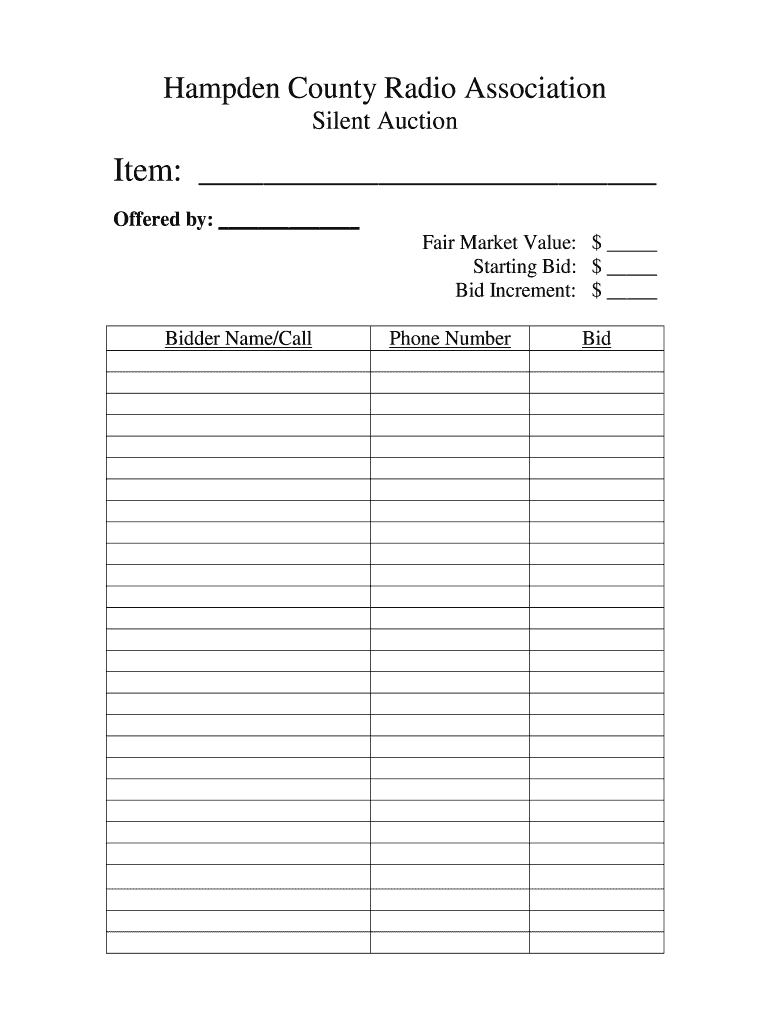
Er Name/Call Phone Number Bid Bidder Name/Call Phone Number Bid .
Loading

Open form follow the instructions

Easily sign the form with your finger

Send filled & signed form or save
How to fill out the HCRA Silent Auction online
The HCRA Silent Auction form is a vital document for participating in the auction, allowing users to submit bids efficiently. This guide provides step-by-step instructions to ensure a smooth and successful completion of the form.
Follow the steps to complete the HCRA Silent Auction form online
- Click ‘Get Form’ button to access the HCRA Silent Auction form and begin filling it out.
- In the 'Item' field, enter a brief description of the item being auctioned.
- In the 'Offered by' section, input the name or organization providing the item.
- Fill in the 'Fair Market Value' of the item, indicating its estimated worth.
- Next, specify the 'Starting Bid' amount, which is the minimum bid accepted for this item.
- In the 'Bid Increment' field, denote the minimum amount by which bids can increase.
- Complete the 'Bidder Name/Call' field by entering your name or call sign.
- Provide your 'Phone Number' to ensure that you can be contacted if necessary.
- In the 'Bid' section, submit your desired bid amount.
- If additional bids are being placed, repeat steps 7-9 for each subsequent 'Bidder Name/Call' instance.
- After completing all fields, save changes, and download or print the form as needed for your records.
Participate in the auction by filling out your HCRA Silent Auction form online today!
Experience a faster way to fill out and sign forms on the web. Access the most extensive library of templates available.
Related content
May 1, 2025 — Elector List May 1, 2025. SC - SG. CHG, Eff. Date, End Date, Name, Type...
by RA Sedler · 2008 — The Supreme Court held per curiam that the plaintiff=s evidence...
Get answers to your most pressing questions about US Legal Forms API.
Should you put a value on silent auction items?
It is advisable to assign a value to silent auction items to inform potential bidders and encourage participation. Knowing the fair market value helps attendees understand the worth of items at the HCRA Silent Auction. This transparency not only increases credibility but also fosters a competitive spirit among bidders, leading to greater fundraising success.
What happens to silent auction items that don't sell?
Silent auction items that remain unsold typically follow a common procedure. Event coordinators might reach out to the donors to discuss the item's fate, including the possibility of extending the auction period. Alternatively, they may choose to donate the items to another cause, maximizing the value of the HCRA Silent Auction for charitable purposes while fostering ongoing community support.
What happens to items not sold at auction?
Items that do not sell at auction may either be returned to their owners or consigned for future auctions. Many organizations also collaborate with the host of the HCRA Silent Auction to find alternative ways to sell or donate unsold goods. Some may even opt to hold special events to promote these items, ensuring that no valuable donations go to waste.
Can you claim silent auction items on taxes?
Yes, you can potentially claim silent auction items on your taxes. If you win an item and it has been donated to a charity, you may be eligible for a tax deduction equal to the fair market value of that item. It's crucial to obtain a receipt from the organization hosting the HCRA Silent Auction for your records. Remember to consult a tax professional for specific guidance.
What are the IRS rules for auctions?
The IRS has specific rules governing auctions, including HCRA Silent Auctions, that can affect your tax deductions. Generally, auction proceeds must be used for charitable purposes to qualify for a deduction. It’s essential to keep meticulous records of all transactions, including donor information and item values, to comply with IRS regulations and ensure your organization benefits fully.
How do you write a silent auction description?
Writing an effective description for items in your HCRA Silent Auction is essential to spark interest. Begin by highlighting the unique features and benefits of the item, and include details such as its value, age, and condition. Use engaging language that paints a picture, allowing potential bidders to envision themselves using the item, and encourage them to participate.
Can I write off a silent auction item?
Yes, you can write off a silent auction item if it was used for charitable purposes during your HCRA Silent Auction. To qualify for a tax deduction, the item must be donated and not used for personal benefit. Keep detailed records of the items, including their value and the event's purpose, to support your claim during tax season.
What to do with leftover silent auction items?
After your HCRA Silent Auction, you may find some items that did not sell. You have several options for these leftover items. Consider donating them to local charities, which can provide a tax deduction for your organization. Additionally, you may want to hold a flash sale or offer them as incentives for future events to keep your audience engaged.
Can anyone hold a silent auction?
Yes, anyone can hold a silent auction, but there are certain legal aspects to consider, especially regarding fundraising regulations in your area. Ensure that your organization is compliant with local laws by researching requirements or consulting legal resources. The US Legal Forms platform can guide you through the necessary legal documentation and strategies to host a successful HCRA Silent Auction.
How do I request a silent auction item?
When requesting a silent auction item for your HCRA Silent Auction, be polite and direct in your communication. Clearly outline the purpose of your auction, and specify how their item would enhance the event and appeal to buyers. Using templates available on the US Legal Forms platform can help you craft a professional and effective request.
Use professional pre-built templates to fill in and sign documents online faster. Get access to thousands of forms.
If you believe that this page should be taken down, please follow our DMCA take down process here.