Loading
Get Annexe 2047
How it works
-

Open form follow the instructions
-

Easily sign the form with your finger
-

Send filled & signed form or save
How to fill out the Annexe 2047 online
This guide provides a detailed overview of how to fill out the Annexe 2047 form online. Designed for users with varying levels of experience, it aims to simplify the process of reporting Swiss income and other related details.
Follow the steps to complete the Annexe 2047 with ease.
- Press the ‘Get Form’ button to obtain the Annexe 2047 form and open it in your editing tool.
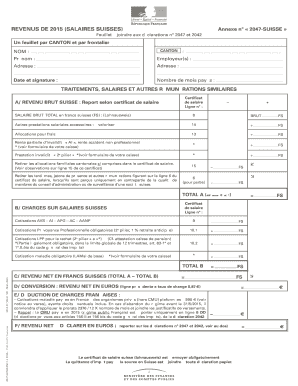
- Begin by filling in the 'Canton' field, specifying the relevant canton where you are employed.
- Provide your full name in the designated fields for 'Nom' and 'Prénom'.
- Enter the details of your employer(s), including their names and addresses, in the appropriate sections.
- Indicate the total number of months for which you were paid in the 'Nombre de mois payés' field.
- Report your gross income from Switzerland as stated on your salary certificate. This information should be placed under 'A/ Revenu brut Suisse'.
- Add any additional salary benefits or allowances, and make deductions as appropriate, following the instructions in the relevant sections.
- Calculate your net income in Swiss francs by subtracting total salary charges from your gross income. Record the result under 'C/ Revenu net en francs suisses'.
- Convert your net income to euros using the specified exchange rate. Enter this under 'D/ Conversion : Revenu net en Euros'.
- Deduct any applicable French charges from your income in the 'E/ Dédiction de charges françaises' field.
- Finally, indicate your net income to declare in euros on the specified line. Ensure all necessary documents, such as your Swiss salary certificate, are attached.
- Once completed, you can save your changes, download, print, or share the Annexe 2047 according to your needs.
Complete your documents online to ensure accuracy and efficiency.
A line-break can be added in HTML, using only CSS, by employing the pseudo-class ::after or ::before . In the stylesheet, we use these pseudo-classes, with the HTML class or id, before or after the place where we want to insert a line-break. In myClass::after : Set the content property to "\a" (the new-line character).
Industry-leading security and compliance
US Legal Forms protects your data by complying with industry-specific security standards.
-
In businnes since 199725+ years providing professional legal documents.
-
Accredited businessGuarantees that a business meets BBB accreditation standards in the US and Canada.
-
Secured by BraintreeValidated Level 1 PCI DSS compliant payment gateway that accepts most major credit and debit card brands from across the globe.