Loading
Form preview
  • US Legal Forms
  • Form Library
  • More Forms
  • More Uncategorized Forms
  • Ssa L9781 Sm 7 2020

Get Ssa L9781 Sm 7 2020

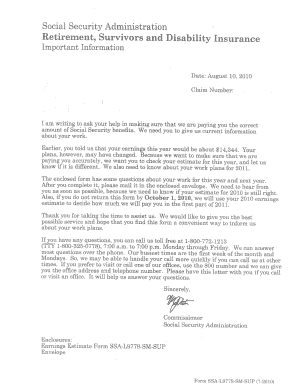
W. Commissioner. Social Security Administration. Enclosures: . Earnings Estimate Form SSA-L9779-SM-SUP. Envelope. Form SSA-L9779-SM-SUP (7- 2010) .

How it works

  1. Open form

    Open form follow the instructions

  2. Easily sign form

    Easily sign the form with your finger

  3. Share form

    Send filled & signed form or save

How to fill out the Ssa L9781 Sm 7 2020 online

Filling out the Ssa L9781 Sm 7 2020 form online can streamline your application process. This guide provides clear and concise instructions to assist you in completing the form accurately and efficiently.

Follow the steps to easily complete your online form.

  1. Click ‘Get Form’ button to obtain the form and open it in the editor.
  2. Begin by providing your personal information in the designated fields. This includes your full name, address, and contact details. Ensure that all information is accurate and up to date.
  3. Next, you will need to fill in any relevant identification numbers, such as your Social Security number. Double-check this information for accuracy, as it is crucial for processing your form.
  4. Proceed to the section where you are required to provide details about your current situation. This may include information related to your employment, health status, or any other circumstances relevant to your request.
  5. Review all fields for completeness. Make sure that you have not left any required fields blank. This is important to avoid delays in processing your application.
  6. Once you have filled out the entire form, you can save your changes. Choose an appropriate file name for easy reference in the future.
  7. Finally, you may download a copy of the completed form for your records, print it out if necessary, or share it with relevant parties, ensuring that you follow any specific submission instructions provided.

Don't hesitate to fill out your forms online today for a more efficient filing experience.

Get form

Experience a faster way to fill out and sign forms on the web. Access the most extensive library of templates available.
Get form

Related content

...
Learn more

Related links form

IRS W-2 2018 IRS W-2 2017 IRS W-2 2016 IRS W-2 2015

Questions & Answers

Get answers to your most pressing questions about US Legal Forms API.

Contact support

The point is that if you earned $120,000 per year for the past 35 years, thanks to the annual maximum taxable wage limits, the maximum Social Security benefit you could get at full retirement age is $2,687.

On the Design tab, select Watermark. In the Insert Watermark dialog, select Text and either type your own watermark text or select one, like DRAFT, from the list. Then, customize the watermark by setting the font, layout, size, colors, and orientation. If you don't see the watermark, click View > Print Layout.

Use a custom watermark On the Design tab, select Watermark > Custom Watermark. Choose Picture Watermark and select a picture, or choose Text watermark and type your watermark text in the Text box. Click OK.

0:59 4:20 3 Easy Ways to Insert a Watermark in Word - YouTube YouTube Start of suggested clip End of suggested clip Down this opens up a printed watermark dialog box in this dialog. Box you can either select theMoreDown this opens up a printed watermark dialog box in this dialog. Box you can either select the option to insert a picture watermark. Or add a text watermark. If you want to add a picture watermark.

Your watermark should protect your photo without taking away from the subject. You may want to avoid placing it over the main subject of the photo without placing it too far off to the side, as that can make it easier for art thieves to crop out. You can also place a watermark in a tiled pattern across your photo.

Insert a Text watermark in Word Step 1: Open the Word document. Step 2: Go the Insert tab on the ribbon and click on the Watermark option in the Page Background section. Step 3: The following window will appear on the screen. Click on the Custom Watermark option.

Use a custom watermark On the Design tab, select Watermark > Custom Watermark. Choose Picture Watermark and select a picture, or choose Text watermark and type your watermark text in the Text box. Click OK.

A watermark with the photographer's brand, name or website can help people who want to use an image find the photographer and ask for permission. There are alternatives to watermarking, too. You can create copyright metadata instead that will stay with the image, even as people download and re-upload it elsewhere.

Visible watermarks overview and examples They usually are in the form of the company or artist's logo who owns the copyright to it. They could also have the company or artist's name. Sometimes, they contain the year when the image was clicked on too.

How to Position Your Watermark. There are two main areas for placing your watermark. Some people like to place them in the bottom left corner, and others prefer to use the top right. You can also try using both of these positions within a single image.

Get This Form Now!

Use professional pre-built templates to fill in and sign documents online faster. Get access to thousands of forms.
Get form
If you believe that this page should be taken down, please follow our DMCA take down processhere.
Get Ssa L9781 Sm 7 2020
Get form
  • Adoption
  • Bankruptcy
  • Contractors
  • Divorce
  • Home Sales
  • Employment
  • Identity Theft
  • Incorporation
  • Landlord Tenant
  • Living Trust
  • Name Change
  • Personal Planning
  • Small Business
  • Wills & Estates
  • Packages A-Z
  • Affidavits
  • Bankruptcy
  • Bill of Sale
  • Corporate - LLC
  • Divorce
  • Employment
  • Identity Theft
  • Internet Technology
  • Landlord Tenant
  • Living Wills
  • Name Change
  • Power of Attorney
  • Real Estate
  • Small Estates
  • Wills
  • All Forms
  • Forms A-Z
  • Form Library
  • Legal Hub
  • About Us
  • Help Portal
  • Legal Resources
  • Blog
  • Affiliates
  • Contact Us
  • Delete My Account
  • Site Map
  • Industries
  • Forms in Spanish
  • Localized Forms
  • State-specific Forms
  • Forms Kit
  • Real Estate Handbook
  • All Guides
  • Notarize
  • Incorporation services
  • For Consumers
  • For Small Business
  • For Attorneys
  • USLegal
  • FormsPass
  • pdfFiller
  • signNow
  • altaFlow
  • DocHub
  • Instapage
Form Packages
  • Adoption
  • Bankruptcy
  • Contractors
  • Divorce
  • Home Sales
  • Employment
  • Identity Theft
  • Incorporation
  • Landlord Tenant
  • Living Trust
  • Name Change
  • Personal Planning
  • Small Business
  • Wills & Estates
  • Packages A-Z
Form Categories
  • Affidavits
  • Bankruptcy
  • Bill of Sale
  • Corporate - LLC
  • Divorce
  • Employment
  • Identity Theft
  • Internet Technology
  • Landlord Tenant
  • Living Wills
  • Name Change
  • Power of Attorney
  • Real Estate
  • Small Estates
  • Wills
  • All Forms
  • Forms A-Z
  • Form Library
Customer Service
  • Legal Hub
  • About Us
  • Help Portal
  • Legal Resources
  • Blog
  • Affiliates
  • Contact Us
  • Delete My Account
  • Site Map
  • Industries
  • Forms in Spanish
  • Localized Forms
  • State-specific Forms
  • Forms Kit
Legal Guides
  • Real Estate Handbook
  • All Guides
Prepared for you
  • Notarize
  • Incorporation services
Our Customers
  • For Consumers
  • For Small Business
  • For Attorneys
Our Sites
  • USLegal
  • FormsPass
  • pdfFiller
  • signNow
  • altaFlow
  • DocHub
  • Instapage
Social Media
Call us now toll free:
+1 833 426 79 33
As seen in:
© Copyright 1999-2026 airSlate Legal Forms, Inc. 17 Station Street, Suite 303, Brookline, MA 02445
  • Your Privacy Choices
  • Terms of Service
  • Privacy Notice
  • Content Takedown Policy
  • Bug Bounty Program