Get Irs Ss-4 2009
How it works
-

Open form follow the instructions
-

Easily sign the form with your finger
-

Send filled & signed form or save
How to fill out the IRS SS-4 online
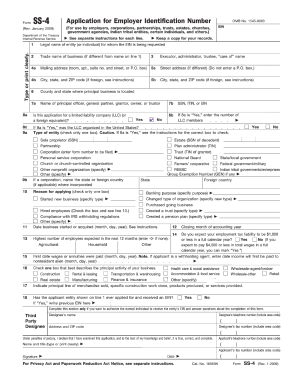
Completing the IRS SS-4 form is essential for obtaining an Employer Identification Number (EIN), which is necessary for various entities, including businesses and organizations. This guide will walk you through the process of filling out the form online, ensuring you understand each section and can complete it accurately.
Follow the steps to complete the IRS SS-4 form online.
- Click ‘Get Form’ button to access the application form for Employer Identification Number.
- In section 1, enter the legal name of the entity or individual requesting the EIN. Ensure that this name matches official documentation.
- If applicable, input the trade name of your business in section 2. This should reflect the name you use to operate if it differs from the legal name.
- In section 3, if relevant, fill in the name of the executor, administrator, or trustee. This is only necessary for trusts or estates.
- Move to sections 4a and 4b to provide the mailing address. Use the full street address without a P.O. box for accurate delivery.
- In sections 5a, 5b, and 6, fill in the street address, city, state, ZIP code, and county where the principal business is located.
- Proceed to section 7a to list the name of the principal officer, general partner, or owner. In section 7b, enter the social security number (SSN), individual taxpayer identification number (ITIN), or EIN.
- Answer the question in section 8a regarding whether this application is for a limited liability company (LLC). If yes, provide additional information in sections 8b and 8c as applicable.
- Select the type of entity you are applying for in section 9. This is crucial for proper classification and compliance.
- In section 10, specify the reason for applying by checking the appropriate box. Ensure that you provide additional details where required.
- Fill out the date of when the business started or was acquired in section 12, and specify the closing month of the accounting year in section 13.
- In sections 15 and 16, input the expected employment tax liability and the highest number of employees you anticipate in the coming year.
- Complete section 17 by selecting the option that best describes the principal activity of your business.
- Indicate the principal line of merchandise or services provided in section 18, and respond to whether the entity has previously applied for an EIN.
- Fill in the third-party designee section if you wish to authorize someone to receive the EIN and discuss matters related to the application.
- Conclude by providing your name, title, and signature to affirm the accuracy of the information submitted. Lastly, save changes, download, print, or share the completed form as needed.
Begin filling out your IRS SS-4 form online today to ensure compliance and secure your EIN.
Get form
Related links form
Often, the responsible party is the same as the owner of the entity, but this is not always the case. In some organizations, such as corporations or partnerships, the responsible party may be a different individual than the owner. Understanding this distinction is key to accurately completing the IRS SS-4 and ensuring compliance with tax obligations.