Loading
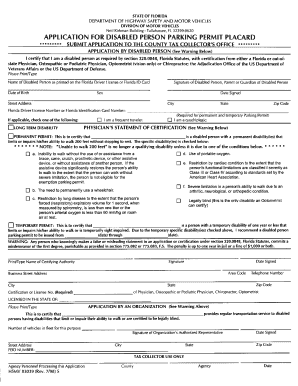
Get Palm Beach County Florida Handicap Form
How it works
-

Open form follow the instructions
-

Easily sign the form with your finger
-

Send filled & signed form or save
How to fill out the Palm Beach County Florida Handicap Form online
This guide provides clear and supportive instructions for filling out the Palm Beach County Florida Handicap Form online. Whether you are a first-time user or familiar with similar forms, this step-by-step approach will help you navigate the process effectively.
Follow the steps to complete your Handicap Form online
- Click ‘Get Form’ button to obtain the form and open it in your editing tool.
- Review the introductory section of the form, which often details eligibility criteria for obtaining a handicap designation. Ensure that you meet these requirements before proceeding.
- Fill out your personal information, including your full name, address, date of birth, and contact details. Make sure all information is accurate and up to date.
- In the next section, provide details regarding your disability. Clearly describe your condition and how it affects your daily activities. Use person-first language, focusing on the impact rather than the label.
- If applicable, include information about any medical professionals who can confirm your disability, including their contact information.
- Review all entered information for clarity and completeness. It's important to ensure that every section is filled to avoid delays in processing.
- Once you have completed all steps, save your changes. You may have the option to download, print, or share the form electronically, depending on the online platform being used.
Take the next step in securing your handicap designation by completing your Palm Beach County Florida Handicap Form online today!
Any person applying for a new permit or renewing or replacing their disabled person parking permit must provide form HSMV 83039, Application For Disabled Person Parking Permit, completed and signed by a certifying medical authority (see list below).