Loading
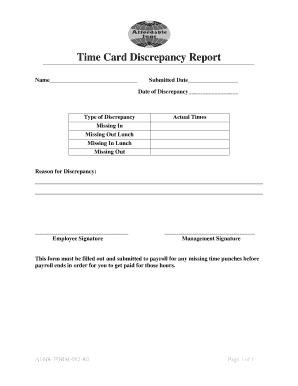
Get Time Card Discrepancy Report - Affordable Inns
How it works
-

Open form follow the instructions
-

Easily sign the form with your finger
-

Send filled & signed form or save
How to fill out the Time Card Discrepancy Report - Affordable Inns online
Filling out the Time Card Discrepancy Report is an essential process to ensure accurate reporting of work hours. This guide provides a clear, step-by-step approach to assist you in completing the form effectively and efficiently.
Follow the steps to accurately complete your Time Card Discrepancy Report
- Click ‘Get Form’ button to obtain the form and open it in the editor.
- Begin by entering your name in the designated Name field at the top of the form. This identifies you as the employee reporting the discrepancy.
- Fill in the Submitted Date field to indicate when you are submitting the report.
- In the Date of Discrepancy field, provide the specific date when the issue occurred. This is crucial for tracking purposes.
- Select the type of discrepancy from the options provided: 'Missing In', 'Missing Out', 'Missing In Lunch', or 'Missing Out Lunch'. This helps in categorizing your report accurately.
- In the Actual Times section, document the exact times you worked, as well as the relevant times for the discrepancies.
- Use the Reason for Discrepancy field to briefly explain why the discrepancy occurred, providing as much detail as necessary.
- Sign your name in the Employee Signature section to validate your report.
- Once you have completed the form, if required, obtain a signature from management in the Management Signature field.
- Finally, review your entries, save any changes, and ensure the form is downloaded, printed, or shared as needed before submitting it to payroll.
Ensure your work hours are accurately reported—complete your Time Card Discrepancy Report online today.
Related links form
Believe it or not, it's actually perfectly legal for an employer to modify a time card without an employee's knowledge. But if you feel your time card has somehow been adjusted unfairly, speak to your supervisor and look at the Fair Labor Standards Act (FLSA) and Department of Labor laws to see if any have been broken.
Industry-leading security and compliance
US Legal Forms protects your data by complying with industry-specific security standards.
-
In businnes since 199725+ years providing professional legal documents.
-
Accredited businessGuarantees that a business meets BBB accreditation standards in the US and Canada.
-
Secured by BraintreeValidated Level 1 PCI DSS compliant payment gateway that accepts most major credit and debit card brands from across the globe.