Loading
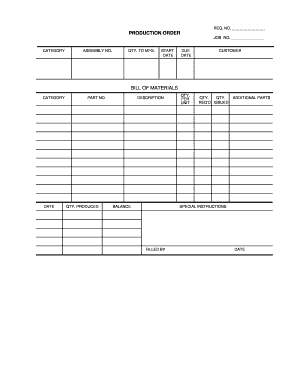
Get Production Order Bill Of Materials - Free Forms
How it works
-

Open form follow the instructions
-

Easily sign the form with your finger
-

Send filled & signed form or save
How to use or fill out the PRODUCTION ORDER BILL OF MATERIALS - Free Forms online
Filling out the Production Order Bill of Materials is an essential task for effective production management. This guide will provide you with clear instructions to complete the form accurately and efficiently.
Follow the steps to complete your form effectively.
- Click ‘Get Form’ button to acquire the form and open it in your preferred editor.
- Begin by entering the request number in the designated 'REQ. NO.' section to identify the order uniquely.
- Input the job number in the 'JOB NO.' field, which helps in tracking the production activities.
- Select the appropriate category for the order to classify it correctly for further processes.
- Enter the assembly number in the 'ASSEMBLY NO.' field, which will correspond to the specific assembly process.
- Quantify the amount to manufacture by filling in the 'QTY. TO MFG.' section, which indicates the total units required.
- Specify the start date in the 'START DATE' area to indicate when production is set to commence.
- Fill in the 'DUE DATE' to denote the expected completion date for the production order.
- Identify the customer by entering their name or organization in the 'CUSTOMER' field.
- Detail the bill of materials information by providing the category in the 'CATEGORY' section.
- Input the date to confirm when the bill of materials was created or updated.
- Fill in the part number under 'PART NO.', which serves as a unique identifier for the items involved.
- Record the quantity produced in the 'QTY. PRODUCED' field to keep track of output.
- Provide a description of the parts in the 'DESCRIPTION' section for clarity and reference.
- Fill in the balance quantity, which might be the remaining stock of parts in the 'BALANCE' field.
- Enter the quantity per unit, which will help in determining how parts are organized in terms of unit count.
- Complete the 'QTY. REQ'D' and 'ISSUED' sections to manage required and issued quantities effectively.
- List any additional parts necessary for production in the 'ADDITIONAL PARTS' section.
- Include any special instructions relevant to the production process in the 'SPECIAL INSTRUCTIONS' area.
- Fill out the 'FILLED BY' section to record the name of the individual completing the form.
- Finally, enter the date when the form was completed in the 'DATE' section.
- After verifying all the fields for accuracy, proceed to save changes, download, print, or share the completed form as needed.
Begin filling out your Production Order Bill of Materials online today!
Related links form
NY Application For Fire Alarm System Installation Inspection Testing And Servicing Company 2021
NY Putnam Valley Petroleum Automatic Oil Delivery Request Form 2018
NY Stillwater Rod & Gun Club Membership Application Agreement And Release Form 2018
NY Application For Fire Alarm System Installation Inspection Testing And Servicing Company 2020
Tailor the BOM to Project/Build Needs. Before creating the BOM, decide the priority details that are required from it and design it to meet those requirements. ... Use a Template. ... Include the Right Amount of Detail. ... Items to Include in a BOM. ... Double Check the Information. ... Track Changes. ... Limit Access. ... Automate, Automate, Automate.
Industry-leading security and compliance
US Legal Forms protects your data by complying with industry-specific security standards.
-
In businnes since 199725+ years providing professional legal documents.
-
Accredited businessGuarantees that a business meets BBB accreditation standards in the US and Canada.
-
Secured by BraintreeValidated Level 1 PCI DSS compliant payment gateway that accepts most major credit and debit card brands from across the globe.