Loading
Get Sap Appeal Form - Baker College - Baker
How it works
-

Open form follow the instructions
-

Easily sign the form with your finger
-

Send filled & signed form or save
How to fill out the SAP Appeal Form - Baker College - Baker online
Navigating the SAP Appeal Form at Baker College can seem daunting, but with clear guidance, you can complete it efficiently. This guide provides you with step-by-step instructions to help you through the process online.
Follow the steps to successfully complete your SAP Appeal Form
- Press the ‘Get Form’ button to access the SAP Appeal Form and open it in your preferred editor.
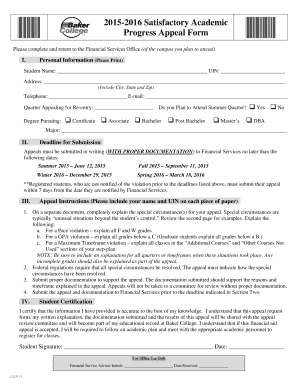
- Begin by entering your personal information in Section I. Ensure that you print your name clearly, include your University Identification Number (UIN), and provide your current address, phone number, and email. Also, indicate the quarter for which you are appealing and whether you plan to attend the summer quarter.
- Next, select your degree pursuit by checking the appropriate box for the level of education you are aiming for, such as Certificate, Associate, Bachelor, Post Bachelor, Master’s, or DBA. Additionally, specify your major in the provided space.
- Move on to Section II and take note of the deadlines for submitting your appeal. Be sure to prepare your materials in advance so that you can provide all required documentation by the specified date.
- In Section III, carefully follow the appeal instructions. Start by writing a separate document explaining your special circumstances. Address any relevant academic violations such as Pace, GPA, or Maximum Timeframe by detailing the circumstances that impacted your academic performance.
- Ensure that your explanation includes all periods where issues occurred, including any incomplete grades, to provide a comprehensive overview supporting your appeal.
- Next, include a statement indicating how the special circumstances have been resolved, as required under federal regulations.
- Gather and submit any necessary documentation that substantiates your appeal. This documentation should align with your explanation and must be submitted with your appeal to be considered.
- Finally, review all your information for accuracy, then submit your appeal and documentation to the Financial Services Office prior to the deadline mentioned in Section II.
- Sign and date the student certification section at the end of the form to confirm the accuracy of your information. After completing your form, you may save changes, download, print, or share your application as needed.
Complete your SAP Appeal Form online today for a smoother appeal process.
Supporting Documentation Sources may include counselor, doctor, therapist, police, clergy, Cook Counseling, or Services for Students with Disabilities. It could be a death certificate, a statement from a lawyer, a police or court document or documentation illustrating commitments outside of school.
Industry-leading security and compliance
US Legal Forms protects your data by complying with industry-specific security standards.
-
In businnes since 199725+ years providing professional legal documents.
-
Accredited businessGuarantees that a business meets BBB accreditation standards in the US and Canada.
-
Secured by BraintreeValidated Level 1 PCI DSS compliant payment gateway that accepts most major credit and debit card brands from across the globe.