Loading
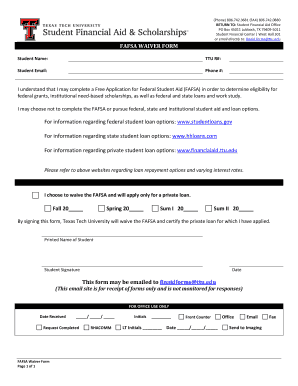
Get Fafsa Waiver Form - Financial Aid - Texas Tech University
How it works
-

Open form follow the instructions
-

Easily sign the form with your finger
-

Send filled & signed form or save
How to fill out the FAFSA Waiver Form - Financial Aid - Texas Tech University online
Filling out the FAFSA Waiver Form is an important step for students at Texas Tech University who choose to forgo federal student aid. This guide provides a comprehensive overview of the form’s components and clear, step-by-step instructions to help you complete it online.
Follow the steps to successfully complete the FAFSA Waiver Form online.
- Click the ‘Get Form’ button to obtain the FAFSA Waiver Form and open it in your preferred document editor.
- In the form, provide your full name in the designated section labeled 'Student Name.' This helps identify the application clearly.
- Enter your TTU R# (Texas Tech University Student ID number) in the specified field. This unique identifier assists in processing your request.
- Fill in your student email address in the corresponding space. This will be used for any necessary communications regarding your waiver.
- Provide a contact phone number where you can be reached in the section labeled 'Phone #.' It's important to have a reliable contact for any inquiries.
- Indicate your choice to waive the FAFSA by checking the relevant option. Acknowledge your understanding of the implications of not applying for federal aid.
- Complete the sections for the academic semesters indicating the year (Fall, Spring, Sum I, and Sum II) for which you are requesting waiving the FAFSA.
- Sign the form in the area labeled 'Student Signature.' This signature indicates your consent and acknowledgment of the information provided.
- Date the form by filling in the current date next to the signature. This step is essential for processing your request.
- Save your changes to the form. You can then download, print, or share the completed document as needed.
- Email the completed form to finaid.forms@ttu.edu. Note that this email address is for form receipt only and is not monitored for responses.
Complete your FAFSA Waiver Form online today to ensure your financial aid options are properly reviewed.
Go to fafsa.gov. Click the Log In button and enter your FSA ID on the left. Only you, the student, should know or use your FSA ID. Select View or Print your Student Aid Report (SAR) from the "My FAFSA" page.
Industry-leading security and compliance
US Legal Forms protects your data by complying with industry-specific security standards.
-
In businnes since 199725+ years providing professional legal documents.
-
Accredited businessGuarantees that a business meets BBB accreditation standards in the US and Canada.
-
Secured by BraintreeValidated Level 1 PCI DSS compliant payment gateway that accepts most major credit and debit card brands from across the globe.