Loading
Get Huntley Park District Registration
How it works
-

Open form follow the instructions
-

Easily sign the form with your finger
-

Send filled & signed form or save
How to fill out the Huntley Park District Registration online
Filling out the Huntley Park District Registration form online is a straightforward process designed to help you register for various programs and activities. This guide provides you with clear, step-by-step instructions to ensure you complete the registration accurately and efficiently.
Follow the steps to complete your registration online.
- Click the ‘Get Form’ button to obtain the form and open it in your preferred editor.
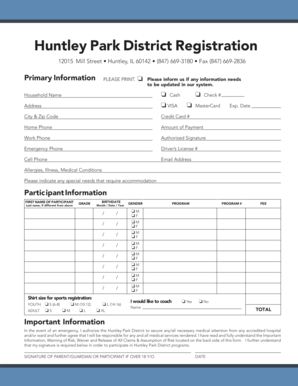
- Begin by entering your primary information in the designated fields. This includes your household name, address, city and zip code, and various contact numbers such as home, work, emergency, and cell phone.
- Proceed to fill out participant information. Enter the first and last name of the participant, their grade, and birthdate in the specified format.
- List the program number and associated fee for each program the participant wishes to enroll in. If you are interested in coaching, please select 'Yes' or 'No' and provide the necessary name information if applicable.
- In the important information section, read the details carefully. By signing, you acknowledge the risks involved in participation and agree to the medical attention policy in case of emergencies.
- Ensure all information is accurate, then sign and date the form as required by the parent, guardian, or participant over the age of 18.
- Finally, review your completed registration form. You can then save any changes, download a copy, print it, or share it as needed.
Complete your Huntley Park District Registration online today to secure your spot in desired programs.
If you and your tax advisor decide you can use this, the tax ID number is 36-26- 14811. Please retain your receipts for tax purposes. The Huntley Park District does NOT send out a tax statement.