Loading
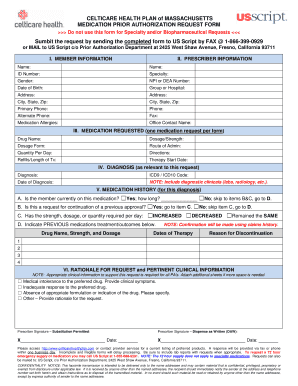
Get Prior Authorization Request Form - Celticare Health
How it works
-

Open form follow the instructions
-

Easily sign the form with your finger
-

Send filled & signed form or save
How to fill out the Prior Authorization Request Form - Celticare Health online
Filling out the Prior Authorization Request Form for Celticare Health can seem complex, but this guide will streamline the process. You will find step-by-step instructions to ensure that you provide all necessary information correctly and efficiently.
Follow the steps to complete the form accurately.
- Press the ‘Get Form’ button to access the Prior Authorization Request Form and open it in your preferred editor.
- Begin by filling in the member information section, which includes the member’s name, ID number, date of birth, gender, address, and contact information. Make sure to provide accurate details as this information is crucial for processing.
- Proceed to the prescriber information section. Here, you will need to enter the prescriber’s name, NPI or DEA number, specialty, contact details, and any medication allergies for the member.
- In the medication requested section, specify the drug name, dosage or strength, dosage form, route of administration, quantity per day, directions for use, and the refills or length of treatment. Ensure that this information aligns with the prescription provided.
- Next, fill in the diagnosis section. Provide the diagnosis, relevant ICD9 or ICD10 code, and the date of diagnosis. Remember to include any necessary clinical documents to support the diagnosis.
- Complete the medication history section by answering whether the member is currently on the requested medication. If so, indicate how long they have been using it. If not, acknowledge whether this is a request for continuation of a previous approval.
- In the rationale for request section, detail the clinical reasoning for the medication request. Check all relevant boxes and provide any additional notes that would support your request.
- Finally, sign the form where indicated, ensuring that any required signatures are provided. Include the date of signature.
- Once you have completed all sections and reviewed the form for accuracy, you can save the changes. The completed form can then be downloaded, printed, or shared as necessary.
Start filling out your Prior Authorization Request Form online today to ensure timely processing of your request.
On the Design tab, select Watermark. Choose a pre-configured watermark, like DRAFT, CONFIDENTIAL, or DO NOT COPY. For placing a logo or image, Select Watermark > Custom Watermark > Picture watermark > Select Picture. On the same menu you can create a custom text watermark.