Loading
Get Toms Bandi
How it works
-

Open form follow the instructions
-

Easily sign the form with your finger
-

Send filled & signed form or save
How to fill out the Toms Bandi online
Filling out the Toms Bandi form online can streamline your passport application process. This guide provides clear steps and helpful insights to ensure you complete the form accurately and efficiently.
Follow the steps to successfully complete the Toms Bandi form.
- Click 'Get Form' button to obtain the form and access it for filling out online.
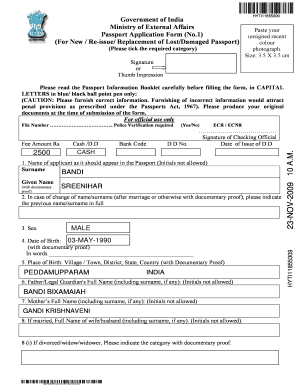
- Begin by entering the applicant's full name as it should appear in the passport. Ensure to avoid initials. Provide your surname and given name with appropriate documentary proof.
- If applicable, indicate any previous names or surnames you have had, along with supporting documentation.
- Select your sex from the provided options, ensuring it reflects the correct information.
- Input your date of birth in the specified format, ensuring it aligns with your documentary proof. Provide the date in both number and word formats.
- Fill in your place of birth, ensuring that both village/town and state information are accurate. Attach any necessary proof.
- Provide the full names of your father and mother as they should appear, avoiding initials. Make sure to include surnames as applicable.
- If married, include the full name of your partner, making sure to avoid initials.
- Indicate your current residential address with details about how long you have resided there. Include your phone number and email address for better communication.
- Fill out your permanent address if different from your current address, noting it specifically with PIN code.
- Detail any past or existing passports you hold or have held, including relevant dates and any lost or damaged cases. Attach necessary documentation for support.
- Answer questions regarding any criminal convictions or pending proceedings honestly and include required documents if necessary.
- Provide details for the person to be contacted in case of an emergency, including their name and relationship to you.
- Complete the self-declaration section, ensuring you acknowledge the accuracy of the information provided.
- With all sections filled, review your entries for accuracy before saving changes. You can download, print, or share the form as required.
Start completing your Toms Bandi form online today for a smoother passport application process.
Checkbox groups can be either horizontal or vertical. By default, checkbox groups are vertical. Use a horizontal checkbox group when vertical space is limited.