Loading
Get 2000-2001 Pre-study Report - Csap
How it works
-

Open form follow the instructions
-

Easily sign the form with your finger
-

Send filled & signed form or save
How to fill out the 2000-2001 PRE-STUDY REPORT - CSAP online
Completing the 2000-2001 PRE-STUDY REPORT - CSAP online can seem daunting, but this guide is designed to support you through each step of the process. Follow these instructions to ensure you fill out the form accurately and efficiently.
Follow the steps to complete your form successfully.
- Click the ‘Get Form’ button to access the PRE-STUDY REPORT and open it in your online editor.
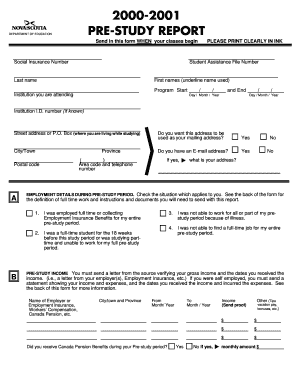
- Begin by entering your social insurance number and student assistance file number in the designated fields. Ensure that all personal information is printed clearly in ink.
- Fill in your last name and first names, underlining the name you use. Then specify the program start and end dates in the provided format (day/month/year).
- Input the institution you are attending along with your institution I.D. number if known. Next, provide your current street address or P.O. Box, and indicate if you want this address used as your mailing address.
- Answer whether you have an email address and provide it if applicable. Fill in your city/town, province, postal code, area code, and telephone number.
- In the employment details section, check the box corresponding to your situation during the pre-study period. Refer to the back of the form for definitions and further instructions.
- For pre-study income, list each source of income along with the corresponding amounts. Send proof from your employer or other sources, as required.
- Complete the accommodations section with your living address during the pre-study period. Provide details of any changes in address using additional pages if necessary.
- If you were looking for a full-time job, include details about the businesses you applied to in the job search section. Remember, you don’t need to submit confirmation letters unless requested.
- In the pre-study expenses section, detail your expected expenses such as tuition, transportation, and childcare. Provide proof for each expense that you claim.
- Fill in the income expected while studying, including all sources of income during your study period. Ensure to provide proof for any amounts anticipated.
- Read the declaration statement carefully, sign and date the form to confirm that the information is accurate. Unsigned forms will be returned, causing delays.
- Once all sections are completed, save your changes, and download or print a copy for your records. You can also share the form if required.
Start filling out your 2000-2001 PRE-STUDY REPORT - CSAP online today to ensure successful completion and submission.