Loading
Get Consent Form - Csap
How it works
-

Open form follow the instructions
-

Easily sign the form with your finger
-

Send filled & signed form or save
How to fill out the Consent Form - CSAP online
Filling out the Consent Form - CSAP online is an essential step in securing permission for your child to participate in school activities. This guide provides clear instructions to help ensure that the form is completed accurately and efficiently.
Follow the steps to complete the Consent Form - CSAP online.
- Click the ‘Get Form’ button to access the Consent Form - CSAP. This will open the form in your preferred document editor.
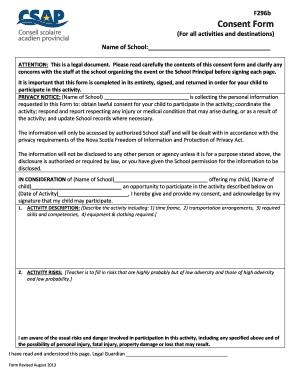
- Begin by entering the name of the school in the designated space. Ensure the spelling is correct, as this is a formal document.
- Next, read the attention note carefully. It is important to understand that this is a legal document. If you have any questions or concerns, discuss them with the school's organizing staff or principal before proceeding.
- Move on to the privacy notice section. Familiarize yourself with how the school will use your child's personal information. This section clarifies the purpose of collecting information and who will have access to it.
- Complete the section regarding consideration for your child's participation. Fill in your child's name, the name of the school, and date of the activity. Your signature is required to confirm consent.
- In the activity description section, include details about the activity, such as the time frame, transportation arrangements, required skills or competencies, and necessary clothing and equipment.
- The next part requires an understanding of activity risks. Be aware of the potential dangers involved and acknowledge them by signing where indicated.
- Fill in the supervision details, explicitly stating what types of supervision will or will not be provided during the activity.
- In the health and medical treatment section, indicate if your child has any conditions that may affect their participation. If applicable, list the specific conditions.
- Confirm that you will provide the required equipment and clothing for your child's participation. It is your responsibility to ensure your child comes prepared.
- Acknowledge understanding of the school’s code of conduct and activity site rules. Ensure that your child is informed about these regulations as well.
- Understand the potential risk of accidents during the activity, even if precautions are taken. Acknowledge this risk in the designated area.
- Indicate that non-participation is an option if you are uncomfortable with the activity. Your child will not be penalized for remaining at the school.
- Provide contact information where the school can reach you during the activity. Ensure these details are accurate.
- Finally, sign the consent section, ensuring you are at least 19 years of age. Review the privacy notice again, read the entire form, and clarify any remaining concerns.
- Once you have completed all sections, save your changes. You may choose to download, print, or share the completed form as needed.
Complete your forms online today to ensure a smooth process for your child's participation!
I understand that my participation is voluntary and that I am free to withdraw at any time, without giving a reason and without cost. I understand that I will be given a copy of this consent form. I voluntarily agree to take part in this study.