Loading
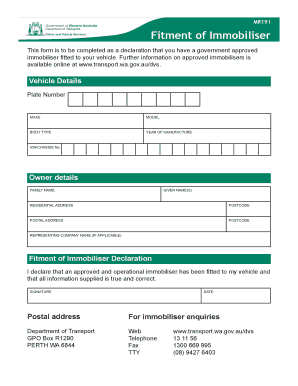
Get Western Australia Immobilizer
How it works
-

Open form follow the instructions
-

Easily sign the form with your finger
-

Send filled & signed form or save
How to fill out the Western Australia Immobilizer online
This guide provides clear instructions on how to effectively complete the Western Australia Immobilizer form online. By following these steps, users can ensure accurate and complete submission for the immobiliser declaration for their vehicle.
Follow the steps to fill out the form accurately
- Press the ‘Get Form’ button to access the Western Australia Immobilizer form and open it for editing.
- In the 'Vehicle Details' section, enter the plate number, make, model, body type, year of manufacture, and VIN/chassis number accurately.
- Proceed to the 'Owner Details' section. Fill in your family name, given name(s), residential address including postcode, and postal address with its corresponding postcode. If applicable, include the name of the representing company.
- In the 'Fitment of Immobiliser Declaration' section, read the declaration carefully. Check the box to confirm your statement that an approved and operational immobiliser is fitted to your vehicle.
- Sign and date the form to authenticate your declaration.
- Finally, review all entered information for accuracy. Once confirmed, you can save changes, download the completed form, print it, or share it as needed.
Complete your documents online to streamline your process.
It is compulsory to fit a Government approved immobiliser when you apply to license (register) or transfer a vehicle in WA.