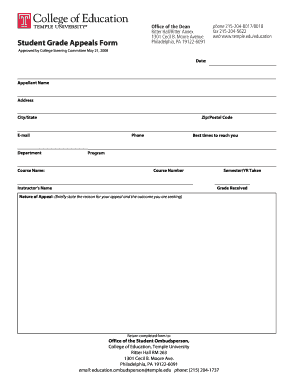
Get Student Grade Appeals Form - Temple University - Temple
How it works
-

Open form follow the instructions
-

Easily sign the form with your finger
-

Send filled & signed form or save
How to fill out the Student Grade Appeals Form - Temple University - Temple online
This guide provides you with clear, step-by-step instructions on filling out the Student Grade Appeals Form for Temple University. Whether you are navigating the appeal process for the first time or looking for assistance, this comprehensive guide aims to support you through each section of the form.
Follow the steps to effectively complete your appeal form.
- Press the ‘Get Form’ button to access the Student Grade Appeals Form, which will open in your chosen editing tool.
- Fill in the date at the top of the form to indicate when you are submitting your appeal.
- Enter your full name in the 'Appellant Name' section. This should include your first and last name.
- Provide your current address, including street, city, state, and zip/postal code, in the designated fields.
- Input your email address to allow for correspondence regarding your appeal.
- Specify the department related to your course under the 'Department' section.
- Indicate the name of the course for which you are appealing in the 'Course Name' field.
- Provide your phone number and the best times to reach you so that the office can contact you if needed.
- Select your program of study by filling out the 'Program' field appropriately.
- Enter the course number associated with the appeal.
- List your instructor's name in the specified section.
- Document the semester and year in which you took the course, ensuring accuracy.
- Record the grade you received in the course accurately.
- In the 'Nature of Appeal' section, briefly explain the reason for your appeal and clarify the outcome you are seeking.
- Once you have completed all sections, review your form for any errors or omissions.
- Save your changes, then choose to download, print, or share the form as necessary.
Complete your Student Grade Appeals Form online and ensure your voice is heard.
Good reasons to appeal include grading discrepancies, lack of communication from instructors, or situations that impacted your ability to perform, such as personal or medical issues. It's essential to present clear evidence and reasoning in your appeal. By using the Student Grade Appeals Form - Temple University - Temple, you can structure your appeal effectively and increase your chances of a favorable outcome.