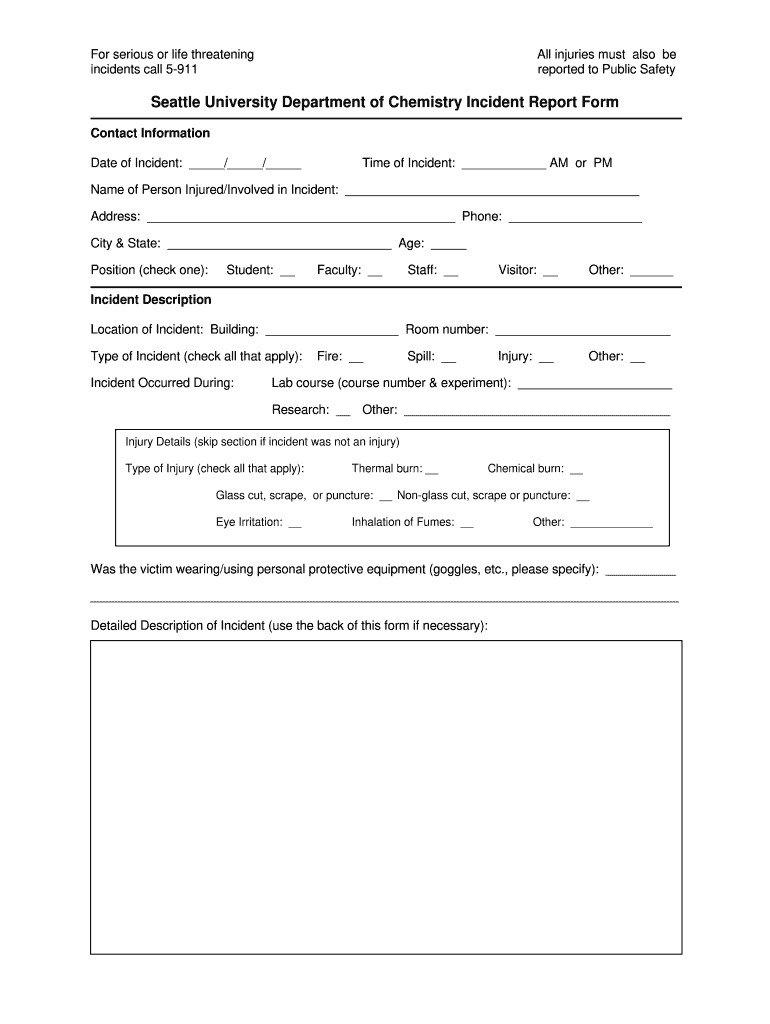
Of Incident: / / Time of Incident: AM or PM Name of Person Injured/Involved in Incident: Address: Phone: City & State: Age: Position (check one): Student: Faculty: Staff: Visitor: Other: Incident Description Location of Incident: Building: Room number:.
Loading

Open form follow the instructions

Easily sign the form with your finger

Send filled & signed form or save
How to fill out the Home Depot Incident Report online
Filing an incident report is an essential step in ensuring safety and accountability. This guide will provide you with clear and concise instructions on how to fill out the Home Depot Incident Report online, emphasizing accuracy and completeness.
Follow the steps to complete the form accurately
- Press the ‘Get Form’ button to access the form and open it in your preferred editor.
- Begin by filling in the contact information. Input the date of the incident using the format ____/____/____ and specify the exact time of the incident, denoting AM or PM.
- Provide the name and address of the person involved in the incident. Include their phone number, city, state, and age. Indicate their position by checking the appropriate box for student, faculty, staff, visitor, or other.
- In the incident description section, specify the location of the incident, including the building name and room number. Check all applicable types of incidents that occurred and provide details if it was during a lab course or research.
- If the incident involved injuries, complete the injury details section. Check all applicable types of injuries and indicate whether the person was using personal protective equipment at the time of the incident.
- Provide a detailed description of the incident. You may use the back of the form if necessary to include all relevant information.
- In the university response section, indicate whether the university police were called, if a public safety incident form was completed, and details regarding the treatment given to the victim.
- Finalize the report by obtaining signatures. The involved person should sign and date the form, followed by the instructor's signature and date.
- If applicable, provide the name and phone number of any witnesses to the incident.
- After completing the form, you can save changes, download, print, or share the form as necessary.
Complete your incident report online today to ensure a prompt and thorough documentation process.
Experience a faster way to fill out and sign forms on the web. Access the most extensive library of templates available.
Related content
Employee #1, of Home Depot, was down-stocking extension ladders from a 10 ft shelf. He was...
by UI Law — He had seen Claimant for an independent medical examination and had authored...
If these repairs cannot be completed within three (3) calendar days, we will send you a...
Get answers to your most pressing questions about US Legal Forms API.
How do I fill in an incident report form?
To fill in an incident report form, start by reviewing the layout thoroughly. Gather all necessary information as prompted by the Home Depot Incident Report format, including witness statements and any immediate follow-up actions taken. This ensures a well-rounded account of the incident that can facilitate better safety practices.
How to fill in an accident report form?
Filling in an accident report form involves providing specific details with clarity and accuracy. The Home Depot Incident Report serves as a useful template, prompting you to include essential information such as the time, location, and circumstances of the accident. Remember, thorough documentation can help prevent similar incidents in the future.
How to fill out an incident report example?
Begin by downloading the Home Depot Incident Report for a clear outline of required sections. Fill in basic details like the incident date, people involved, and a step-by-step account of the event. This systematic approach simplifies the process, ensuring that each vital element receives attention.
What are the 5 rules of incident reporting?
The five rules of incident reporting emphasize clarity, accuracy, honesty, timeliness, and completeness. Always aim to document events as they occurred, without assumptions or omissions. Following the guidelines of the Home Depot Incident Report ensures your reporting aligns with these principles, fostering improved safety protocols and accountability.
When filling out the incident report, what must be included?
When filling out the incident report, be sure to include the date and time of the incident, the location, and the names of individuals involved. Additionally, the Home Depot Incident Report advises you to add a detailed description of the incident and any actions taken immediately after. This information ensures a comprehensive overview of what happened.
How to fill an incident report?
To fill an incident report, begin by collecting all pertinent information. Use the Home Depot Incident Report format, which guides you through documenting the incident timeline, involving witnesses, and specifying any safety measures taken afterward. Complete the report promptly to maintain accuracy and trustworthiness.
How do you fill out an incident report example?
When filling out an incident report example, focus on gathering accurate details. Utilize the Home Depot Incident Report template, which prompts you for essential information such as the names of individuals involved, the time of the incident, and a description of what occurred. Ensure clarity and precision to avoid misunderstandings later.
How to answer incident report example?
To answer an incident report example effectively, first, ensure you understand the context of the incident. Start by clearly stating the facts without personal bias. Use the Home Depot Incident Report as a reliable guide, and structure your response to cover all relevant points, including the who, what, when, and where of the incident.
How to make an incident violation report?
Making an incident violation report requires you to start with a detailed account of the violation event. Be sure to record the time, location, and individuals involved, along with the specific nature of the violation. Using a Home Depot Incident Report as a guide can help structure your report effectively. Consider using US Legal Forms to access templates that streamline the creation process, ensuring you cover all necessary details.
Who is responsible for filing an incident report?
Typically, the individual who witnesses the incident or is directly involved is responsible for filing the report. It is essential for that person to communicate all relevant facts accurately. However, in some cases, management or designated personnel may also gather and submit the Home Depot Incident Report on behalf of others to ensure proper reporting procedures are followed.
Use professional pre-built templates to fill in and sign documents online faster. Get access to thousands of forms.
If you believe that this page should be taken down, please follow our DMCA take down process here.