Loading
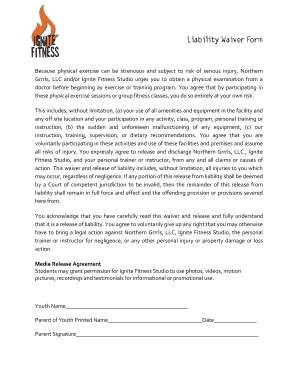
Get Liability Waiver Form - Ignite Fitness Studio
How it works
-

Open form follow the instructions
-

Easily sign the form with your finger
-

Send filled & signed form or save
How to fill out the Liability Waiver Form - Ignite Fitness Studio online
Filling out the Liability Waiver Form for Ignite Fitness Studio is an important step to participate in physical exercises and classes. This guide will help you navigate through the form effectively to ensure it's completed accurately and safely.
Follow the steps to complete the waiver form accurately.
- Click ‘Get Form’ button to obtain the form and open it in the editor.
- Begin by filling in your name in the designated field. Ensure that your name is spelled correctly, as this will be used in conjunction with the waiver.
- If you are completing the waiver for a youth, include their name where indicated. This is essential for parental consent.
- In the section for the parent or guardian's printed name, please write your full name if you are signing on behalf of a minor.
- Complete the date field to indicate when the waiver is being completed. This is critical for record-keeping purposes.
- Provide your signature in the designated field. If you are a parent or guardian, ensure your signature is clear, as this verifies your consent.
- Review the completed form carefully to ensure all fields are filled out correctly. It is important that all provided information is accurate.
- Once you are satisfied with the form, you can choose to save your changes, download, print, or share the completed waiver as needed.
Complete your Liability Waiver Form online today to ensure a smooth start to your fitness journey!
I agree to conduct myself in a controlled and reasonable manner at all times, and to refrain from using any equipment in a manner inconsistent with its intended design and purpose. I understand and acknowledge that the use of exercise equipment involves risk of serious injury, including permanent disability and death.