Get Refund And Copy Brequestb Form - Sigue Bmoneyb Transfer Services
How it works
-

Open form follow the instructions
-

Easily sign the form with your finger
-

Send filled & signed form or save
How to fill out the Refund and Copy Request Form - Sigue Money Transfer Services online
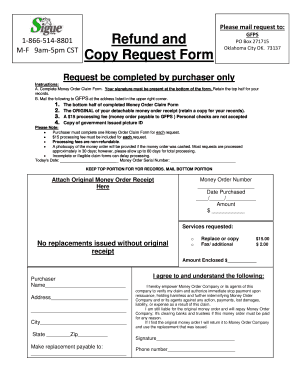
Filling out the Refund and Copy Request Form for Sigue Money Transfer Services is a straightforward process that requires careful attention to detail. This guide will provide you with clear, step-by-step instructions to ensure you complete the form accurately and submit it correctly.
Follow the steps to successfully complete the Refund and Copy Request Form.
- Click ‘Get Form’ button to obtain the form and open it in your chosen editor.
- Date: Start by entering today’s date in the designated field.
- Money Order Serial Number: Fill in the serial number of your money order in the provided space.
- Money Order Number: Enter your money order number in the specified field.
- Date Purchased: Indicate the purchase date of your money order using the format MM/DD/YYYY.
- Amount: Write the total amount of the money order in the allocated box.
- Attach Original Money Order Receipt: Make sure to attach the original money order receipt in the designated area.
- Services Requested: Check the appropriate box for either replacement or copy of the money order.
- Amount Enclosed: Calculate the total fee and fill it in the box indicating the amount you are enclosing.
- Purchaser Information: Provide your full name, address, city, state, and zip code in the required fields.
- Make Replacement Payable To: Write the name of the individual or entity to whom the replacement should be made.
- Signature: Sign the form to authorize the request.
- Phone Number: Enter your contact phone number in the designated area.
- Review: Before submission, review all fields for accuracy.
- Save: Save changes, then download, print, or share the form as needed.
Start completing your Refund and Copy Request Form online today to ensure a seamless request process.
If you encounter issues with Sigue, it may stem from various factors such as network problems or service maintenance. To resolve this, check your internet connection or visit their website for updates. Additionally, reviewing the requirements for the Refund And Copy BRequestb Form - Sigue BMoneyb Transfer Services can help ensure everything is in order. Should problems persist, reach out to their customer support for fast solutions.