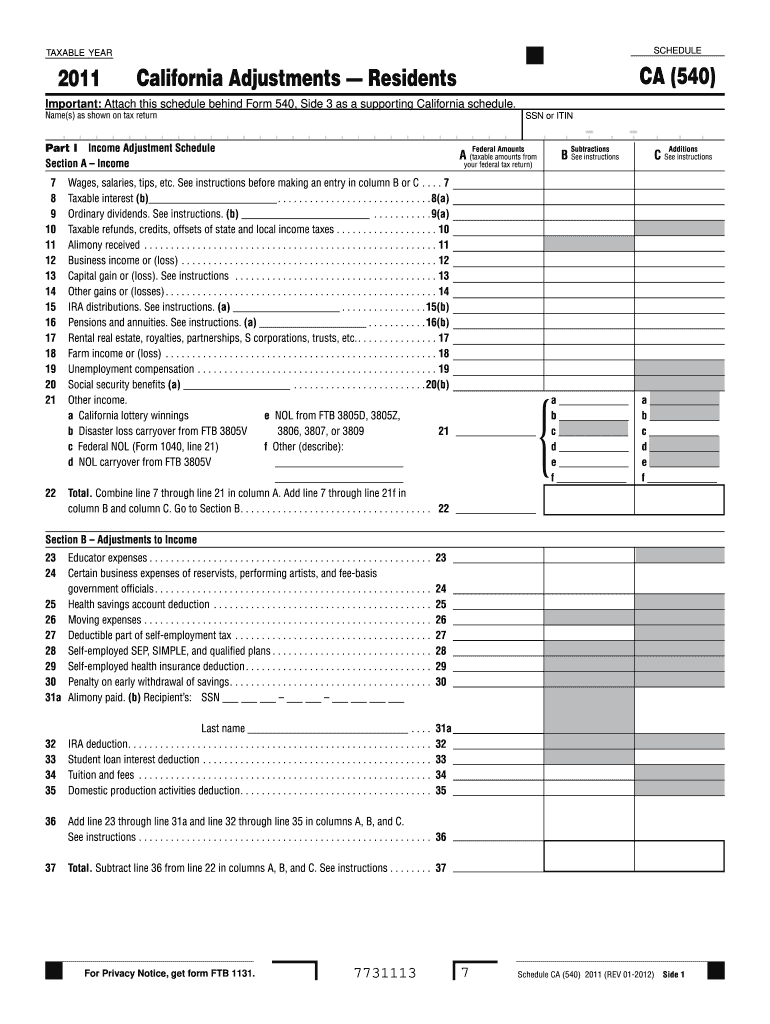
Rtists, and fee-basis government officials . . . . . . . . . . . . . . . . . . . . . . . . . . . . . . . . . . . . . . . . . . . . . . . . . . . 24 25 Health savings account deduction . . . . . . . . . . . . . . . . . . . . . . . . . . . . . . . . . . . . . . . . . 25 26 Moving expenses . . . . . . . . . . . . . . . . . . . . . . . . . . . . . . . . . . . . . . . . . . . . . . . . . . . . . . 26 27 Deductible part of self-employment tax . . . . . . . . . . . . . . . . . . . . . .
Loading

Open form follow the instructions

Easily sign the form with your finger

Send filled & signed form or save
How to fill out the CA FTB Schedule CA (540) online
Filling out the CA FTB Schedule CA (540) online is an essential step for California residents when preparing their state tax returns. This guide provides a clear and supportive approach to help users navigate each section and field of the form efficiently.
Follow the steps to complete your CA FTB Schedule CA (540) online.
- Press the ‘Get Form’ button to acquire the form and open it in your chosen document editor.
- Begin by entering your name(s) as shown on your tax return and your Social Security Number (SSN) or Individual Taxpayer Identification Number (ITIN). This information is crucial for identity verification.
- In Part I, Section A – Income, record the federally recognized amounts in Column A. For each income source listed (e.g., wages, taxable interest, dividends), include the corresponding amounts from your federal tax return.
- For Column B, make any necessary subtractions from the federal amounts, adhering to the provided instructions for each income type.
- Continue through the various lines by noting any additional sources of income or losses (e.g., business income, capital gains, etc.) and filling in the corresponding columns.
- After completing Section A, calculate the total income in line 22 by adding all entries in Columns A, B, and C.
- Move to Section B – Adjustments to Income, where you will enter any qualified adjustments such as educator expenses, moving expenses, or health savings accounts.
- Follow the instructions carefully for lines 36 and 37, which require you to total the adjustments and subtract them from the total income calculated earlier.
- In Part II, record any adjustments to federal itemized deductions. Ensure accuracy in your entries to reflect proper state adjustments.
- Once all sections are filled out, review your form for accuracy before proceeding to save your changes, download, print, or share the completed Schedule CA (540).
Complete your CA FTB Schedule CA (540) online today for accurate and efficient tax filing.
Experience a faster way to fill out and sign forms on the web. Access the most extensive library of templates available.
Related content
Schedule CA (540) is a supporting California schedule for residents, attached behind Form...
Important: Attach this schedule behind Form 540NR, Side 5 as a supporting California...
CA – For regulatory acceptance, environmental data must be legally defensible. The...
Get answers to your most pressing questions about US Legal Forms API.
How to fill out schedule CA 540?
Filling out the CA FTB Schedule CA (540) involves gathering all necessary income and deduction information. Carefully follow the instructions outlined by the California Franchise Tax Board while completing the schedule. For additional assistance, consider using knowledgeable online resources that can simplify the process.
Where do I file 540 ES?
You should file your 540 ES forms with the California Franchise Tax Board. The forms can be mailed to the address provided in the instructions or submitted electronically if applicable. For proper guidance, check with reliable tax services or the CA FTB website.
How do I file an amended 540?
To file an amended 540, you need to complete the appropriate forms and attach your revised CA FTB Schedule CA (540). Ensure to clearly identify the changes you are making compared to your original return. Using a reliable tax preparation platform can guide you through this process effectively.
Can you file CA taxes online?
Absolutely, you can file CA taxes online, including the CA FTB Schedule CA (540). Many online tax services offer secure options for submission. By going online, you benefit from ease of use and can track your filing status conveniently.
Can I file CA 540 online?
Yes, you can file CA 540 online, which is an efficient way to handle your state tax returns. When you utilize approved e-filing platforms, you can accurately submit your CA FTB Schedule CA (540) from the comfort of your home. This process typically results in faster processing times as well.
Do I have to file schedule CA 540?
If you meet certain income thresholds and other criteria, you must file the CA FTB Schedule CA (540). It's essential to check if you are required to file based on your financial situation. Completing this schedule accurately ensures you comply with state tax laws.
Can I file my return electronically?
Yes, filing your return electronically is available and encouraged for the CA FTB Schedule CA (540). Electronic filing can save you time and reduce the chances of errors. You will need access to approved e-filing software for a seamless experience.
Can amended California return be filed electronically?
Yes, you can file an amended California return electronically using the CA FTB Schedule CA (540). This option simplifies the process and allows for quicker processing times. Ensure that you follow the guidelines provided by the California Franchise Tax Board to make your filing smooth.
How to calculate California adjusted gross income?
To calculate your California adjusted gross income, start with your federal AGI and then make California-specific adjustments. These may include adding back any tax-exempt interest and deducting certain state-specific items. It is important to refer to the CA FTB Schedule CA (540) for detailed instructions and potential adjustments tailored to your situation.
What is the 50% rule for tax exempt interest in California?
The 50% rule for tax-exempt interest in California states that if you receive tax-exempt interest, only 50% of that income is excluded from your federal adjusted gross income when calculating your California tax return. This rule ensures consistency with how many states handle tax-exempt interest. Be sure to take this into account when completing your CA FTB Schedule CA (540).
Use professional pre-built templates to fill in and sign documents online faster. Get access to thousands of forms.
If you believe that this page should be taken down, please follow our DMCA take down process here.
This form is available in several versions. Select the version you need from the drop-down list below.