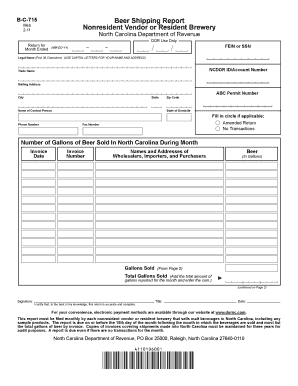
Acters) (USE CAPITAL LETTERS FOR YOUR NAME AND ADDRESS) NCDOR ID/Account Number Trade Name Mailing Address ABC Permit Number City State Name of Contact Person Zip Code State of Domicile Fill in circle if applicable: Phone Number Amended Return No Transactions Fax Number Number of Gallons of Beer Sold In North Carolina During Month Invoice Date Invoice Number Names and Addresses of Wholesalers, Importers, and Purchasers Gallons Sold Beer (In Gallons) (From Page 2) Total Gallons.
Open form follow the instructions
Easily sign the form with your finger
Send filled & signed form or save
How to fill out the NC B-C-715 online
The NC B-C-715 form is essential for nonresident vendors and resident breweries to report their beer sales in North Carolina. This guide will help you navigate through the online completion of this form step-by-step, ensuring accuracy in your submissions.
Follow the steps to complete the NC B-C-715 form online.
- Click ‘Get Form’ button to obtain the form and open it in the editor.
- Start by filling in the 'Return for Month Ended' section, entering the date in MM-DD-YY format.
- Provide your Federal Employer Identification Number (FEIN) or Social Security Number (SSN) in the designated field.
- Input your legal name using only capital letters, ensuring it fits within the first 35 characters of the space provided.
- Enter your North Carolina Department of Revenue (NCDOR) ID or account number accurately.
- Fill in your trade name and mailing address including city, state, and zip code.
- Enter your ABC permit number, followed by your contact person's name and phone number.
- Indicate your state of domicile and select the applicable circles for 'Amended Return' or 'No Transactions' if necessary.
- Report the number of gallons of beer sold in North Carolina during the month. Include details of invoice dates, invoice numbers, names, and addresses of wholesalers or purchasers alongside the gallons sold.
- Sum the gallons sold on this page and enter that total on Page 1 in the 'Total Gallons Sold' section.
- Finally, provide your signature, title, and date in the appropriate fields to certify the accuracy of your report.
- After completing the form, you can save your changes, download, print, or share the finished document.
Complete your NC B-C-715 form online today for a hassle-free reporting process.
Experience a faster way to fill out and sign forms on the web. Access the most extensive library of templates available.
Related content
ORDER AND OPINION ON TRAVELERS PROPERTY CASUALTY COMPANY OF AMERICA'S MOTIONS TO DISMISS...
by G Day · Cited by 11 — ABSTRACT. Over the past two decades, almost half of all states...
Get answers to your most pressing questions about US Legal Forms API.
What are the two basic forms you need to file your taxes?
The two basic forms you typically need to file your taxes in North Carolina are Form D-400 and possibly Form NC B-C-715, depending on your income situation. The D-400 is for individual income tax, while the B-C-715 serves businesses. Choosing the correct forms is crucial for an accurate and timely filing.
What form do I need to file NC state taxes?
For filing NC state taxes, you primarily need Form D-400. However, if you have special circumstances such as business income, you might also need to file the NC B-C-715 form. Ensure you read the instructions carefully to choose the correct forms for your situation.
Do I need to file a NC extension?
If you require more time to file your NC state taxes, you should file an extension using Form D-410. This allows you to get an additional six months to complete your return, which may include the NC B-C-715. Remember, filing for an extension does not extend the deadline for any tax payments due.
Can you file NC BR online?
Indeed, you can file the Business Registration application (NC BR) online through the North Carolina Secretary of State's website. Utilizing the NC B-C-715 form in conjunction with your online application ensures that your business is registered without hassle. This convenience streamlines the registration process for entrepreneurs and business owners.
How to file an amended sales tax return in North Carolina?
To file an amended sales tax return in North Carolina, you need to complete the appropriate form for amendments. The form typically used is the NC B-C-715, which allows adjustments to previously reported amounts. Make sure to submit your amended return to ensure compliance and avoid penalties.
Can NC state taxes be filed electronically?
Yes, North Carolina allows taxpayers to file state taxes electronically. You can use approved software or services that support the NC B-C-715 form for electronic filing. This method is often faster and can help you receive your refund more quickly.
What form do I use to file NC state taxes?
In North Carolina, the main form for state tax filing is the D-400. If you have business income or specific tax situations, you may also use associated forms like the NC B-C-715. It is essential to complete the correct form to ensure accurate processing of your state taxes.
What tax form do I use for state refund?
To request a state refund in North Carolina, you typically need to use Form D-400. This form allows you to claim your refund for any overpaid state taxes. If you filed your original taxes using the NC B-C-715 form, make sure to reference that in your refund request.
How do I pay quarterly taxes online?
Sign up for the Electronic Federal Tax Payment System, or EFTPS. The system allows anyone to pay taxes they owe. ... Pay online via the IRS at www.irs.gov/payments. Pay using debit or credit card. Remit a check or money order using estimated tax payment voucher.
How do I pay my NC State Income Tax?
Select 'File & Pay'. Scroll down to the 'Commonly Filed Taxes' section. Select the type of tax you are paying ... Complete your contact information, click next. Complete your tax payment information, click next. Select your payment method, Debit/Credit or Bank Draft.
Use professional pre-built templates to fill in and sign documents online faster. Get access to thousands of forms.
If you believe that this page should be taken down, please follow our DMCA take down process here.
This form is available in several versions. Select the version you need from the drop-down list below.