Loading
Form preview
  • US Legal Forms
  • Other Templates
  • Tax Forms
  • South Carolina Tax Forms
  • Sc Dor St-385 2003

Get Sc Dor St-385 2003

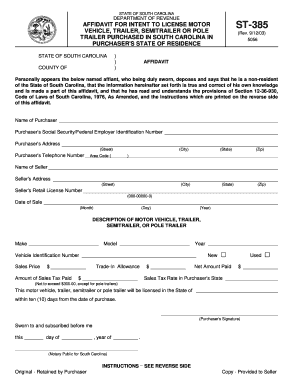
ENCE STATE OF SOUTH CAROLINA COUNTY OF ) ) ) (Rev. 9/12/03) 5056 AFFIDAVIT Personally appears the below named affiant, who being duly sworn, deposes and says that he is a non-resident of the State of South Carolina, that the information hereinafter set forth is true and correct of his own knowledge and is made a part of this affidavit, and that he has read and understands the provisions of Section 12-36-930, Code of Laws of South Carolina, 1976, As Amended, and the instructions which are pri.

How it works

  1. Open form

    Open form follow the instructions

  2. Easily sign form

    Easily sign the form with your finger

  3. Share form

    Send filled & signed form or save

How to fill out the SC DoR ST-385 online

The SC DoR ST-385 is a necessary affidavit for individuals purchasing a motor vehicle, trailer, semitrailer, or pole trailer in South Carolina. This guide provides clear, step-by-step instructions on how to complete this form online, ensuring you understand each component and requirement.

Follow the steps to complete the SC DoR ST-385 affidavit online.

  1. Click ‘Get Form’ button to begin the process and access the form in an editable format.
  2. In the section labeled 'Name of Purchaser', input the full name of the individual or entity purchasing the vehicle.
  3. Next, provide the 'Purchaser's Social Security/Federal Employer Identification Number'. This is vital for identification and tax purposes.
  4. Fill in 'Purchaser's Address' by entering the street address, including city, state, and zip code.
  5. Enter the 'Purchaser's Telephone Number' including the area code.
  6. In the 'Name of Seller' field, input the full name of the individual or entity selling the vehicle.
  7. Complete the 'Seller's Address' with the street address, city, state, and zip code.
  8. Provide the 'Seller's Retail License Number' in the specified format.
  9. Indicate the 'Date of Sale' by selecting or entering the month, day, and year of the transaction.
  10. For the 'Description of Motor Vehicle, Trailer, Semitrailer, or Pole Trailer', fill in the make, model, year, and Vehicle Identification Number (VIN) of the item being purchased.
  11. Input the 'Sales Price' of the vehicle followed by the 'Amount of Sales Tax Paid'.
  12. If applicable, enter the 'Trade-In Allowance' if you traded in an old vehicle.
  13. Calculate and input the 'Net Amount Paid' by subtracting any trade-in allowance from the sales price.
  14. Specify the 'Sales Tax Rate in Purchaser's State', ensuring that it does not exceed $300.00 for the specified vehicle types.
  15. Affirm that the vehicle will be licensed in your state within ten days by signing the form in the designated area for 'Purchaser's Signature'.
  16. Finally, ensure there are no missed fields and review the information. Once confirmed, you can save the changes, download, print, or share the completed form with relevant parties.

Complete your documentation process online for a seamless experience.

Get form

Experience a faster way to fill out and sign forms on the web. Access the most extensive library of templates available.

Related content

ST-385 - SC Department of Revenue
Jun 28, 2017 — A copy of this affidavit must be retained by the seller to support any...
Learn more
Sales & Use Tax Seminar Manual
by S Carolina · 2011 — retain a completed and notarized copy of Form ST-385. The...
Learn more
e-SUS Atenção Básica MANUAL DE USO DO SISTEMA...
O e-SUS AB é uma estratégia do Departamento de Atenção Básica (DAB) para reestruturar...
Learn more

Related links form

KS K-47 2019 KS DoR CT-10U 2019 KS DoR IA-81 2018 KY DoR 5695–K 2015

Questions & Answers

Get answers to your most pressing questions about US Legal Forms API.

Contact support

To obtain a SC sales tax number, begin the process by visiting the South Carolina Department of Revenue website. You will need to complete relevant forms, including the SC DoR ST-385, to apply for the number. This number is essential for conducting any taxable sales in the state. For a more convenient solution, consider leveraging US Legal Forms to access all the necessary documents and steps.

Acquiring your exemption certificate in South Carolina starts with filling out the SC DoR ST-385 form correctly. Ensure that you provide all necessary details and documents to validate your request. After your application is submitted, you will receive your certificate from the appropriate authorities. Make the process easier by turning to US Legal Forms for clear directions and form access.

To be recognized as a tax-exempt individual in South Carolina, you must meet specific criteria outlined by the SC DoR. Typically, this includes being a charitable organization, a certain type of government body, or having special circumstances. Review these qualifications carefully using the SC DoR guidelines. For more thorough insights, check out US Legal Forms for detailed information.

To obtain a SC tax exemption certificate, you need to successfully complete the SC DoR ST-385 form. Make sure you remain accurate and thorough in your disclosures. After submission, await approval from the South Carolina Department of Revenue. Additionally, US Legal Forms provides a comprehensive platform to assist you in this process.

Applying for a South Carolina property tax exemption involves completing the SC DoR ST-385 form. You will need to provide information about your property and your eligibility for the exemption. Once filled, submit the application to your local tax office. For a smoother experience, consider visiting US Legal Forms to access essential forms and guidelines.

Filling out the ST-3 form is quite straightforward. First, gather all necessary information regarding your exemption status and transactions. Be sure to follow the guidelines provided by the SC DoR when completing the form. For easier completion, you can use resources from US Legal Forms to guide you step by step.

To obtain a tax exemption certificate in South Carolina, you need to complete the SC DoR ST-385 form. This form allows you to declare your eligibility for tax exemptions. After filling it out, submit it to the appropriate tax authority in your county. If you need help navigating the process, consider using US Legal Forms for clear instructions and assistance.

Qualifying for property tax exemption in South Carolina generally includes homeowners who are at least 65 years old, individuals who are permanently disabled, or those meeting specific income criteria. It's essential to ensure all documentation is in order when filing. The SC DoR ST-385 can be instrumental in demonstrating eligibility. Additionally, uslegalforms offers resources to guide you through the exemption process.

Sales tax exemptions in South Carolina typically apply to certain organizations, such as nonprofit entities and government agencies, as well as transactions involving specific goods. Healthcare-related services and some utilities might also qualify for exemption. To understand the nuances of these exemptions, the SC DoR ST-385 can be a valuable tool. For a detailed outline of who qualifies, consider accessing the resources on the uslegalforms platform.

You can apply for a property tax exemption in South Carolina by completing the required application forms, which vary depending on the type of exemption sought. The SC DoR ST-385 is crucial for owner-occupied residences, helping ensure smooth processing of your request. Submit your application to your local tax authority, and for comprehensive assistance, explore what uslegalforms has to offer.

Get This Form Now!

Use professional pre-built templates to fill in and sign documents online faster. Get access to thousands of forms.
If you believe that this page should be taken down, please follow our DMCA take down processhere.
Get SC DoR ST-385
  • Adoption
  • Bankruptcy
  • Contractors
  • Divorce
  • Home Sales
  • Employment
  • Identity Theft
  • Incorporation
  • Landlord Tenant
  • Living Trust
  • Name Change
  • Personal Planning
  • Small Business
  • Wills & Estates
  • Packages A-Z
  • Affidavits
  • Bankruptcy
  • Bill of Sale
  • Corporate - LLC
  • Divorce
  • Employment
  • Identity Theft
  • Internet Technology
  • Landlord Tenant
  • Living Wills
  • Name Change
  • Power of Attorney
  • Real Estate
  • Small Estates
  • Wills
  • All Forms
  • Forms A-Z
  • Other Templates
  • Legal Hub
  • About Us
  • Help Portal
  • Legal Resources
  • Blog
  • Affiliates
  • Contact Us
  • Delete My Account
  • Site Map
  • Industries
  • Forms in Spanish
  • Localized Forms
  • State-specific Forms
  • Forms Kit
  • Real Estate Handbook
  • All Guides
  • Notarize
  • Incorporation services
  • For Consumers
  • For Small Business
  • For Attorneys
  • USLegal
  • FormsPass
  • pdfFiller
  • signNow
  • altaFlow
  • DocHub
  • Instapage
Form Packages
  • Adoption
  • Bankruptcy
  • Contractors
  • Divorce
  • Home Sales
  • Employment
  • Identity Theft
  • Incorporation
  • Landlord Tenant
  • Living Trust
  • Name Change
  • Personal Planning
  • Small Business
  • Wills & Estates
  • Packages A-Z
Form Categories
  • Affidavits
  • Bankruptcy
  • Bill of Sale
  • Corporate - LLC
  • Divorce
  • Employment
  • Identity Theft
  • Internet Technology
  • Landlord Tenant
  • Living Wills
  • Name Change
  • Power of Attorney
  • Real Estate
  • Small Estates
  • Wills
  • All Forms
  • Forms A-Z
  • Other Templates
Customer Service
  • Legal Hub
  • About Us
  • Help Portal
  • Legal Resources
  • Blog
  • Affiliates
  • Contact Us
  • Delete My Account
  • Site Map
  • Industries
  • Forms in Spanish
  • Localized Forms
  • State-specific Forms
  • Forms Kit
Legal Guides
  • Real Estate Handbook
  • All Guides
Prepared for you
  • Notarize
  • Incorporation services
Our Customers
  • For Consumers
  • For Small Business
  • For Attorneys
Our Sites
  • USLegal
  • FormsPass
  • pdfFiller
  • signNow
  • altaFlow
  • DocHub
  • Instapage
Social Media
Call us now toll free:
+1 833 426 79 33
As seen in:
© Copyright 1999-2026 airSlate Legal Forms, Inc. 17 Station Street, Suite 303, Brookline, MA 02445
  • Your Privacy Choices
  • Terms of Service
  • Privacy Notice
  • Content Takedown Policy
  • Bug Bounty Program
SC DoR ST-385
This form is available in several versions.
Select the version you need from the drop-down list below.
2017 SC DoR ST-385
Select form
  • 2017 SC DoR ST-385
  • 2008 SC DoR ST-385
  • 2003 SC DoR ST-385
Select form