Loading
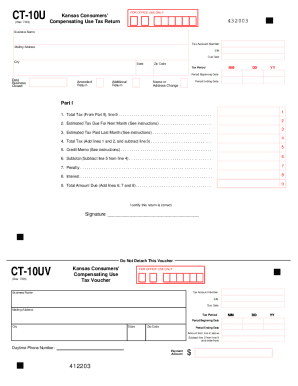
Get Ks Dor Ct-10u 2019-2026
How it works
-

Open form follow the instructions
-

Easily sign the form with your finger
-

Send filled & signed form or save
How to fill out the KS DoR CT-10U online
Completing the KS DoR CT-10U online is essential for reporting your compensating use tax efficiently. This guide offers step-by-step instructions tailored for users of all experience levels, ensuring a smooth filing process.
Follow the steps to fill out the KS DoR CT-10U online accurately.
- Click ‘Get Form’ button to obtain the KS DoR CT-10U form and open it in your preferred document editor.
- Begin with Part II, where you will enter the relevant tax information for each jurisdiction. Fill out the city or county name, jurisdiction code, total amount of taxable purchases, tax rate, and any taxes paid to another state.
- Once Part II is completed, proceed to Part I. Enter the total tax from line 9 of Part II onto line 1 of Part I.
- If your filing frequency is prepaid monthly, fill in lines 2 and 3 with the estimated tax due and the estimated tax paid from the last month, respectively. For non-prepaid filers, skip these lines.
- Proceed to line 4, where you will add lines 1 and 2 and then subtract line 3.
- On line 5, enter any credit memorandum amounts issued by the Department of Revenue, if applicable.
- Subtract line 5 from line 4 to compute the total on line 6.
- If this is a late return, include penalties and interest on lines 7 and 8, respectively.
- Finally, add lines 6, 7, and 8 to determine the total amount due, which you will enter on line 9.
- After completing the form, ensure to save your changes, and consider downloading or printing your completed return for your records.
Complete your documents online for a more efficient tax reporting experience.
Groceries are slightly cheaper in Kansas following a food sales tax cut that went into effect Jan. 1, but you may still have questions about how much you're paying. The cut lowers the sales tax rate on many food items from 6.5% to 4%.