We use cookies to improve security, personalize the user experience, enhance our marketing activities (including cooperating with our marketing partners) and for other business use.
Click "here" to read our Cookie Policy. By clicking "Accept" you agree to the use of cookies. Read less
Read more
Accept
Loading
Form preview
  • US Legal Forms
  • Form Library
  • Tax Forms
  • South Carolina Tax Forms
  • Sc Dor Sc8453 2007

Get Sc Dor Sc8453 2007

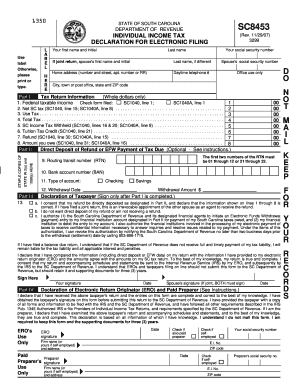
Eturn, I understand that if the SC Department of Revenue does not receive full and timely payment of my tax liability, I will remain liable for the tax liability and all applicable interest and penalties. I declare that I have compared the information (including direct deposit or EFW data) on my return with the information I have provided to my electronic return originator (ERO) and the amounts agree with the amounts on my SC tax return. To the best of my knowledge, my return is true and complet.

How it works

  1. Open form

    Open form follow the instructions

  2. Easily sign form

    Easily sign the form with your finger

  3. Share form

    Send filled & signed form or save

How to fill out the SC DoR SC8453 online

Filling out the SC DoR SC8453 form online is an essential step in submitting your individual income tax return electronically. This guide provides a detailed, step-by-step approach to ensure that you complete the form accurately and efficiently.

Follow the steps to successfully complete the SC DoR SC8453 form.

  1. Click ‘Get Form’ button to access the SC DoR SC8453 form and open it in your preferred online environment.
  2. Enter your first name and initial, followed by your last name in the designated fields. Include your social security number to ensure accurate identification.
  3. If filing a joint return, provide your spouse's first name and initial, last name (if different), and their social security number as instructed.
  4. Fill in your home address, including the street number, apartment number (if applicable), city, state, and ZIP code.
  5. Provide a daytime telephone number for any inquiries regarding your submission.
  6. In Part I, enter the federal taxable income from your SC1040 or SC1040A. Fill in the required amounts for net SC tax, use tax, total tax, SC income tax withheld, and tuition tax credit, ensuring accuracy in whole dollar amounts only.
  7. Indicate whether you wish to opt for direct deposit for your refund or authorize an electronic funds withdrawal for tax payments by filling in the appropriate fields in Part II. Provide your bank account number and select the account type (checking or savings).
  8. For the withdrawal date, enter the exact date you wish the transaction to occur. Remember, this date cannot exceed the stipulated deadline to avoid penalties.
  9. Review your entries carefully and ensure they are correct. In Part III, you must indicate your preferences for direct deposit or EFW and sign where required.
  10. If applicable, have your spouse sign as well if filing jointly. Next, complete the section for the electronic return originator (ERO) and ensure their signature and details are filled where necessary.
  11. Once all information is accurately entered, save changes, and download or print your completed form as needed for your records.

Complete your SC DoR SC8453 form online today to ensure timely and efficient processing of your tax return!

Get form

Experience a faster way to fill out and sign forms on the web. Access the most extensive library of templates available.

Related content

SC8453
The quickest, easiest way to pay is using our free online tax portal, MyDORWAY, at...
Learn more

Related links form

MN DoR Schedule M1M 2020 MN M15NP Additional Charge For Underpayment Of Estimated Tax 2019 MN DoR Schedule M1ED K–12 Education Credit 2020 MN DoR Schedule M1MA 2020

Questions & Answers

Get answers to your most pressing questions about US Legal Forms API.

Contact support

To obtain a South Carolina sales tax exemption certificate, you must fill out the appropriate form provided by the SC Department of Revenue. The certificate requires specific information, including your business details and reason for exemption. Once completed, submit it as instructed to the SC DoR SC8453 address. USLegalForms can help you with the forms and provide clarity on the process.

You should mail your South Carolina estimated tax payments to the address specified on the payment voucher. This will generally be the SC DoR SC8453 address. Always check that your payment is made out correctly and includes your identifier to avoid delays. USLegalForms can assist in generating the correct payment voucher for your needs.

To send tax documents by mail, securely package your documents and include a cover letter if necessary. Use a reliable method to ensure they reach the appropriate SC DoR SC8453 address on time. It’s wise to send important documents via certified mail to track delivery and obtain confirmation. For help preparing your documents, USLegalForms can provide necessary templates.

You should send your South Carolina state taxes to the address listed on your tax forms or notices. Most often, this is also the SC DoR SC8453 address. Be sure to include any relevant identification details to prevent delays. For added assurance, consider using USLegalForms to guide you through the mailing process.

To mail your South Carolina state tax return, use the address indicated on the return form. This is often the SC DoR SC8453 address. Make sure to review your return for accuracy before mailing, as any mistakes could delay processing. If you prefer assistance, USLegalForms provides templates and guidance to ensure your return is filed properly.

Yes, you can file your South Carolina taxes online. The South Carolina Department of Revenue offers an online filing option, making the process quick and easy. Just visit the official SC DoR website and follow the instructions provided. Using USLegalForms can also simplify the filing process, ensuring you submit your SC DoR SC8453 correctly.

You can send your tax check to the address provided on your tax bill or notice from the South Carolina Department of Revenue. Typically, this is the SC DoR SC8453 mailing address. It is important to ensure that your check is made out correctly and includes your taxpayer identification number on the memo line. For added convenience, consider using USLegalForms to help you create the necessary forms.

Yes, the SC Department of Revenue has the authority to garnish wages if taxes remain unpaid or if there is a significant tax debt. This means a portion of your earnings can be withheld directly from your paycheck to satisfy your tax obligations. If you face this situation, it is advisable to communicate with the SC DoR and seek assistance to explore options that may be available to you.

To track your SC state refund, you can visit the SC Department of Revenue's website and use their online tracking tool. You will typically need your Social Security number and the exact amount of your refund. By checking the status regularly, you can stay informed and manage any follow-up actions necessary for the SC DoR SC8453 process.

The Department of Revenue might send you a letter to notify you about tax assessments, changes to your tax filings, or even penalties for non-compliance. Understanding these communications can help you take the necessary actions to resolve any issues quickly. If you need assistance interpreting the letter or responding, consider using a platform like US Legal Forms for guidance.

Get This Form Now!

Use professional pre-built templates to fill in and sign documents online faster. Get access to thousands of forms.
If you believe that this page should be taken down, please follow our DMCA take down processhere.

Industry-leading security and compliance

US Legal Forms protects your data by complying with industry-specific security standards.
  • In businnes since 1997
    25+ years providing professional legal documents.
  • Accredited business
    Guarantees that a business meets BBB accreditation standards in the US and Canada.
  • Secured by Braintree
    Validated Level 1 PCI DSS compliant payment gateway that accepts most major credit and debit card brands from across the globe.
Get SC DoR SC8453
Form Packages
Adoption
Bankruptcy
Contractors
Divorce
Home Sales
Employment
Identity Theft
Incorporation
Landlord Tenant
Living Trust
Name Change
Personal Planning
Small Business
Wills & Estates
Packages A-Z
Form Categories
Affidavits
Bankruptcy
Bill of Sale
Corporate - LLC
Divorce
Employment
Identity Theft
Internet Technology
Landlord Tenant
Living Wills
Name Change
Power of Attorney
Real Estate
Small Estates
Wills
All Forms
Forms A-Z
Form Library
Customer Service
Terms of Service
Privacy Notice
Legal Hub
Content Takedown Policy
Bug Bounty Program
About Us
Help Portal
Legal Resources
Blog
Affiliates
Contact Us
Delete My Account
Site Map
Industries
Forms in Spanish
Localized Forms
State-specific Forms
Forms Kit
Legal Guides
Real Estate Handbook
All Guides
Prepared for You
Notarize
Incorporation services
Our Customers
For Consumers
For Small Business
For Attorneys
Our Sites
US Legal Forms
USLegal
FormsPass
pdfFiller
signNow
airSlate WorkFlow
DocHub
Instapage
Social Media
Call us now toll free:
+1 833 426 79 33
As seen in:
  • USA Today logo picture
  • CBC News logo picture
  • LA Times logo picture
  • The Washington Post logo picture
  • AP logo picture
  • Forbes logo picture
© Copyright 1997-2025
airSlate Legal Forms, Inc.
3720 Flowood Dr, Flowood, Mississippi 39232
Form Packages
Adoption
Bankruptcy
Contractors
Divorce
Home Sales
Employment
Identity Theft
Incorporation
Landlord Tenant
Living Trust
Name Change
Personal Planning
Small Business
Wills & Estates
Packages A-Z
Form Categories
Affidavits
Bankruptcy
Bill of Sale
Corporate - LLC
Divorce
Employment
Identity Theft
Internet Technology
Landlord Tenant
Living Wills
Name Change
Power of Attorney
Real Estate
Small Estates
Wills
All Forms
Forms A-Z
Form Library
Customer Service
Terms of Service
Privacy Notice
Legal Hub
Content Takedown Policy
Bug Bounty Program
About Us
Help Portal
Legal Resources
Blog
Affiliates
Contact Us
Delete My Account
Site Map
Industries
Forms in Spanish
Localized Forms
State-specific Forms
Forms Kit
Legal Guides
Real Estate Handbook
All Guides
Prepared for You
Notarize
Incorporation services
Our Customers
For Consumers
For Small Business
For Attorneys
Our Sites
US Legal Forms
USLegal
FormsPass
pdfFiller
signNow
airSlate WorkFlow
DocHub
Instapage
Social Media
Call us now toll free:
+1 833 426 79 33
As seen in:
  • USA Today logo picture
  • CBC News logo picture
  • LA Times logo picture
  • The Washington Post logo picture
  • AP logo picture
  • Forbes logo picture
© Copyright 1997-2025
airSlate Legal Forms, Inc.
3720 Flowood Dr, Flowood, Mississippi 39232
SC DoR SC8453
This form is available in several versions.
Select the version you need from the drop-down list below.
2021 SC DoR SC8453
Select form
  • 2021 SC DoR SC8453
  • 2015 SC DoR SC8453
  • 2014 SC DoR SC8453
  • 2007 SC DoR SC8453
  • 2004 SC DoR SC8453
Select form