Loading
Get Mn Dor Schedule M1ed K–12 Education Credit 2020-2025
How it works
-

Open form follow the instructions
-

Easily sign the form with your finger
-

Send filled & signed form or save
How to fill out the MN DoR Schedule M1ED K–12 Education Credit online
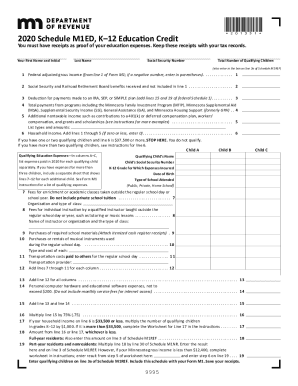
Filling out the MN DoR Schedule M1ED K–12 Education Credit can be a straightforward process if you follow the right steps. This guide will provide a comprehensive walkthrough of the components of the form, ensuring you accurately report your education-related expenses for K-12 children.
Follow the steps to complete your Schedule M1ED form online effectively.
- Click ‘Get Form’ button to obtain the form and open it in your preferred editing tool.
- Enter your first name and initial, last name, and social security number in the designated fields.
- Indicate the total number of qualifying children by entering the number in the appropriate field.
- Fill in your federal adjusted gross income from line 1 of Form M1, noting to enter negative amounts in parentheses.
- Report any social security and railroad retirement board benefits received that are not included in line 1.
- Document any deductions for payments made to an IRA, SEP, or SIMPLE plan as shown in your federal documentation.
- List total payments from relevant programs that you or your family benefited from.
- Enter other non-taxable income that you received, specifying the types and amounts in the provided section.
- Add lines 1 through 5 together to calculate and display your household income.
- Check eligibility criteria based on your household income and number of qualifying children, noting the thresholds provided.
- For each qualifying child, enter their name, social security number, K-12 grade, date of birth, and school type.
- Itemize qualifying education expenses for each child in the designated fields, including details for classes and supplies.
- Sum the total qualifying expenses from applicable lines and enter this amount.
- Multiply total expenses by 75% and follow any additional calculations as instructed based on your financial status.
- Complete any necessary worksheets for specific income thresholds and deductions, ensuring accuracy.
- Finalize by entering the qualifying amount on the appropriate line and attaching any required schedules.
- Save your changes, download, print, or share the completed form as needed.
Complete your MN DoR Schedule M1ED K–12 Education Credit online today!
Be pursuing a degree or other recognized education credential. Have qualified education expenses at an eligible educational institution. Be enrolled at least half time for at least one academic period* beginning in the tax year. Not have finished the first four years of higher education at the beginning of the tax year.
Industry-leading security and compliance
US Legal Forms protects your data by complying with industry-specific security standards.
-
In businnes since 199725+ years providing professional legal documents.
-
Accredited businessGuarantees that a business meets BBB accreditation standards in the US and Canada.
-
Secured by BraintreeValidated Level 1 PCI DSS compliant payment gateway that accepts most major credit and debit card brands from across the globe.