Loading
Get Ut Tc-69c 2015
How it works
-

Open form follow the instructions
-

Easily sign the form with your finger
-

Send filled & signed form or save
How to fill out the UT TC-69C online
Filling out the UT TC-69C form is essential for maintaining accurate business and tax account information in Utah. This guide provides step-by-step instructions to help users effectively complete the form online, ensuring that all necessary details are included.
Follow the steps to successfully complete the UT TC-69C form.
- Click ‘Get Form’ button to obtain the form and open it in the editor.
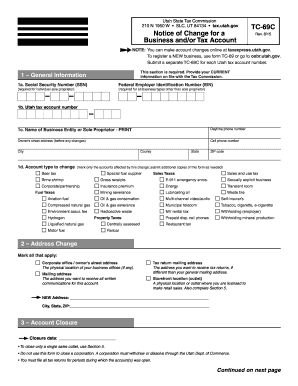
- Begin by filling out the general information section. Provide your current tax account information, including your social security number or federal employer identification number, tax account number, and the name of the business entity or sole proprietor. Additionally, include your daytime and cell phone numbers, as well as your street address before any changes.
- Indicate the account type to change by marking the appropriate checkboxes. Ensure you select all accounts affected by this change. If more than one TC-69C is needed, submit a separate form for additional accounts.
- In the address change section, mark all addresses that apply to the changes being made, including the corporate office, tax return mailing address, and physical location of business offices if applicable. Clearly state the new address provided.
- If closing an account, fill in the closure date in the designated area. Note that this form is not for closing a corporation, which requires different procedures.
- For outlet changes, document any adjustments to existing outlets by providing the current physical address and indicating whether you are closing or changing details for a sales tax outlet, transient room outlet, or cigarette/tobacco outlet. Include closure dates and outlet numbers where necessary.
- Finally, ensure the form is signed in the authorized signature section. The form will be rejected without a signature. After signing, save your changes, and consider downloading or printing a copy for your records.
Complete the UT TC-69C form online to ensure your tax information is current and accurate.
Get form
Experience a faster way to fill out and sign forms on the web. Access the most extensive library of templates available.
To obtain a Utah withholding account number, complete the TC-69C form, which registers you for withholding tax. Once your application is processed by the Utah State Tax Commission, you will receive your account number via mail. This number is essential for all your withholding tax obligations as an employer.
Get This Form Now!
Use professional pre-built templates to fill in and sign documents online faster. Get access to thousands of forms.