Loading
Get Ny Dtf It-2104-sny 2022
How it works
-

Open form follow the instructions
-

Easily sign the form with your finger
-

Send filled & signed form or save
How to fill out the NY DTF IT-2104-SNY online
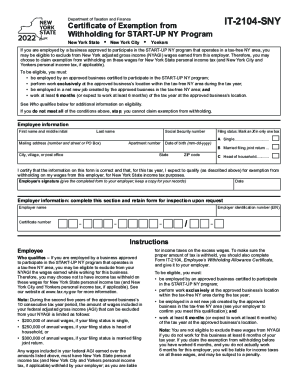
Filling out the NY DTF IT-2104-SNY form correctly is crucial for employees participating in the START-UP NY program to claim exemption from withholding. This guide provides you with step-by-step instructions to help you complete the form with ease.
Follow the steps to accurately complete the NY DTF IT-2104-SNY form.
- Click ‘Get Form’ button to access the form and open it in your preferred online format.
- Begin by entering your personal information in the designated fields: first name and middle initial, last name, mailing address (street number or P.O. Box), city, state, ZIP code, and apartment number if applicable.
- Provide your social security number in the specified field. Ensure that this information is accurate to avoid any issues with processing.
- Indicate your date of birth in the format mm-dd-yyyy to confirm your identity.
- Select your filing status by marking an X in the appropriate box: Single, Married filing joint return, or Head of household. Only select one option.
- Read the certification statement carefully. Confirm that the information provided is correct and that you expect to qualify for exemption from withholding for the current tax year.
- Sign and date the form to validate your claim. Remember to provide the completed form to your employer and retain a copy for your records.
- In the employer information section, fill out the employer's name, certificate number, and employer identification number (EIN) as required.
- Once all fields have been filled out, review the form for accuracy before submitting it to your employer. You can then save changes, download, or print the form as necessary.
Complete your NY DTF IT-2104-SNY form online today to ensure you receive the maximum tax benefits available.
Get form
Experience a faster way to fill out and sign forms on the web. Access the most extensive library of templates available.
By placing a “0” on line 5, you are indicating that you want the most amount of tax taken out of your pay each pay period. If you wish to claim 1 for yourself instead, then less tax is taken out of your pay each pay period.
Get This Form Now!
Use professional pre-built templates to fill in and sign documents online faster. Get access to thousands of forms.