T if the following apply: l business is conducted at multiple locations. l Distinct and separate economic activities involving separate employees are performed at a single location. each activity may be treated as a separate establishment as long as separate reports can be prepared for the number of employees, wages and salaries, or sales and receipts. How to avoid delays in processing: l Review the registration form and accompanying sections to be sure that every item is complete. The preparer.
Loading

Open form follow the instructions

Easily sign the form with your finger

Send filled & signed form or save
How to fill out the PA PA-100 online
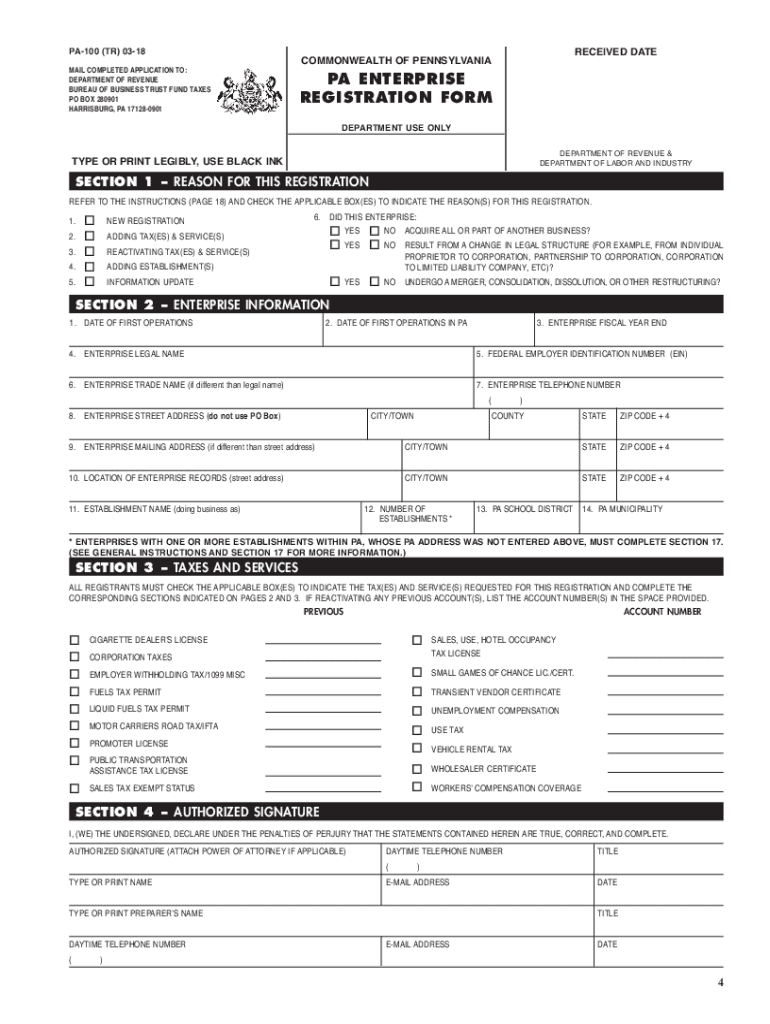
The Pennsylvania Enterprise Registration Form (PA-100) is essential for businesses to register for various taxes and services within Pennsylvania. This guide provides easy-to-follow instructions to complete the PA-100 online, ensuring you meet all registration requirements.
Follow the steps to complete the PA PA-100 online:
- Click ‘Get Form’ button to obtain the form and open it in the editor.
- Begin by selecting the reason for registration in Section 1. Indicate whether this is a new registration, an update, or a reactivation of services.
- Complete Section 2, where you will provide the enterprise information, including the date of operations, legal name, EIN, and addresses.
- In Section 3, check all applicable taxes and services needed for registration. Fill in any necessary previous account numbers if reactivating accounts.
- Section 4 requires an authorized signature. Include the name, title, and contact information of the signer who attests to the truthfulness of the information provided.
- Fill out Section 5 by checking the appropriate business structure and indicating if the enterprise is for-profit or non-profit.
- Provide details on owners, partners, and responsible parties in Section 6. Ensure to include their roles and ownership percentages.
- In Section 7, document the types of business activities conducted and their respective percentages that contribute to total receipts.
- Complete Sections 8 and 9 regarding sales information and employment information if applicable.
- If you are applying for any licenses (like sales tax or cigarette dealer’s license), complete the relevant sections (Sections 18, 19, 20, 21, 22).
- Finally, once all sections have been filled out completely and accurately, save your changes. You may then download, print, or share the form as needed.
Complete your PA PA-100 form online today to ensure your business is properly registered!
Experience a faster way to fill out and sign forms on the web. Access the most extensive library of templates available.
Related content
COMPLETE THIS SECTION IF THE REGISTERING ENTERPRISE IS WHOLLY OR PARTIALLY SUCCEEDING A...
Upon completion of this course the student will be able to: understand the roles played by...
The PA 100 is a four channel mixer/amplifier and speaker system featuring three inputs...
Get answers to your most pressing questions about US Legal Forms API.
What is the PA state withholding requirement?
The PA state withholding requirement mandates employers to withhold a flat rate of 3.07% from employees' wages. This withholding is a crucial part of ensuring that state tax obligations are met. When in doubt, refer to the PA PA-100 for accurate information on withholding requirements and practices.
What percentage should I use for tax withholding?
The percentage you should use for tax withholding depends on your income level and filing status. Generally, for Pennsylvania, a standard rate of 3.07% applies. By referring to your PA PA-100 documentation, you can ensure you're withholding the correct amount for state taxes.
What is the PA withholding rate?
The PA withholding rate is currently set at 3.07% for most employees. This rate applies to wages earned in Pennsylvania and is mandatory for employers to deduct from employees' paychecks. For more details on the PA PA-100, refer to the official guidelines or consult a tax professional.
What is a PA100 form?
The PA100 form, also known as the Pennsylvania Corporation Tax Report, is a document that businesses must file to report their income and calculate taxes. This form is crucial for compliance with state tax regulations. For accurate completion, refer to detailed instructions provided by the PA Department of Revenue regarding the PA PA-100.
What is the PA withholding tax rate?
The PA withholding tax rate is a flat rate imposed on wages earned within the state. For most employees, this rate is set at 3.07%. Employers should consult the latest PA PA-100 guidelines to ensure they withhold the correct amount from employee wages.
How do I track my PA state refund?
To track your PA state refund, visit the Pennsylvania Department of Revenue's website. You will need to provide your Social Security number, the exact amount of your refund, and your filing status. By using the PA PA-100 form information, you can easily check the status of your refund online.
How to file PA taxes on myPATH?
To file PA taxes on myPATH, start by visiting the myPATH website and logging in or creating an account. You will follow the step-by-step instructions to complete your tax return and submit it online. If you encounter any challenges, the US Legal Forms platform has guides available to assist you with your PA tax filing journey.
How do I file a PA tax return on myPATH?
Filing a PA tax return on myPATH involves creating an account on the myPATH website. After accessing your account, you can begin entering your information and submitting your tax return electronically. US Legal Forms provides valuable resources to ensure you complete this process smoothly and accurately.
Where do I file my property tax rebate in PA?
You can file your property tax rebate application through the Pennsylvania Department of Revenue. The application is typically submitted either online or by mail, depending on your preference. If you need assistance, the US Legal Forms platform offers helpful resources to guide you through this process.
How do I file PA sales tax?
To file PA sales tax, you must first obtain a Sales Tax License through the PA 100 form. You can then report and remit your sales tax using the Pennsylvania Department of Revenue's e-services. The US Legal Forms platform can help you navigate through the filing process effectively.
Use professional pre-built templates to fill in and sign documents online faster. Get access to thousands of forms.
If you believe that this page should be taken down, please follow our DMCA take down process here.