Loading
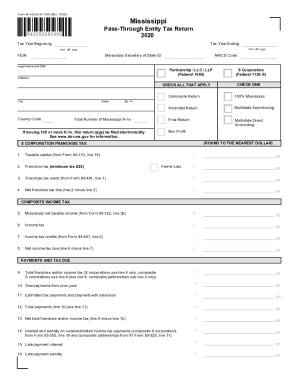
Get Ms 84-105 2020
How it works
-

Open form follow the instructions
-

Easily sign the form with your finger
-

Send filled & signed form or save
How to fill out the MS 84-105 online
Filing the MS 84-105, the pass-through entity tax return, can seem complex, but this guide will provide clear, step-by-step instructions to help you complete the form accurately online. Understanding each section and field is vital for ensuring compliance and proper tax reporting.
Follow the steps to complete the MS 84-105 form online effectively.
- Press the ‘Get Form’ button to access the form. This will open the document in your preferred online editor for completion.
- Begin by filling out the entity information section. Input the tax year starting and ending dates in the specified fields. Input your Federal Employer Identification Number (FEIN) and Mississippi Secretary of State ID as required.
- Complete the legal name and any doing-business-as (DBA) names. Indicate the type of entity by checking the appropriate boxes (e.g., partnership, LLC, or corporation). Also, provide the NAICS code that corresponds to your business activity.
- Fill in the address fields including state, city, county code, and ZIP + 4. Ensure the accuracy of this information as it is vital for processing.
- In the section for issuing Mississippi K-1s, indicate the total number. If issuing 100 or more, remember that this return must be filed electronically.
- Proceed to complete the franchise tax calculations. Enter figures for the franchise tax, credit, and net taxes due. Make sure to round to the nearest dollar where necessary.
- Move on to the composite income tax section. Input the Mississippi net taxable income and any income tax credits. Calculate the net income tax due.
- Finalize the payments and tax due section. Calculate any overpayments, late payments, and total balance due as directed.
- In Part I: Entity Information, provide details if this is a final return, if a federal election has been made, or if there are any audits involved. Fill in contact information for the return.
- In parts II and III, list all pass-through entities and disregarded entities, respectively. Ensure you provide accurate details for each entity.
- Once all sections are complete, review the form for accuracy. Save changes, download a copy, and decide whether to print or share the form as needed.
Take action now and fill out your MS 84-105 form online to ensure timely filing.
Get form
Experience a faster way to fill out and sign forms on the web. Access the most extensive library of templates available.
Related links form
Get This Form Now!
Use professional pre-built templates to fill in and sign documents online faster. Get access to thousands of forms.