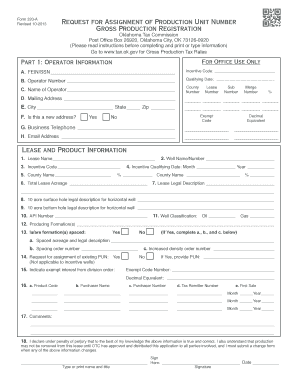
Get Ok Otc 320-a 2013
How it works
-

Open form follow the instructions
-

Easily sign the form with your finger
-

Send filled & signed form or save
How to fill out the OK OTC 320-A online
This guide provides comprehensive instructions for completing the OK OTC 320-A form online, ensuring that users understand each section and field. By following these detailed steps, users can confidently fill out the form and submit their requests accurately.
Follow the steps to complete the OK OTC 320-A form online.
- Click ‘Get Form’ button to obtain the form and open it in your editor.
- In Part 1, provide Operator Information. Fill in each field with the necessary details: FEIN or SSN, Operator Number, Name of Operator, and Mailing Address. Ensure you include the county number, lease number, sub number, and merge number if applicable.
- Continue in Part 1 by indicating whether this is a new address, filling in your business telephone number, and providing an email address.
- Moving to Lease and Product Information, start with Section 1. Enter the Lease Name, and then provide the Well Name and Number in the respective fields.
- For Incentive Code, choose the appropriate code from the options provided. Specify the Incentive Qualifying Date by indicating the month and year.
- Complete the county information section by listing the name of the county or counties involved in the lease and specifying the percentage held in each.
- Indicate the total lease acreage and provide a detailed legal description of the lease.
- If applicable, fill out the Surface Hole and Bottom Hole legal descriptions for horizontal wells. Ensure accuracy in section, township, and range.
- Enter the API Number and classify the well as Oil or Gas, based on the specified classification criteria.
- Detail any Producing Formation(s) and whether they are spaced. If they are, provide the required additional information.
- If requesting an assignment of an existing Production Unit Number (PUN), check the appropriate box and fill in any relevant details.
- For the exempt interest section, enter the exemption code and decimal equivalent if applicable.
- Complete the Product Information section by entering product codes, purchaser names, numbers, and tax remitter information, along with dates of first sales.
- In the comments section, provide any pertinent additional information.
- Finally, sign and date the form, entering your printed name and title. Review all information for accuracy before submission.
- After completing the form, users can save changes, download, print, or share the form as needed.
Complete your OK OTC 320-A form online today for efficient processing of your request.
Get form
Related links form
Settling your Oklahoma tax debt involves several steps, including contacting the Oklahoma Tax Commission to discuss payment options like installment agreements or lump-sum payments. Investigating programs such as the OK OTC 320-A can provide you with additional strategies for reducing and managing your tax liabilities effectively. Don't hesitate to reach out to professionals for assistance in navigating this process.