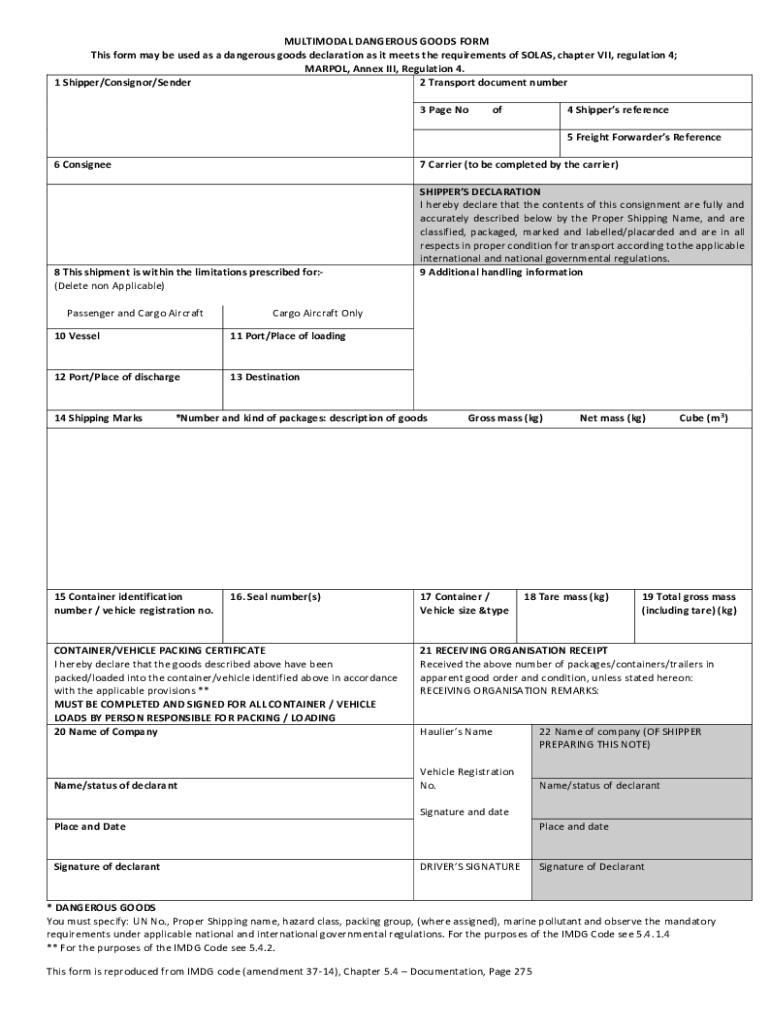
2 Transport document number 3 Page No of 4 Shipper s reference 5 Freight Forwarder s Reference 6 Consignee 7 Carrier (to be completed by the carrier) 8 This shipment is within the limitations prescribed for:(Delete non Applicable) Passenger and Cargo Aircraft Cargo Aircraft Only 10 Vessel 11 Port/Place of loading 12 Port/Place of discharge 13 Destination 14 Shipping Marks SHIPPER S DECLARATION I hereby declare that the contents of this consignment are fully and accurately desc.
Loading

Open form follow the instructions

Easily sign the form with your finger

Send filled & signed form or save
How to fill out the UK MCA0 online
The UK MCA0 form is essential for declaring dangerous goods in transportation. This guide will provide you with step-by-step instructions to fill out the form accurately and effectively, ensuring compliance with international regulations.
Follow the steps to complete the UK MCA0 form online.
- Press the ‘Get Form’ button to access the UK MCA0 form and open it in the document editor.
- Begin by filling in the 'Shipper/Consignor/Sender' section. Provide the name and contact details of the person or organization responsible for sending the shipment.
- Enter the 'Transport document number' which corresponds to the shipment for tracking purposes. Ensure this number is unique and correctly recorded.
- Specify the 'Page No' if applicable. Indicate which page of the form you are completing.
- Fill in the 'Shipper’s reference' with any internal tracking number or reference the shipper may use.
- Complete the 'Consignee' section with the name and contact information of the person or organization receiving the goods.
- The 'Carrier' section should be filled out by the carrier. Ensure all details are accurately recorded.
- Fill in the 'Vessel' details if applicable, providing the name of the vessel used for transportation.
- Indicate the 'Port/Place of loading', where the goods were loaded onto the transport vessel.
- Provide the 'Port/Place of discharge', where the goods will be unloaded.
- Mark the 'Destination' to clarify where the goods are headed.
- Include 'Shipping Marks' that identify the shipment, ensuring they are clear and legible.
- In the 'Shipper’s Declaration', certify that the contents of the consignment are correctly classified and comply with the necessary regulations.
- Clearly specify the number and type of packages, along with a description of the goods.
- Provide 'Container identification number / vehicle registration no.' for tracing the transport vehicle or container.
- Record any 'Seal number(s)' associated with the shipment, confirming the security of the package.
- In the 'Container/Vehicle Packing Certificate', declare that the goods have been packed according to the regulations.
- Fill in the 'Name of Company' and 'Name/status of declarant', ensuring the responsible individual is noted.
- Provide the 'Gross mass (kg)', 'Net mass (kg)', 'Tare mass (kg)', and 'Cube (m3)' to detail the weight and size of the shipment.
- For 'Total gross mass (including tare)(kg)', sum the total weight of the shipment.
- In the 'Receiving Organisation Receipt', indicate the number of packages/containers/trailers received and note any discrepancies.
- Include the 'Haulier’s Name' and 'Vehicle Registration No.' associated with the shipment.
- Finally, have the 'Signature and date' of the declarant, ensuring all required signatures are captured.
- Once all sections are completed, remember to save your changes, download, print, or share the completed form as needed.
Complete the UK MCA0 form online today for efficient management of dangerous goods transport.
Experience a faster way to fill out and sign forms on the web. Access the most extensive library of templates available.
Related content
The AWIA and the MCA were introduced to reform capacity law, and are ... A data extraction...
Available at www.scie.org.uk/ mca/ introduction/ mental-capacity-act-2005-at-a-glance...
Sony BMG Music Entertainment was an American record company owned as a 50–50 joint...
Use professional pre-built templates to fill in and sign documents online faster. Get access to thousands of forms.
If you believe that this page should be taken down, please follow our DMCA take down process here.