Loading
Get Uk B0222 2009-2026
How it works
-

Open form follow the instructions
-

Easily sign the form with your finger
-

Send filled & signed form or save
How to fill out the UK B0222 online
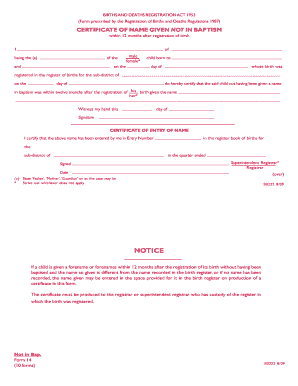
The UK B0222 form is essential for certifying the name given to a child when no name was provided during baptism. This guide offers clear and concise instructions on how to accurately complete the form online, ensuring a smooth experience for all users.
Follow the steps to successfully complete the form.
- Press the ‘Get Form’ button to access the UK B0222 document and open it in the online editor.
- Begin by filling in the full name of the child in the first field. Ensure the name matches any legal documentation where applicable.
- Indicate the gender of the child in the next section. Select 'male' or appropriate neutral terminology.
- In the following field, provide the names of both parents or guardians. Include the name of the partner or individual who is not a biological parent where necessary.
- Enter the date of birth in the specified format. Make sure the information corresponds with the birth register.
- Complete the section that states the details of the registered birth, including the sub-district and relevant dates.
- In the designated space, write the name that has been given to the child not in baptism. This must be written clearly to ensure correct entry.
- Sign and date the document at the bottom. Your signature verifies the accuracy of the information provided.
- After completing all sections, you can save your changes, download the document, or share it as needed.
Complete your documents online to ensure a hassle-free registration process.