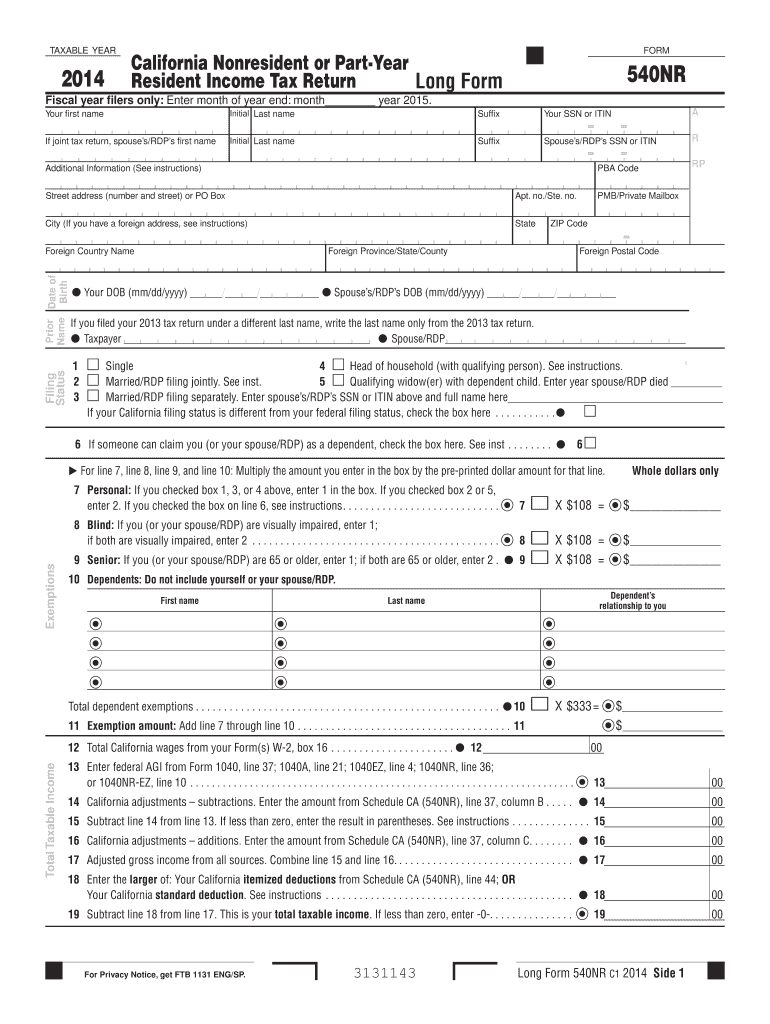
. . . . . . . . . . . . 11 X $333 $ $ 12 Total California wages from your Form(s) W-2, box 16 . . . . . . . . . . . . . . . . . . . . . . 12 Total Taxable Income RP PMB/Private Mailbox ZIP Code Foreign Province/State/County R 00 13 Enter federal AGI from Form 1040, line 37; 1040A, line 21; 1040EZ, line 4; 1040NR, line 36; or 1040NR-EZ, line 10 . . . . . . . . . . . . . . . . . . . . . . . . . . . . .
Loading

Open form follow the instructions

Easily sign the form with your finger

Send filled & signed form or save
How to fill out the CA FTB 540NR Long online
Filling out the CA FTB 540NR Long form can seem daunting, especially for those unfamiliar with tax documents. This guide provides clear and supportive instructions to help you navigate each section of the form effectively, ensuring that you can complete your California nonresident or part-year resident income tax return with confidence.
Follow the steps to fill out the CA FTB 540NR Long form online.
- Click ‘Get Form’ button to obtain the form and open it in the editor.
- Begin with your personal information. Enter your first name, initial, last name, and suffix in the designated fields. Provide your social security number (SSN) or individual tax identification number (ITIN). If filing jointly, include your partner’s information as well.
- Fill in your address, including the street address, apartment number (if applicable), city, state, and ZIP code. If you have a foreign address, refer to the instructions for the correct format.
- Indicate your filing status by checking the appropriate box. Options include single, married filing jointly, married filing separately, head of household, or qualifying widow(er). If someone can claim you or your partner as a dependent, make sure to check the corresponding box.
- For exemptions, enter the necessary information in lines 7 through 10. Indicate your personal exemptions based on your filing status and additional exemptions for being blind or a senior citizen, if applicable.
- Input your total California wages in line 12, and provide your federal adjusted gross income (AGI) in line 13. These figures will be essential for calculating your tax obligations.
- Continue completing the form by calculating lines 15 through 19, which detail your total taxable income, California adjustments, and deductions. Follow the instructions for entering amounts from the appropriate schedules.
- Proceed to calculate your tax on lines 31 through 42 based on your taxable income. Depending on your preference, you may use the tax table or rate schedule.
- Enter any credits you qualify for on lines 50 through 62. Check the instructions for details on various credits available to you.
- Finalize the document by reviewing your calculations in lines 81 through 104 to determine if you owe tax or if you will be receiving a refund. If you have any overpayments, complete the direct deposit section for your refund.
- Review the entire form, ensuring all fields are completed accurately. Save your changes and download, print, or share your completed form as needed.
Complete your CA FTB 540NR Long form online to ensure a smooth filing process.
Experience a faster way to fill out and sign forms on the web. Access the most extensive library of templates available.
Related content
For line 7, line 8, line 9, and line 10: Multiply the number you enter in the box by the...
Students or scholars who are considered nonresidents for California state tax filing will...
Get answers to your most pressing questions about US Legal Forms API.
What do I attach to 540NR?
When submitting your CA 540NR, you need to attach various documents, including copies of any W-2s, 1099 forms, and schedules that support your income and deduction claims. Additionally, if you are claiming any credits or specific deductions, include the corresponding documentation. Organizations like uslegalforms provide resources to ensure you have everything needed for a complete and compliant CA FTB 540NR Long submission.
How to amend CA 540NR?
To amend your CA 540NR, you must fill out a new 540NR form and indicate that it is an amended return. You should include all revised information and any additional documentation that supports your changes. Make sure to double-check your calculations and details before submission. If you need assistance, platforms like uslegalforms offer guidance tailored for filing or amending the CA FTB 540NR Long form.
Can you amend California tax return online?
You can amend your California tax return online, including any necessary modifications to form 540 or 540NR. Most tax software programs provide an option to amend your return swiftly. If you're dealing with the CA FTB 540NR Long form, look for specific guidelines in your chosen platform to ensure a smooth amendment process. This online feature significantly simplifies correcting past submissions.
Can I file ca 540NR online?
Yes, you can file CA 540NR online through various approved tax software and online platforms. Filing online often provides convenience, speed, and accuracy, which can alleviate some stress during tax season. Remember, utilizing tools that handle the CA FTB 540NR Long form will guide you through the necessary steps. Embrace this digital option to enhance your filing experience.
What is the 540NR long form?
The 540NR long form is a version of the California non-resident tax return specifically designed for individuals who earn income in California but live outside the state. This form allows for a detailed reporting of all income sourced within California, along with any applicable deductions. If you're a non-resident, using the CA FTB 540NR Long form is essential for accurate tax submission. It ensures you fulfill your obligations while potentially maximizing any deductions.
What is the difference between ca form 540 and 540NR?
The main difference between California form 540 and form 540NR lies in residency status. Form 540 is for California residents, while form 540NR is for non-residents and part-year residents. Understanding this distinction is crucial for compliance and accurate tax reporting. If you find yourself needing to file the CA FTB 540NR Long form, ensure you correctly identify your residency status to avoid mistakes.
Can form 540NR be filed electronically?
Yes, you can file form 540NR electronically. Many tax software programs and online platforms support electronic filing for this form, making the process easier and faster. When using the CA FTB 540NR Long form, be sure to verify that your chosen e-filing method complies with California's requirements. This option is ideal for those who want a quick and efficient filing experience.
Where do I file 540NR?
You can file the CA FTB 540NR Long form electronically or by mail. If you choose to file by mail, send it to the appropriate address listed on the California Franchise Tax Board website. Electronic filing can speed up processing times and enable quicker refunds. Consider using platforms like uslegalforms for an efficient filing experience.
Does California require you to file a state tax return?
Yes, California requires individuals to file a state tax return if their income meets certain thresholds. This requirement applies to both residents and nonresidents earning income in California. The CA FTB 540NR Long form is used for nonresidents to accurately report their income. Make sure to understand your filing obligations to comply with state law.
Do I have to file a California nonresident tax return?
If you earned income from California sources while being a nonresident, you must file a California nonresident tax return. This requirement ensures you report your California income using the CA FTB 540NR Long form. Filing helps you claim any applicable credits, potentially reducing your tax liability. Using platforms like uslegalforms can help streamline this process.
Use professional pre-built templates to fill in and sign documents online faster. Get access to thousands of forms.
If you believe that this page should be taken down, please follow our DMCA take down process here.
This form is available in several versions. Select the version you need from the drop-down list below.