Loading
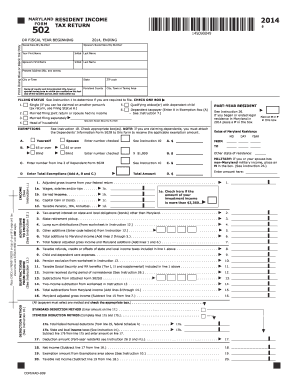
Get Md Comptroller 502 2014
How it works
-

Open form follow the instructions
-

Easily sign the form with your finger
-

Send filled & signed form or save
How to fill out the MD Comptroller 502 online
Completing the MD Comptroller 502 form online is a straightforward process, designed to facilitate the filing of your Maryland resident income tax return. This guide provides step-by-step instructions to help users accurately complete the necessary fields on the form.
Follow the steps to complete the MD Comptroller 502 online.
- Press the ‘Get Form’ button to access the MD Comptroller 502 and open it in your online editor.
- Begin by filling in your social security number and your spouse's social security number, if applicable. Ensure the information is accurately entered to avoid delays.
- Input your first name, middle initial, and last name. Repeat this for your spouse if you are filing jointly.
- Enter your present address, including the street number, city, state, and ZIP code, ensuring that all information is correct.
- Identify your filing status by checking one of the provided boxes that best describes your situation.
- For exemptions, check the appropriate boxes indicating if you or your spouse qualifies for any exemptions, like age or blindness. If claiming dependents, you will need to attach the Dependents' Information Form 502B.
- If applicable, mark the box indicating that you are a part-year resident or that you or your spouse has non-Maryland military income.
- Report your total income, ensuring you follow the instructions for each line related to wages, pensions, and any additions or subtractions from income.
- Select your deduction method, deciding between the standard deduction or itemizing deductions, and complete the corresponding fields.
- Calculate your net income and exemptions, then determine your taxable income by following the given instructions.
- Use the Maryland tax table to calculate your tax based on your taxable income, entering the respective figures as needed.
- Complete the local tax computation as instructed, including any local credits you may be eligible for.
- Provide any contributions to state funds if applicable and total your Maryland and local taxes.
- Finally, review your total payments and credits, calculate any balance due or overpayment, and complete your direct deposit information for refunds, if applicable.
- Once all information has been filled out, save your changes, and you may proceed to download, print or share the completed form as necessary.
Complete your MD Comptroller 502 online today to ensure timely filing and avoid penalties.
Get form
Experience a faster way to fill out and sign forms on the web. Access the most extensive library of templates available.
Related links form
To write a check to the Comptroller of Maryland, use a personal or business check made payable to 'Comptroller of Maryland.' Clearly include your tax identification number and the applicable tax year on the memo line. Mail the check along with any required forms to the address provided by the MD Comptroller 502 to ensure proper crediting to your account.
Get This Form Now!
Use professional pre-built templates to fill in and sign documents online faster. Get access to thousands of forms.