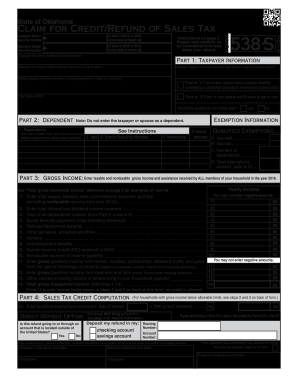
Get Ok 537-s 2018
How it works
-

Open form follow the instructions
-

Easily sign the form with your finger
-

Send filled & signed form or save
How to fill out the OK 537-S online
The OK 537-S form, also known as the Claim for Credit/Refund of Sales Tax, is designed for Oklahoma residents seeking a sales tax credit or refund. This guide will provide you with a clear, step-by-step approach to completing the form online to ensure accurate submission and successful processing.
Follow the steps to complete the OK 537-S form online.
- Press the ‘Get Form’ button to access the OK 537-S form and open it in the editor.
- Begin with Part 1: Taxpayer Information. Fill in your first name, middle initial, and last name accurately. Provide your Social Security Number and physical address for the year 2018 if it differs from your mailing address. Additionally, mark if you or your spouse have a physical disability or are aged 65 or over.
- In Part 2: Dependent, list any dependents you are claiming. Ensure you provide their full names, Social Security Numbers, ages, and their relationship to you. If claiming additional dependents, attach an additional schedule as needed.
- Proceed to Part 3: Gross Income. Document the total gross income for your household as defined in the instructions. Include all relevant income streams: wages, interest, Social Security payments, and any other forms of taxable and nontaxable income. Carefully total these amounts.
- Next, in Part 4: Sales Tax Credit Computation, if applicable, answer whether the refund will be deposited in an account outside of the United States. Enter total qualified exemptions claimed and calculate if you are eligible for a credit.
- Complete the Direct Deposit Option section to specify the account type for your refund. Include your routing and account number if you wish to receive direct deposit.
- Review the entire form for completeness. Ensure all sections are filled out accurately and that you have read any additional instructions, especially on the last page regarding eligibility and deadlines.
- Finally, sign and date the form as the taxpayer and, if applicable, your spouse. Then save your changes, download, print, or share the completed form for submission.
Start filling out the OK 537-S form online today to ensure you receive your sales tax credit or refund promptly.
Get form
When filling out a 64 8 form, start by entering the required details, including your name and contact information. Follow the instructions closely to ensure all data is accurate and complete. It can be helpful to refer to the OK 537-S guidelines if your 64 8 form is part of a leasing process, ensuring all aspects are properly addressed. This clarity benefits all involved parties.