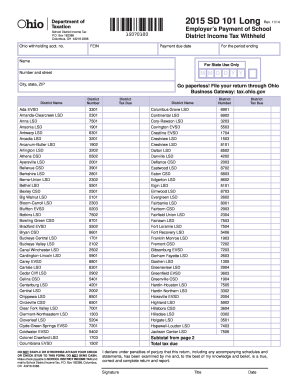
Get Oh Odt Sd 101 Long 2015
How it works
-

Open form follow the instructions
-

Easily sign the form with your finger
-

Send filled & signed form or save
How to fill out the OH ODT SD 101 Long online
This guide aims to simplify the process of completing the OH ODT SD 101 Long form online. By following these clear and structured steps, users can efficiently provide the necessary information regarding school district income tax withholding. Whether you are familiar with tax documents or a first-time filer, this guide supports your journey.
Follow the steps to complete the OH ODT SD 101 Long form online.
- Press the ‘Get Form’ button to access the document and open it in the online editor.
- Enter your Ohio withholding account number in the designated field.
- Fill in the Federal Employer Identification Number (FEIN) accurately.
- Indicate the employer's payment due date for the period ending.
- Provide your full name as it appears on official documents.
- Complete your address by including number, street, city, state, and ZIP code.
- Select the appropriate district name from the provided list, ensuring it matches your location.
- Record the district number that corresponds with the district you selected.
- Enter the total tax due in the specified field, making sure to double-check your calculations.
- At the end of the form, review all entered information for accuracy.
- Save your changes, download the completed form, print it, or share it as needed.
Complete your OH ODT SD 101 Long form online today and make your tax filing process easier!
Get form
To determine if you qualify for exemption from Ohio or school district income tax, review the specific criteria and income threshold published by the state. Generally, certain types of income or individuals who meet specific conditions might qualify for exemption. You can stay informed about regulations and requirements by checking the resources available on US Legal Forms.