Loading
Get Vtl301
How it works
-

Open form follow the instructions
-

Easily sign the form with your finger
-

Send filled & signed form or save
How to fill out the Vtl301 online
The Vtl301 form is essential for individuals seeking to apply for a first trade license or add additional licenses. This guide provides clear and comprehensive steps to simplify the process of completing the Vtl301 online.
Follow the steps to successfully complete the Vtl301 form.
- Click the ‘Get Form’ button to obtain the Vtl301 form and access it in the editor.
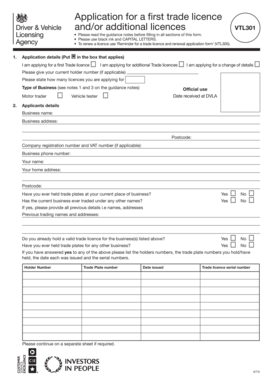
- In the application details section, indicate whether you are applying for a first trade license, additional licenses, or a change of details by placing an ‘✖’ in the appropriate box. If applicable, provide your current holder number and state the number of licenses you are applying for.
- Specify the type of business you are operating from the available options, such as motor trader or vehicle tester. Ensure to follow the guidance notes provided.
- Complete the applicant's details section, including your business name, business address (with postcode), company registration number, VAT number, and business phone number. You must also provide your name and home address (with postcode).
- Indicate whether you have previously held trade plates at the current place of business and if your business has ever traded under different names. If yes, list previous trading names and addresses.
- Answer whether you currently hold a valid trade license for the business listed and if you have ever held trade plates for any other business. If applicable, provide details of your holder numbers, trade plate numbers, issue dates, and serial numbers.
- In the section regarding the trade license usage, specify if the license is intended for use on vehicles, motorcycles only, or all vehicles. Additionally, state the desired start date for the license.
- Complete the payment section by indicating the fee submitted with the application. Make sure to follow the payment instructions regarding cheques and postal orders.
- Sign and date the declaration, confirming the accuracy of the information provided. Make sure that the declaration is signed by the appropriate individual, whether it's a motor trader, partner, or director.
- After completing the form, review all entries for accuracy. Once confirmed, proceed to save changes, download, or print the completed form for submission.
Complete the Vtl301 form online today to start the application process for your trade licenses.
Get form
Experience a faster way to fill out and sign forms on the web. Access the most extensive library of templates available.
Get This Form Now!
Use professional pre-built templates to fill in and sign documents online faster. Get access to thousands of forms.