Loading
Form preview
  • US Legal Forms
  • Other Templates
  • More Forms
  • More Multi-State Forms
  • Metlife Met-autormd 2024

Get Metlife Met-autormd 2024-2026

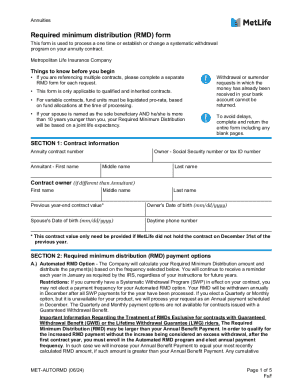
Dx Annuities Required minimum distribution (RMD) form This form is used to process a one time or establish or change a systematic withdrawal program on your annuity contract. Metropolitan Life Insurance.

How it works

  1. Open form

    Open form follow the instructions

  2. Easily sign form

    Easily sign the form with your finger

  3. Share form

    Send filled & signed form or save

How to fill out and sign MetLife MET-AUTORMD online?

Get your online template and fill it in using progressive features. Enjoy smart fillable fields and interactivity.Follow the simple instructions below:

The preparing of legal documents can be costly and time-ingesting. However, with our preconfigured web templates, everything gets simpler. Now, creating a MetLife MET-AUTORMD takes a maximum of 5 minutes. Our state-specific browser-based samples and crystal-clear guidelines remove human-prone errors.

Follow our easy steps to have your MetLife MET-AUTORMD ready quickly:

  1. Select the template from the library.
  2. Enter all necessary information in the necessary fillable fields. The easy-to-use drag&drop user interface allows you to add or move fields.
  3. Ensure everything is completed appropriately, without any typos or lacking blocks.
  4. Use your e-signature to the PDF page.
  5. Click Done to save the changes.
  6. Save the data file or print out your copy.
  7. Submit immediately towards the receiver.

Make use of the fast search and powerful cloud editor to make an accurate MetLife MET-AUTORMD. Clear away the routine and produce papers online!

Tips on how to fill out, edit and sign MetLife MET-AUTORMD online

How to fill out and sign MetLife MET-AUTORMD online?

Get your online template and fill it in using progressive features. Enjoy smart fillable fields and interactivity.Follow the simple instructions below:

The preparing of legal documents can be costly and time-ingesting. However, with our preconfigured web templates, everything gets simpler. Now, creating a MetLife MET-AUTORMD takes a maximum of 5 minutes. Our state-specific browser-based samples and crystal-clear guidelines remove human-prone errors.

Follow our easy steps to have your MetLife MET-AUTORMD ready quickly:

  1. Select the template from the library.
  2. Enter all necessary information in the necessary fillable fields. The easy-to-use drag&drop user interface allows you to add or move fields.
  3. Ensure everything is completed appropriately, without any typos or lacking blocks.
  4. Use your e-signature to the PDF page.
  5. Click Done to save the changes.
  6. Save the data file or print out your copy.
  7. Submit immediately towards the receiver.

Make use of the fast search and powerful cloud editor to make an accurate MetLife MET-AUTORMD. Clear away the routine and produce papers online!

How to edit MetLife MET-AUTORMD: customize forms online

Put the right document management tools at your fingertips. Complete MetLife MET-AUTORMD with our trusted solution that comes with editing and eSignature functionality}.

If you want to complete and sign MetLife MET-AUTORMD online without hassle, then our online cloud-based solution is the way to go. We provide a wealthy template-based catalog of ready-to-use forms you can modify and fill out online. Furthermore, you don't need to print out the document or use third-party options to make it fillable. All the necessary features will be readily available for your use as soon as you open the document in the editor.

Let’s examine our online editing tools and their main functions. The editor has a self-explanatory interface, so it won't require much time to learn how to utilize it. We’ll take a look at three major sections that allow you to:

  • Modify and annotate the template
  • The top toolbar comes with the features that help you highlight and blackout text, without graphics and graphical factors (lines, arrows and checkmarks etc.), add your signature to, initialize, date the document, and more.

  • Arrange your paperwork
  • Use the toolbar on the left if you would like to re-order the document or/and delete pages.

  • Make them shareable
  • If you want to make the document fillable for others and share it, you can use the tools on the right and add various fillable fields, signature and date, text box, etc.).

Aside from the capabilities mentioned above, you can shield your document with a password, put a watermark, convert the file to the necessary format, and much more.

Our editor makes completing and certifying the MetLife MET-AUTORMD a breeze. It allows you to make basically everything concerning dealing with forms. In addition, we always make sure that your experience working with documents is protected and compliant with the major regulatory standards. All these aspects make using our solution even more enjoyable.

Get MetLife MET-AUTORMD, apply the necessary edits and tweaks, and get it in the desired file format. Try it out today!

Get form

Experience a faster way to fill out and sign forms on the web. Access the most extensive library of templates available.
Get form

Related links form

PA Pine-Richland School District Policy 915 Required Information For Booster Groups 2020 NJ Natural Beauty Spray Tans Infrared Sauna Agreement And Consent Form 2016 WI Centime Nocturne Dance Club Application For Membership 2024 PA Pine-Richland School District Policy 915 Required Information For Booster Groups 2017

Questions & Answers

Get answers to your most pressing questions about US Legal Forms API.

Contact support

MetLife's demutualization took place in 2000, marking a transformative moment for the company. This change allowed MetLife to transition into a publicly traded organization and broaden its reach and product offerings in the insurance market. As you navigate your options, remember to consider the implications of MetLife MET-AUTORMD for your financial strategy.

A MetLife annuity is a financial product designed to provide a steady income stream, typically during retirement. These annuities come in various forms, each tailored to meet different needs, such as fixed income or investment growth. Incorporating a MetLife MET-AUTORMD annuity can play a key role in your financial planning, ensuring you achieve long-term goals.

Prudential demutualized in 2001, becoming a publicly traded company shortly thereafter. This significant event allowed Prudential to operate with greater financial flexibility, much like MetLife had done a year earlier. As you explore options like MetLife MET-AUTORMD, it is insightful to review such milestones in the insurance industry.

The rate of a MetLife annuity varies based on several factors, including market conditions and the type of annuity selected. Generally, these rates offer competitive returns, making them a viable option for long-term financial planning. To find a MetLife MET-AUTORMD annuity that fits your needs, consider consulting a financial advisor or accessing detailed information through trusted platforms.

MetLife's first stock split occurred in 2006 and was part of the company’s growth strategy. This split aimed to improve liquidity and make shares more accessible to investors. With each split, shareholders received additional shares, reflecting the company's commitment to increasing shareholder value. Hence, keep an eye on MetLife MET-AUTORMD for potential growth.

MetLife demutualized in 2000. This process transformed the mutual company into a publicly traded entity. As a result, MetLife became more flexible in its operations, allowing it to offer a wider range of products and services. Understanding the timeline of MetLife MET-AUTORMD can provide valuable insights into its evolution.

When applying for life insurance with MetLife, avoid inconsistencies or exaggerations in your information. It’s important to be honest about your health history and lifestyle choices without omitting crucial details. Misleading information can lead to claim disputes in the future. By being straightforward, you ensure a clearer path to obtaining coverage.

Filling out a life insurance claim form for MetLife requires accurate and thorough details. You should include the policyholder's name, policy number, and circumstances surrounding the claim. It's helpful to have all supporting documents on hand to accompany your claim form. This comprehensive approach can streamline the processing of your claim.

To set up direct deposit with MetLife, log into your account on the MetLife website. Navigate to the direct deposit option and enter your banking information securely. Completing this process will ensure you receive your payments efficiently. Having your funds directly deposited provides convenience and peace of mind.

Filling out a life insurance claim with MetLife involves entering your personal information and details about the deceased person. Be sure to provide complete and accurate information, especially regarding the cause of death. Additionally, reviewing all entries before submission helps to avoid delays. This diligence can lead to a smoother claim experience.

Get This Form Now!

Use professional pre-built templates to fill in and sign documents online faster. Get access to thousands of forms.
Get form
If you believe that this page should be taken down, please follow our DMCA take down processhere.
Get MetLife MET-AUTORMD
Get form
  • Adoption
  • Bankruptcy
  • Contractors
  • Divorce
  • Home Sales
  • Employment
  • Identity Theft
  • Incorporation
  • Landlord Tenant
  • Living Trust
  • Name Change
  • Personal Planning
  • Small Business
  • Wills & Estates
  • Packages A-Z
  • Affidavits
  • Bankruptcy
  • Bill of Sale
  • Corporate - LLC
  • Divorce
  • Employment
  • Identity Theft
  • Internet Technology
  • Landlord Tenant
  • Living Wills
  • Name Change
  • Power of Attorney
  • Real Estate
  • Small Estates
  • Wills
  • All Forms
  • Forms A-Z
  • Other Templates
  • Legal Hub
  • About Us
  • Help Portal
  • Legal Resources
  • Blog
  • Affiliates
  • Contact Us
  • Delete My Account
  • Site Map
  • Industries
  • Forms in Spanish
  • Localized Forms
  • State-specific Forms
  • Forms Kit
  • Real Estate Handbook
  • All Guides
  • Notarize
  • Incorporation services
  • For Consumers
  • For Small Business
  • For Attorneys
  • USLegal
  • FormsPass
  • pdfFiller
  • signNow
  • altaFlow
  • DocHub
  • Instapage
Form Packages
  • Adoption
  • Bankruptcy
  • Contractors
  • Divorce
  • Home Sales
  • Employment
  • Identity Theft
  • Incorporation
  • Landlord Tenant
  • Living Trust
  • Name Change
  • Personal Planning
  • Small Business
  • Wills & Estates
  • Packages A-Z
Form Categories
  • Affidavits
  • Bankruptcy
  • Bill of Sale
  • Corporate - LLC
  • Divorce
  • Employment
  • Identity Theft
  • Internet Technology
  • Landlord Tenant
  • Living Wills
  • Name Change
  • Power of Attorney
  • Real Estate
  • Small Estates
  • Wills
  • All Forms
  • Forms A-Z
  • Other Templates
Customer Service
  • Legal Hub
  • About Us
  • Help Portal
  • Legal Resources
  • Blog
  • Affiliates
  • Contact Us
  • Delete My Account
  • Site Map
  • Industries
  • Forms in Spanish
  • Localized Forms
  • State-specific Forms
  • Forms Kit
Legal Guides
  • Real Estate Handbook
  • All Guides
Prepared for you
  • Notarize
  • Incorporation services
Our Customers
  • For Consumers
  • For Small Business
  • For Attorneys
Our Sites
  • USLegal
  • FormsPass
  • pdfFiller
  • signNow
  • altaFlow
  • DocHub
  • Instapage
Social Media
Call us now toll free:
+1 833 426 79 33
As seen in:
© Copyright 1999-2026 airSlate Legal Forms, Inc. 17 Station Street, Ste. 203, Brookline, MA 02445
  • Your Privacy Choices
  • Terms of Service
  • Privacy Notice
  • Content Takedown Policy
  • Bug Bounty Program