Loading
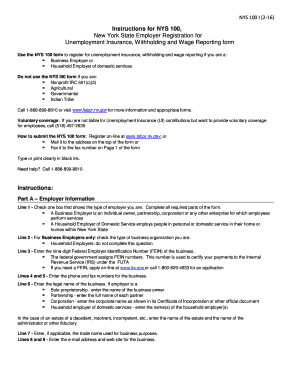
Get Ny Dtf Nys-100-i 2016
How it works
-

Open form follow the instructions
-

Easily sign the form with your finger
-

Send filled & signed form or save
How to fill out the NY DTF NYS-100-I online
Filling out the NY DTF NYS-100-I form is an essential step for employers registering for unemployment insurance, withholding, and wage reporting in New York State. This guide provides clear, step-by-step instructions to help you complete the form accurately and efficiently.
Follow the steps to effectively complete the NY DTF NYS-100-I form online.
- Click ‘Get Form’ button to access the NY DTF NYS-100-I form and begin the online completion process.
- In Part A, start by providing your employer information. Select the appropriate box to identify if you are a business employer or a household employer of domestic services. Complete all required fields.
- For business employers, indicate the type of business organization. Enter the nine-digit Federal Employer Identification Number (FEIN) assigned to your business.
- Input your business's phone and fax numbers, as well as the legal name of the business. This should reflect the official name as recognized in legal documents.
- If applicable, provide the trade name used for business purposes, followed by your business email address and website.
- Move to Part B to fill in liability information. Enter the date your business began operating in New York State and the date of your first payroll from which you will withhold income tax.
- Respond to questions regarding employees and registration for unemployment insurance, providing required details if you employ individuals not considered your employees.
- Specify whether you are registering for unemployment insurance and enter the first calendar quarter in which you paid total remuneration of $300 or more to covered employees.
- In Part C, household employers should indicate the first calendar quarter and year where cash wages of $500 or more were paid to household employees, followed by the number of household employees you employ.
- Complete Part D by confirming your mailing and physical addresses. Ensure these are accurate to receive all relevant communications.
- In Part E, provide detailed business information for each legal entity associated with your business operations, including names, Social Security numbers, and titles.
- Make sure to sign and date the form in the signature box, affirming that all provided information is true to the best of your knowledge.
- Upon completion, you can save the changes to the form. You may choose to download, print or share the completed NY DTF NYS-100-I form as needed.
Start completing your NY DTF NYS-100-I form online today for a smooth registration process.
Get form
Experience a faster way to fill out and sign forms on the web. Access the most extensive library of templates available.
Related links form
If you need to find your NY employer registration number, start by checking the documentation you received after submitting the NY DTF NYS-100-I form. Additionally, you can contact the New York State Department of Taxation and Finance for assistance. Having your registration number is important for proper tax reporting and compliance.
Get This Form Now!
Use professional pre-built templates to fill in and sign documents online faster. Get access to thousands of forms.