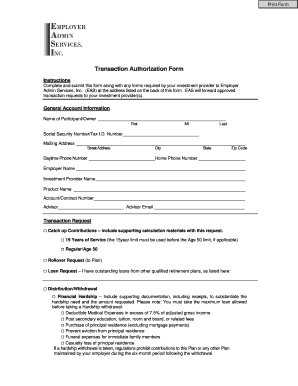
Get Eas Transaction Authorization Form
How it works
-

Open form follow the instructions
-

Easily sign the form with your finger
-

Send filled & signed form or save
How to fill out the Eas Transaction Authorization Form online
Completing the Eas Transaction Authorization Form online ensures a smooth and efficient process for managing your transactions. This guide will walk you through each section of the form, providing clear instructions tailored to meet your needs.
Follow the steps to complete your Eas Transaction Authorization Form online.
- Click 'Get Form' button to obtain the form and open it in the online editor.
- In the 'General Account Information' section, enter your name, Social Security number or Tax I.D. number, mailing address, daytime phone number, home phone number, employer name, investment provider name, product name, and account or contract number. Ensure all information is accurate.
- For the 'Transaction Request' section, select the type of transaction you are requesting by checking the appropriate box. If applicable, provide any necessary supporting calculations or documentation as indicated in the form.
- If you are requesting a rollover, transfer, or non-financial change, fill out the corresponding sections by providing new investment provider details, new product name, account number, and address. Indicate whether you are requesting a full or partial balance.
- In the 'Signatures' section, read the acknowledgment statements carefully. Provide your electronic signature and the date to certify that the information provided is complete and accurate. If required, include the authorized signature from Employer Admin Services, Inc.
- After completing all sections of the form, review your entries for accuracy. Save the changes, then choose to download, print, or share the form as needed.
Complete your Eas Transaction Authorization Form online today for a streamlined filing experience.
To fill out a payment authorization form correctly, begin by entering your contact details clearly at the top of the Eas Transaction Authorization Form. Specify the payment amount and the purpose of the payment. Include any necessary banking information, such as account and routing numbers, to ensure proper processing. Completing this form allows for transparent transactions and protects your financial interests.