Loading
Form preview
  • US Legal Forms
  • Other Templates
  • Tax Forms
  • Alaska Tax Forms
  • Ak 6395i 2014

Get Ak 6395i 2014

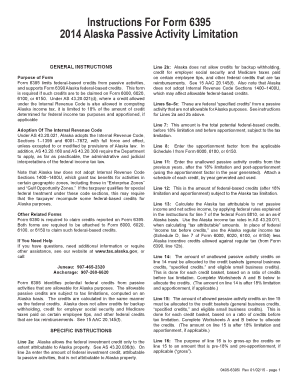
Federal-based credits. This form is required if such credits are to be claimed on Form 6000, 6020, 6100, or 6150. Under AS 43.20.021(d), where a credit allowed under the Internal Revenue Code is also allowed in computing Alaska income tax, it is limited to 18% of the amount of credit determined for federal income tax purposes and apportioned, if applicable Adoption Of The Internal Revenue Code Under AS 43.20.021, Alaska adopts the Internal Revenue Code, Sections 1 1399 and 6001 7872, with f.

How it works

  1. Open form

    Open form follow the instructions

  2. Easily sign form

    Easily sign the form with your finger

  3. Share form

    Send filled & signed form or save

How to fill out the AK 6395i online

The AK 6395i form is essential for reporting passive activity credits in Alaska. This guide provides a step-by-step walkthrough to help users navigate the online completion of the form effectively.

Follow the steps to complete the AK 6395i form online.

  1. Press the ‘Get Form’ button to obtain the form and open it in the online editing tool.
  2. On line 2a, enter the amount of federal investment credit that is attributable to passive activities but not to Alaska property.
  3. On line 2b, remember that Alaska does not allow credits for backup withholding or certain federal tax reimbursements.
  4. For lines 5a-5c, input any federal specified credits from passive activities that are not allowed for Alaska tax purposes.
  5. On line 7, enter the total potential federal-based credits before any limitations or apportionments.
  6. For line 8, use your Schedule I from Form 6000, 6100, or 6150 to enter your apportionment factor.
  7. Complete line 11 with any unallowed passive activity credits from prior years, after the limitations.
  8. On line 12, provide the federal-based credits subject to the Alaska tax limitation after adjustments.
  9. For line 13, calculate the Alaska tax attributable to net passive and active income as per instructed rules.
  10. On line 14, allocate any unallowed passive activity credits into the designated credit baskets using worksheets provided.
  11. Complete line 15 with the allowed passive activity credits, allocated as specified.
  12. Enter the grossed-up credits on line 16 to report pre-limitation and pre-apportionment amounts.
  13. On line 17, report the allowed passive general business credits from Worksheet B.
  14. Complete line 18 with allowed ‘specified credits’ and eligible small business credits from Worksheet B.
  15. Finally, review your entries and then save your changes, download, print, or share the form as needed.

Start filling out the AK 6395i form online today to streamline your tax credit reporting process.

Get form

Experience a faster way to fill out and sign forms on the web. Access the most extensive library of templates available.

Related content

h *, %T~ & ' * , . W
_ _ _ _ _ _ _ . _ _ _ _ . _ _ _ _ _ _ _ _ _ _ _ _ _ _ _ _ _ _ _ _ _ _ _ _ _ _. _ _ _ _ _...
Learn more
Reductions for Safety Proofs (Extended Version)
by A FARZAN — Program reductions are used widely to simplify reasoning about the...
Learn more

Related links form

AL DoR 40NR 2017 AL DoR 40NR 2016 AL DoR 40V 2018 AL DoR 40V 2017

Questions & Answers

Get answers to your most pressing questions about US Legal Forms API.

Contact support

When filling out the W4 form, you indicate either 0 or 1 on the appropriate line in the allowances section. Following the guidance from AK 6395i can assist you in making the correct decision based on your individual tax circumstances. Be sure to check your entries and make any necessary adjustments based on your financial situation to ensure proper withholding.

Choosing between claiming 1 or 0 allowances depends on your financial situation. Claiming 1 allows for a moderate amount to be withheld for taxes, while 0 results in higher withholding, which might be beneficial if you have other income sources. Use the AK 6395i guidelines to analyze your tax situation and decide which option aligns best with your financial goals.

Completing your withholding form requires attention to detail. Using AK 6395i as a reference, start by filling in your personal information accurately. Follow the instructions to indicate your exemptions, allowances, or additional withholding amounts. This thorough approach ensures your employer calculates the correct tax withholding based on your input.

Filling out a 15 H form involves several simple steps outlined in the AK 6395i. Begin by entering your personal details, including your name and Social Security number. You will then provide information about your income sources and the exemption status you wish to claim. Lastly, make sure you review the form for completeness before submission.

Determining your withholding allowance is crucial for accurate tax withholding. Refer to the AK 6395i guidelines to calculate the appropriate number based on your financial situation and dependents. Your aim should be to balance your tax payments throughout the year, so you neither owe a large amount nor receive a substantial refund at tax time.

When filling out a withholding allowance form, refer to the AK 6395i specifications for guidance. Start by providing your basic information, then indicate your filing status and the number of allowances you wish to claim. Follow the prompts to determine any additional deductions or adjustments, which can help minimize your tax withholding.

To complete your income tax return form, begin with your basic identification information. Use the AK 6395i resources to determine which income and deductions apply to you. Next, fill out each section carefully, ensuring that all figures align with your financial documents. After filling out your return, double-check all entries to avoid mistakes.

Filling out a withholding exemption form is straightforward with the help of the AK 6395i guidelines. Start by entering your personal details, including your name, address, and Social Security number. Next, indicate the number of exemptions you are claiming based on your circumstances. Make sure to review your form to ensure accuracy before submitting it to your employer.

Yes, K-1 distributions are generally considered income and must be reported on your individual tax return. The income from K-1 distributions can affect your overall tax liability, so it’s important to report it correctly. To ensure compliance with tax laws, checking resources like AK 6395i can offer clarity and detailed guidance.

Filing Form 1065 online involves accessing an appropriate software platform, where you can enter partnership information and the income details reported on your K-1s. It's crucial to double-check all entries before submission to ensure accuracy. For additional help, leveraging AK 6395i can simplify your understanding of any intricacies involved.

Get This Form Now!

Use professional pre-built templates to fill in and sign documents online faster. Get access to thousands of forms.
If you believe that this page should be taken down, please follow our DMCA take down processhere.
Get AK 6395i
  • Adoption
  • Bankruptcy
  • Contractors
  • Divorce
  • Home Sales
  • Employment
  • Identity Theft
  • Incorporation
  • Landlord Tenant
  • Living Trust
  • Name Change
  • Personal Planning
  • Small Business
  • Wills & Estates
  • Packages A-Z
  • Affidavits
  • Bankruptcy
  • Bill of Sale
  • Corporate - LLC
  • Divorce
  • Employment
  • Identity Theft
  • Internet Technology
  • Landlord Tenant
  • Living Wills
  • Name Change
  • Power of Attorney
  • Real Estate
  • Small Estates
  • Wills
  • All Forms
  • Forms A-Z
  • Other Templates
  • Legal Hub
  • About Us
  • Help Portal
  • Legal Resources
  • Blog
  • Affiliates
  • Contact Us
  • Delete My Account
  • Site Map
  • Industries
  • Forms in Spanish
  • Localized Forms
  • State-specific Forms
  • Forms Kit
  • Real Estate Handbook
  • All Guides
  • Notarize
  • Incorporation services
  • For Consumers
  • For Small Business
  • For Attorneys
  • USLegal
  • FormsPass
  • pdfFiller
  • signNow
  • altaFlow
  • DocHub
  • Instapage
Form Packages
  • Adoption
  • Bankruptcy
  • Contractors
  • Divorce
  • Home Sales
  • Employment
  • Identity Theft
  • Incorporation
  • Landlord Tenant
  • Living Trust
  • Name Change
  • Personal Planning
  • Small Business
  • Wills & Estates
  • Packages A-Z
Form Categories
  • Affidavits
  • Bankruptcy
  • Bill of Sale
  • Corporate - LLC
  • Divorce
  • Employment
  • Identity Theft
  • Internet Technology
  • Landlord Tenant
  • Living Wills
  • Name Change
  • Power of Attorney
  • Real Estate
  • Small Estates
  • Wills
  • All Forms
  • Forms A-Z
  • Other Templates
Customer Service
  • Legal Hub
  • About Us
  • Help Portal
  • Legal Resources
  • Blog
  • Affiliates
  • Contact Us
  • Delete My Account
  • Site Map
  • Industries
  • Forms in Spanish
  • Localized Forms
  • State-specific Forms
  • Forms Kit
Legal Guides
  • Real Estate Handbook
  • All Guides
Prepared for you
  • Notarize
  • Incorporation services
Our Customers
  • For Consumers
  • For Small Business
  • For Attorneys
Our Sites
  • USLegal
  • FormsPass
  • pdfFiller
  • signNow
  • altaFlow
  • DocHub
  • Instapage
Social Media
Call us now toll free:
+1 833 426 79 33
As seen in:
© Copyright 1999-2026 airSlate Legal Forms, Inc. 17 Station Street, Ste. 203, Brookline, MA 02445
  • Your Privacy Choices
  • Terms of Service
  • Privacy Notice
  • Content Takedown Policy
  • Bug Bounty Program
AK 6395i
This form is available in several versions.
Select the version you need from the drop-down list below.
2024 AK 6395i
Select form
  • 2024 AK 6395i
  • 2019 AK 6395i
  • 2017 AK 6395i
  • 2015 AK 6395i
  • 2014 AK 6395i
Select form