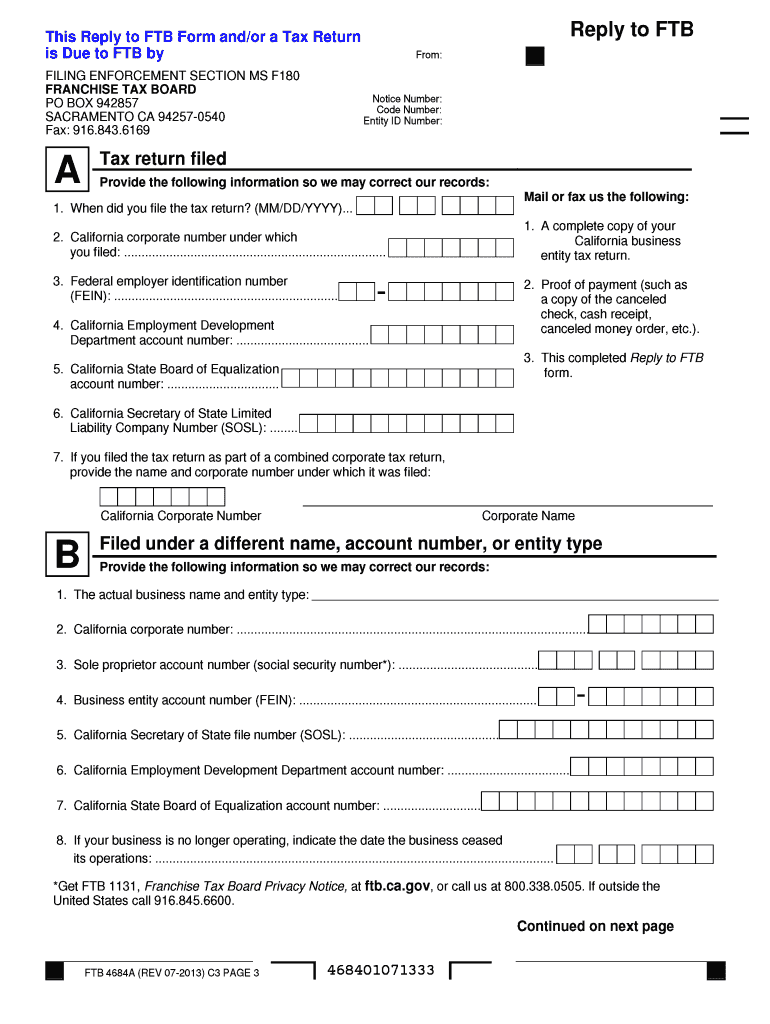
MENTO CA 94257-0540 Fax: 916.843.6169 A Tax return filed Provide the following information so we may correct our records: Mail or fax us the following: 1. When did you file the tax return? (MM/DD/YYYY)... 1. A complete copy of your 2. California corporate number under which California business you filed: ........................................................................... entity tax return. 3. Federal employer identification number 2. Proof of payment (such as (FEIN): .
Loading

Open form follow the instructions

Easily sign the form with your finger

Send filled & signed form or save
How to fill out the CA FTB 4684A MEO online
The CA FTB 4684A MEO form is an essential document for taxpayers who need to respond to the Franchise Tax Board regarding their tax return. This guide will help you navigate the process of filling out the form online, ensuring accuracy and compliance.
Follow the steps to complete the CA FTB 4684A MEO form online.
- Click ‘Get Form’ button to obtain the form and open it in the editor.
- Begin by entering the notice number, code number, and entity ID number as specified in the upper section of the form.
- Indicate the date you filed your tax return in the format MM/DD/YYYY.
- Provide your California corporate number under which you filed your California business entity tax return.
- Include the federal employer identification number (FEIN).
- Fill in the California Employment Development Department account number.
- Complete the California State Board of Equalization account number and if applicable, the California Secretary of State Limited Liability Company Number (SOSL).
- If applicable, provide the name and corporate number under which a combined corporate tax return was filed.
- For the section regarding a different name, indicate the actual business name and entity type, along with all related identification numbers.
- Respond to the questionnaire about your entity's activities within California, providing specific details as required.
- After completing all sections, ensure you review the information entered for accuracy.
- Save changes, download, print, or share the completed form as necessary.
Complete your CA FTB 4684A MEO form online today for efficient processing.
Experience a faster way to fill out and sign forms on the web. Access the most extensive library of templates available.
Related content
Jun 10, 2025 — Demand for Tax Return (FTB 4601); Notice of Tax Return Change (FTB 5818);...
by M Ouerfelli · 2021 — ADVERTIMENT La consulta d'aquesta tesi queda condicionada a...
Get answers to your most pressing questions about US Legal Forms API.
How to get a copy of California tax return online?
To get a copy of your California tax return online, access the California Franchise Tax Board's website. After logging in, you can view and download your tax return directly from the secure portal. This process ensures you have quick access to your documents whenever needed. Remember, if you are working with the CA FTB 4684A MEO form, having your complete tax return will aid you in completing it accurately.
How do I download a copy of my tax return?
Downloading a copy of your California tax return is simple. Go to the California Franchise Tax Board's website and log in to your account. Once authenticated, navigate to your tax documents section, and you’ll find options to download the necessary files. If you need specific forms like the CA FTB 4684A MEO, having everything in hand can greatly simplify your filing process.
How do I get a copy of my California tax return?
To get a copy of your California tax return, visit the California Franchise Tax Board's website or contact their office. You can request a copy either online or by mail, depending on your preference. Make sure to provide the necessary identification information, which is essential for processing your request. If you're using the CA FTB 4684A MEO for casualty losses, having a copy of your return can be very useful.
Can I get a full copy of my tax return online?
Yes, you can obtain a full copy of your California tax return online through the California Franchise Tax Board's website. They provide secure access to your tax documents after you verify your identity. This process is straightforward, so you can easily retrieve your information. If you need help with specific forms like the CA FTB 4684A MEO, consider accessing legal form resources.
How do I get a live person at FTB?
To speak with a live person at the California Franchise Tax Board, call their customer service number during business hours. Be prepared for potential hold times, and have your relevant information ready to expedite the process. For specific questions about the CA FTB 4684A MEO form or other services, they can provide direct assistance over the phone. This can help you navigate any tax-related concerns.
Where to get a California tax return?
You can obtain a California tax return from the California Franchise Tax Board's official website. They provide various forms, including the CA FTB 4684A MEO, for reporting casualty losses. Additionally, if you used tax software last year, it may offer an option to download your return. Consider using the uslegalforms platform for easy access to a range of tax-related documents.
Does California still allow casualty losses?
Yes, California still allows for casualty losses, particularly through the CA FTB 4684A MEO form. This form helps you report losses due to disasters, theft, or other qualifying events. Remember, to claim these losses, you must follow specific guidelines set by the California Franchise Tax Board. It’s important to keep all relevant documentation to support your claim.
How do I write a check to the Franchise Tax Board?
When writing a check to the Franchise Tax Board, write the date in the upper right corner, then indicate 'Franchise Tax Board' on the payee line. Specify the amount of payment both in numbers and in words, and don’t forget to mention the purpose of payment, like CA FTB 4684A MEO, in the memo. Sign the check at the bottom right.
How to fill out withholding allowance certificate California?
To fill out the withholding allowance certificate in California, begin by providing your personal information at the top of the form. Next, calculate the number of allowances you qualify for based on your personal situation and document that on the form. Make sure to keep a copy for your records, as it might be useful for reporting matters related to CA FTB 4684A MEO.
How to write a check to the government?
Writing a check to the government follows a simple format. Include the date, write 'U.S. Treasury' or 'Franchise Tax Board' on the payee line, and specify the amount in numbers and words. When jotting down the memo, indicate the purpose, like CA FTB 4684A MEO, to ensure it gets attributed correctly.
Use professional pre-built templates to fill in and sign documents online faster. Get access to thousands of forms.
If you believe that this page should be taken down, please follow our DMCA take down process here.