Loading
Form preview
  • US Legal Forms
  • Other Templates
  • Tax Forms
  • New York Tax Forms
  • Ny Ac 2674 2017

Get Ny Ac 2674 2017-2026

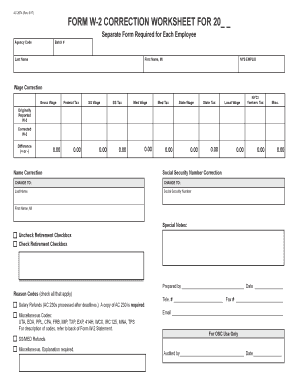
Tax SS Wage SS Tax Med Wage Med Tax State Wage State Tax Local Wage NYC / Yonkers Tax Misc. Originally Reported W-2 Corrected W-2 Difference (+ or -) 0.00 0.00 0.00 0.00 0.00 Name Correction 0.00 0.00 0.00 0.00 0.00 0.00 Social Security Number Correction CHANGE TO: CHANGE TO: Last Name Social Security Number First Name, MI Special Notes: c Uncheck Retirement Checkbox c Check Retirement Checkbox Reason:.

How it works

  1. Open form

    Open form follow the instructions

  2. Easily sign form

    Easily sign the form with your finger

  3. Share form

    Send filled & signed form or save

How to fill out the NY AC 2674 online

The NY AC 2674 form is designed for correcting wage and tax information previously reported on a W-2. This guide will assist you in accurately completing the form online, ensuring all necessary fields are filled out properly for each employee.

Follow the steps to accurately complete and submit the NY AC 2674 form.

  1. Click 'Get Form' button to access the NY AC 2674 and open it in the online editor.
  2. Begin by filling in the agency code, batch number, and employee details including last name, first name, and middle initial. Ensure that the NYS EMPLID is accurate as this identifies the employee uniquely.
  3. Proceed to the wage correction section where you’ll input corrected amounts for Gross Wage, Federal Tax, Social Security Wage, Social Security Tax, Medicare Wage, Medicare Tax, State Wage, State Tax, and Local Wage. Specify amounts as either positive or negative to reflect increases or decreases accurately.
  4. In the correction areas labeled Originally Reported W-2 and Corrected W-2, fill in the respective original and corrected amounts for each type of wage and tax.
  5. If there are any name corrections or Social Security number changes, enter the updates in the name correction section. Note the changes clearly to prevent any confusion.
  6. Uncheck or check the retirement checkbox as necessary, based on whether the correction applies to retirement contributions.
  7. In the reason section, provide a detailed explanation of why the changes are being made. This may include applicable reason codes for clarity.
  8. Finish by entering your name, telephone number, and email for follow-up. Confirm that each section has been fully completed before proceeding.
  9. Once all information is verified, save any changes you have made. You can then choose to download, print, or share the completed form as needed.

Complete the NY AC 2674 form online today for efficient and accurate processing of wage corrections.

Get form

Experience a faster way to fill out and sign forms on the web. Access the most extensive library of templates available.
Get form

Related content

FORM W-2 CORRECTION WORKSHEET FOR 20_ _
AC 2674 (Rev. 6/17). FORM W-2 CORRECTION WORKSHEET FOR 20_ _. Separate Form Required for...
Learn more
(PDF) Ac 2011-2674: Orthogonal Frequency Division...
This paper describes a work in progress on a digital baseband communications development...
Learn more
AC Motors DR/DV/DT/DTE/DVE, Asynchronous ...
Clarence Center, NY 14032. Tel. 716 741-7728. Fax 716 568-8441 aconner@seweurodrive.com...
Learn more

Related links form

Okc Fence Permit Emo Form Sr 22 Form California Pdf 2020 Social Security Payee Ledger 2020

Questions & Answers

Get answers to your most pressing questions about US Legal Forms API.

Contact support

When using TurboTax and filling out box 12 on your W-2, you must input the designated codes and amounts provided by your employer. TurboTax guides you through the process, ensuring you follow the requirements of NY AC 2674 accurately. If unsure, verify the codes or consult your W-2 instructions for accuracy. Utilize US Legal Forms for additional resources and clarity.

To fill out the NY ST 120 form, start by providing your identification details, including your business name and tax identification number. Follow the prompts to provide accurate information regarding your tax situation. This form is crucial for your tax filings under NY AC 2674, so clarity and precision are necessary. For ease, consider obtaining assistance from US Legal Forms to ensure compliance.

When filling out box 12 on your taxes, refer to the codes and amounts specified on your W-2. Ensure you provide the correct information to match your employer’s filing to avoid discrepancies. This information directly impacts your tax return, so attention is key. Leverage NY AC 2674 for guidance, and consider using US Legal Forms for professional assistance.

If box 12 on your W-2 states 'see instructions,' it indicates you need to consult accompanying documentation for correct reporting. This situation often arises when there are multiple codes or specific details related to your earnings. Following the instructions aids in accurately filing your taxes in accordance with NY AC 2674. Using platforms like US Legal can further simplify this process.

When Is a State Refund Taxable Income? You might have to report the state income tax refund you received last year on your federal income tax return if you itemized your deductions on your federal return last year. It depends on whether you claimed a deduction for state and local income taxes.

Unemployment compensation is generally taxable income to you, so Form 1099-G gives you the amount of unemployment benefits you must report on your tax return. You may opt to have federal income tax withheld on those benefits.

Generally, you must include in taxable income any unemployment compensation from a state government. Box 1 of the 1099-G Form shows your total unemployment compensation payments for the year. ... The amount from box 1 needs to be included in your income, but it is not necessary to attach the 1099-G to your tax return.

You report your unemployment compensation on your federal tax return in the income section. The amount will show up on a specific line of your tax form. Remember to keep all of your forms, including any 1099-G form you receive, with your tax records.

Schedule 4 is where you'll report other taxes you might owe in addition to your standard income tax.

State, local, and foreign property taxes, and sales taxes which are deductible on Schedule C, Schedule E, or Schedule F are not capped. ... And yes, Congress already knows what you're planning, so amounts paid in 2017 for state or local income tax which is imposed for the 2018 tax year will be treated as paid in 2018.

Get This Form Now!

Use professional pre-built templates to fill in and sign documents online faster. Get access to thousands of forms.
Get form
If you believe that this page should be taken down, please follow our DMCA take down processhere.
Get NY AC 2674
Get form
  • Adoption
  • Bankruptcy
  • Contractors
  • Divorce
  • Home Sales
  • Employment
  • Identity Theft
  • Incorporation
  • Landlord Tenant
  • Living Trust
  • Name Change
  • Personal Planning
  • Small Business
  • Wills & Estates
  • Packages A-Z
  • Affidavits
  • Bankruptcy
  • Bill of Sale
  • Corporate - LLC
  • Divorce
  • Employment
  • Identity Theft
  • Internet Technology
  • Landlord Tenant
  • Living Wills
  • Name Change
  • Power of Attorney
  • Real Estate
  • Small Estates
  • Wills
  • All Forms
  • Forms A-Z
  • Other Templates
  • Legal Hub
  • About Us
  • Help Portal
  • Legal Resources
  • Blog
  • Affiliates
  • Contact Us
  • Delete My Account
  • Site Map
  • Industries
  • Forms in Spanish
  • Localized Forms
  • State-specific Forms
  • Forms Kit
  • Real Estate Handbook
  • All Guides
  • Notarize
  • Incorporation services
  • For Consumers
  • For Small Business
  • For Attorneys
  • USLegal
  • FormsPass
  • pdfFiller
  • signNow
  • altaFlow
  • DocHub
  • Instapage
Form Packages
  • Adoption
  • Bankruptcy
  • Contractors
  • Divorce
  • Home Sales
  • Employment
  • Identity Theft
  • Incorporation
  • Landlord Tenant
  • Living Trust
  • Name Change
  • Personal Planning
  • Small Business
  • Wills & Estates
  • Packages A-Z
Form Categories
  • Affidavits
  • Bankruptcy
  • Bill of Sale
  • Corporate - LLC
  • Divorce
  • Employment
  • Identity Theft
  • Internet Technology
  • Landlord Tenant
  • Living Wills
  • Name Change
  • Power of Attorney
  • Real Estate
  • Small Estates
  • Wills
  • All Forms
  • Forms A-Z
  • Other Templates
Customer Service
  • Legal Hub
  • About Us
  • Help Portal
  • Legal Resources
  • Blog
  • Affiliates
  • Contact Us
  • Delete My Account
  • Site Map
  • Industries
  • Forms in Spanish
  • Localized Forms
  • State-specific Forms
  • Forms Kit
Legal Guides
  • Real Estate Handbook
  • All Guides
Prepared for you
  • Notarize
  • Incorporation services
Our Customers
  • For Consumers
  • For Small Business
  • For Attorneys
Our Sites
  • USLegal
  • FormsPass
  • pdfFiller
  • signNow
  • altaFlow
  • DocHub
  • Instapage
Social Media
Call us now toll free:
+1 833 426 79 33
As seen in:
© Copyright 1999-2026 airSlate Legal Forms, Inc. 17 Station Street, Suite 303, Brookline, MA 02445
  • Your Privacy Choices
  • Terms of Service
  • Privacy Notice
  • Content Takedown Policy
  • Bug Bounty Program