Get Nm Trd Cit-1 2014
How it works
-

Open form follow the instructions
-

Easily sign the form with your finger
-

Send filled & signed form or save
How to fill out the NM TRD CIT-1 online
Completing the NM TRD CIT-1 online can seem daunting, but this guide provides clear and supportive instructions to help you navigate the process. Follow these steps to ensure your corporate income and franchise tax return is accurately filled out and submitted on time.
Follow the steps to successfully submit your NM TRD CIT-1 online.
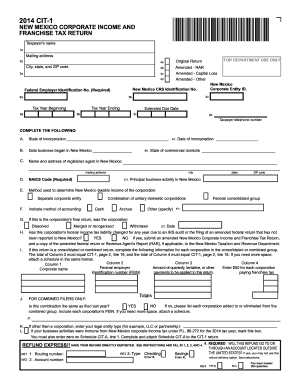
- Click ‘Get Form’ button to obtain the form and open it in the editor.
- Fill out the taxpayer's name and mailing address in the designated fields. Ensure that the information is accurate and up-to-date.
- If applicable, indicate whether this return is amended by selecting the appropriate option under the amended section.
- Enter your New Mexico Corporate Entity ID, CRS Identification Number, and Federal Employer Identification Number in the specified fields. These are critical for your return to be processed.
- Complete the tax year beginning and ending dates, ensuring that these reflect the correct period for the return.
- In section A, specify the state of incorporation and the date your business began in New Mexico, as well as your registered agent's name and address.
- Indicate the NAICS Code and principal business activity in New Mexico.
- Select the method used to determine New Mexico taxable income and indicate your accounting method.
- If this is the final return of the corporation, select the appropriate options regarding dissolution, merger, or reorganization.
- Answer questions regarding changes in federal tax liability due to audits or amended returns.
- For combined filers, provide detailed information about each corporation in the group.
- Complete the refund section, providing routing and account numbers if you desire a direct deposit of any refund.
- Move on to the second page to fill out the income details, including taxable income, deductions, and total taxes owed.
- Review all filled sections for accuracy before saving your changes.
- Once completed, download the form for your records, or print it if necessary to submit by mail.
Complete your NM TRD CIT-1 online today to ensure timely processing of your corporate tax return.
Get form
Related links form
You can find your CRS number on various tax documents, such as your business registration paperwork or previous tax returns. Additionally, if you have an online account with the New Mexico Taxation and Revenue Department, your CRS number will be accessible there. If you're having trouble locating it, consider using our platform, USLegalForms, to guide you through the process of retrieving your NM TRD CIT-1 number. Alternatively, reaching out to the department directly can also provide the information you need.