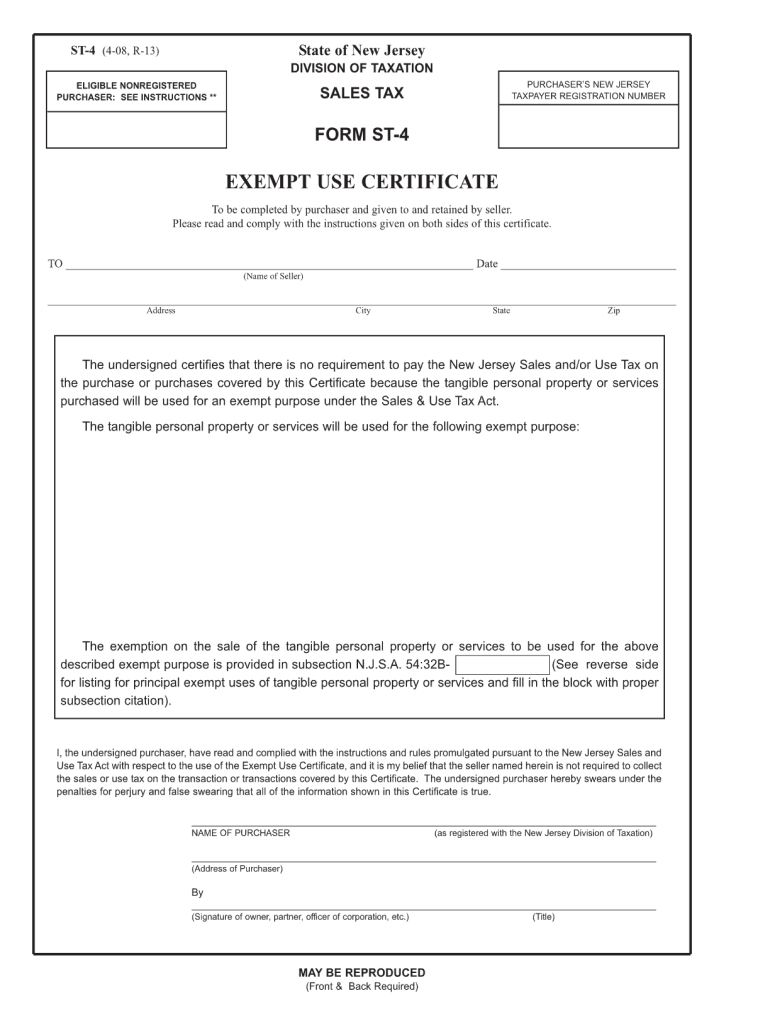
Ained by seller. Please read and comply with the instructions given on both sides of this certificate. TO Date (Name of Seller) Address City State Zip The undersigned certifies that there is no requirement to pay the New Jersey Sales and/or Use Tax on the pur.
Loading

Open form follow the instructions

Easily sign the form with your finger

Send filled & signed form or save
How to fill out the NJ ST-4 online
This guide provides step-by-step instructions for filling out the NJ ST-4 form online, ensuring that users of all backgrounds can understand the process. The NJ ST-4 Exempt Use Certificate is pivotal for purchasers claiming exemption from New Jersey sales tax, and it is essential to complete the form accurately.
Follow the steps to complete the NJ ST-4 form online.
- Click ‘Get Form’ button to obtain the form and access it for completion.
- Enter the name of the seller in the designated area, ensuring it is correct.
- Fill in the seller's address, including the city, state, and zip code to ensure proper identification.
- Clearly state the exempt purpose for the purchase, referring to the categories that qualify under subsection N.J.S.A. 54:32B.
- Provide the purchaser’s New Jersey taxpayer registration number in the required field if applicable.
- Complete the name and address of the purchaser as registered with the New Jersey Division of Taxation.
- Specify the type of business to determine the eligibility for exemption.
- Sign the form in the signature field. Ensure that the signature belongs to the owner, partner, or authorized officer.
- Once all sections are filled out accurately, save your changes. You may then download, print, or share the form as necessary.
Complete the NJ ST-4 form online to streamline your sales tax exemption process.
Experience a faster way to fill out and sign forms on the web. Access the most extensive library of templates available.
Related content
The undersigned certifies that there is no requirement to pay the New Jersey Sales and/or...
The undersigned certifies that there is no requirement to pay the New Jersey Sales and/or...
Repair parts and replacement parts for these vehicles are exempt, provided the customer...
Get answers to your most pressing questions about US Legal Forms API.
What is an ST4 form in NJ?
The ST-4 form in New Jersey is a declaration made by employees who believe they are exempt from state income tax. This form acts as a request for their employer to stop withholding state taxes from their paycheck. Completing the ST-4 accurately is essential to avoid unnecessary withholding. If you’re unsure about your exemption status, consulting with a tax professional can be beneficial.
What is the difference between ST3 and ST4 in NJ?
The primary difference between ST3 and ST4 in New Jersey lies in their purposes. The ST3 form is a sales tax exemption certificate, while ST4 is specifically for claiming exemption from income tax withholding. Both forms require careful completion to ensure compliance with state tax regulations. Understanding their distinct uses can help you navigate your tax responsibilities more effectively.
What is ST4 used for?
The NJ ST-4 form is used to claim exemption from New Jersey income tax withholding for certain individuals. It allows eligible employees to stop their employer from withholding income tax from their paychecks. This can be beneficial for those who do not expect to have any New Jersey tax liability. Ensure that you meet the eligibility requirements outlined for the ST-4 to prevent complications.
How to fill out W4 step by step?
To fill out your W-4 form step by step, start by entering your personal details, such as name and Social Security number. Next, choose your filing status and claim allowances based on your situation. Don’t forget to specify any additional amount you want withheld on line 4. Finally, review your completed W-4 thoroughly to ensure accuracy before submission.
How many allowances should I claim for NJ?
The number of allowances you should claim on your NJ W-4 depends on your specific tax situation. Generally, claiming more allowances reduces your withholding, while fewer allowances increase it. Consider factors such as your income, dependents, and other sources of taxable income. Using the NJ ST-4 can help clarify your withholding needs and exemptions.
How do I use line 4 on NJ W4?
To use line 4 on the NJ W-4 form, first determine if you want to request additional withholding. Then, enter the desired additional amount to be withheld from each paycheck on that line. This option can be beneficial if you expect to owe more tax than just the standard withholding. Calculate based on your tax liability to ensure sufficient withholding.
What is form ST-3 used for?
Form ST-3 is a sales tax exemption certificate in New Jersey. It's used by purchasers to claim exemption from sales tax on qualifying purchases. This form requires details about the buyer and the reason for the exemption. Proper use of the ST-3 can help businesses save on expenses when making tax-exempt purchases.
Do you claim to be exempt from New Jersey withholding?
Claiming exemption from New Jersey withholding typically means you believe you won't owe any state income tax due to your financial situation. You need to submit form NJ ST-4 to establish this claim. This form requires you to provide specific information about your income and tax status. Make sure to review your eligibility carefully to avoid any future tax issues.
What is the difference between ST-3 and ST-4 in NJ?
The ST-3 and ST-4 forms serve different purposes in New Jersey's tax system. The ST-3 form is used primarily for sales tax exemption for certain purchasers, while the ST-4 form targets property tax relief specifically for eligible residential properties. Understanding these distinctions can help you choose the correct form for your situation and ensure compliance with tax laws.
Who is eligible for NJ property tax relief?
NJ property tax relief programs cater to different groups, including senior citizens and disabled individuals. To access this relief, you may need to apply using forms like the NJ ST-4, which helps outline your eligibility based on income and residency. Staying informed about these programs can significantly benefit those who qualify.
Use professional pre-built templates to fill in and sign documents online faster. Get access to thousands of forms.
If you believe that this page should be taken down, please follow our DMCA take down process here.
This form is available in several versions. Select the version you need from the drop-down list below.